4BMounting / Installation
| 64
2015-05-04
5.2 Detector base DB72x
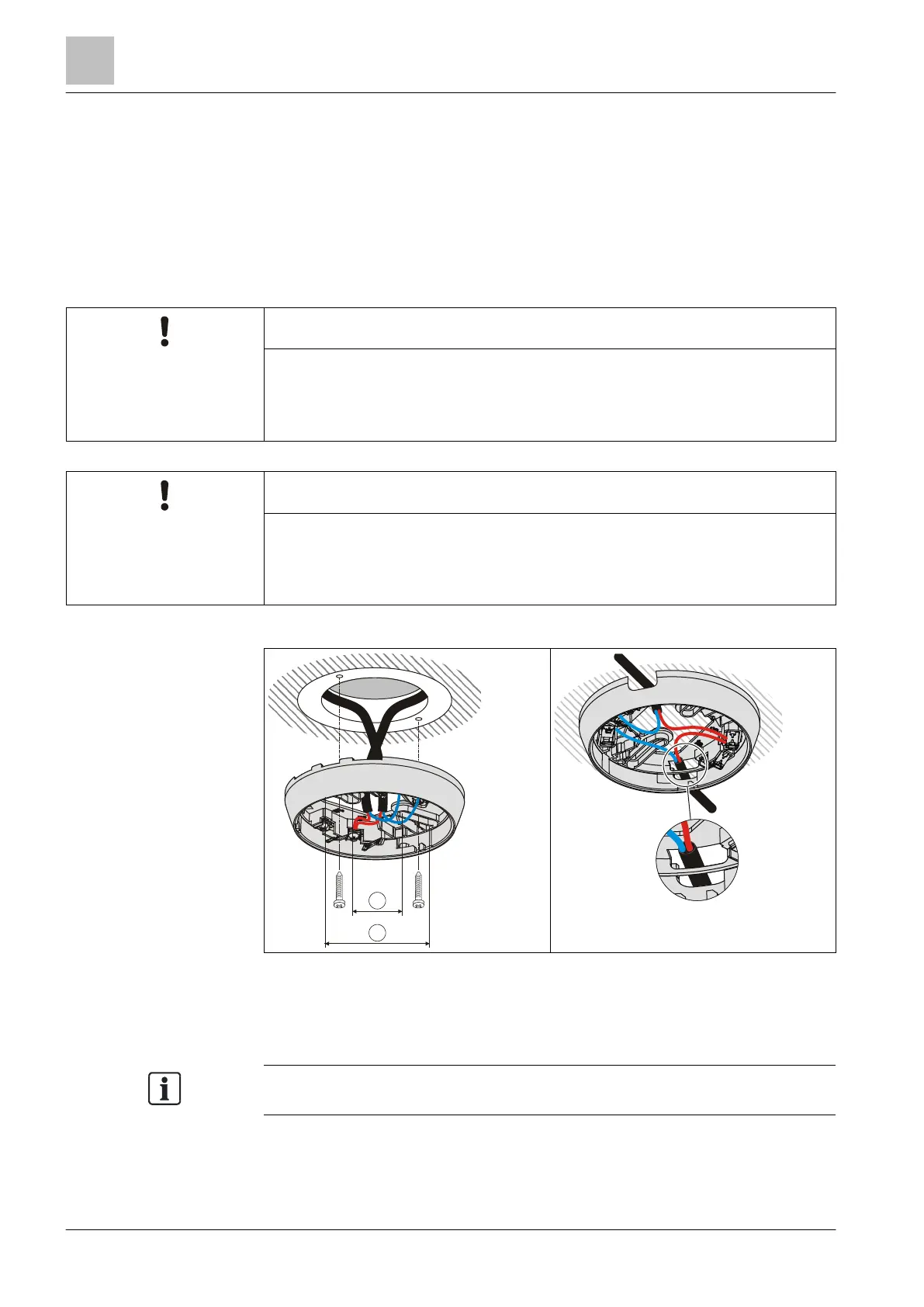
● Install the detector base DB72x directly on the ceiling.
● Insert the cables into the detector base. You have the option of using the
following types of line:
– Recess-mounted cable entry
– Surface-mounted cable entry (cable diameter max. 8 mm)
Incorrect laying of cables
Damage to cables and difficulties when installing the point detector
● The cable loops must be placed flat in the base bottom.
● The bare length of the cables is approximately 8…10 mm.
Excessively large holes in detector base seal DB722
Potential IP protection category impaired
● Do not cut or drill holes in the detector base seal.
● Without using a tool, push the lines through the detector base seal.
1 Minimum Ø 40 mm 2 Maximum Ø 90 mm
In the case of the detector base DB721, the C-NET detector line is not interrupted
even if a point detector is not used.



 To Next Page