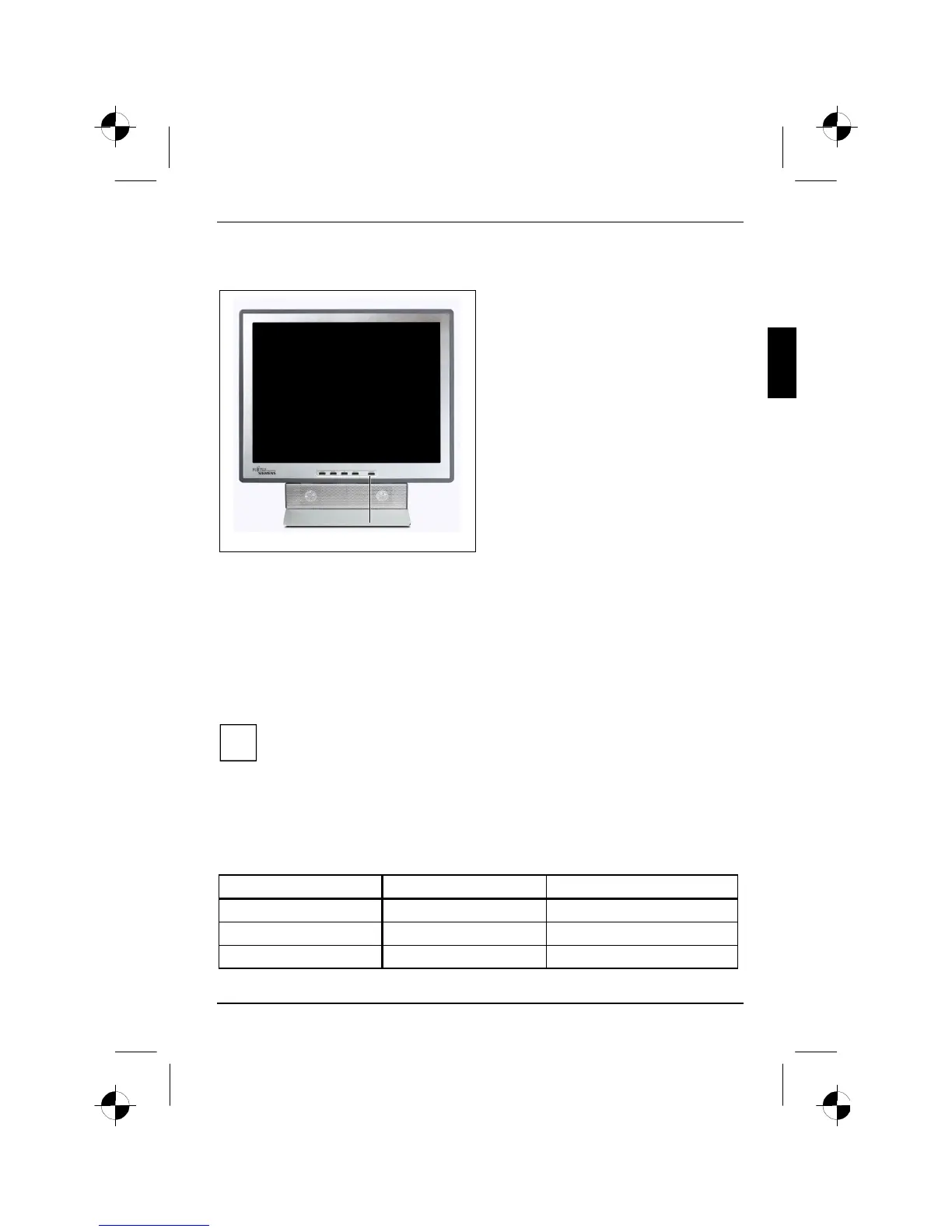
Colour monitor S7
A26361-K877-Z100-4-5E19 English - 9
Operation of the monitor
1
1 = ON/OFF switch with power indicator
Switching the monitor on/off
The ON/OFF switch (1) is used for switching the monitor on and off.
The power indicator glows green when the monitor and computer are switched on. The power
indicator glows amber when the monitor does not receive a video signal or is in the energy-saving
mode. The power indicator goes off when the monitor is switched off.
When you switch the computer system on, you must proceed in the following order:
Ê First switch the LCD monitor on with the ON/OFF switch (1).
Ê Then switch on the computer.
i
If your computer has a power management function (energy-saving mode), you should
read the "Notes on power management" of the monitor in this chapter.
Notes on power management
If your computer is equipped with power management, the monitor can support this function fully.
Here the monitor does not distinguish between the individual energy-saving modes of the computer
(standby mode, suspend mode and OFF mode), as it is capable of immediately switching into the
mode with the highest energy-saving effect.
Stage ON Energy-saving mode
Power indicator lights green glows amber
Function Monitor operating normally Monitor is dark
Power consumption (typical) normal < 35 W reduced to < 4,5 W








 To Next Page