Colour monitor S7
6 - English A26361-K877-Z100-4-5E19
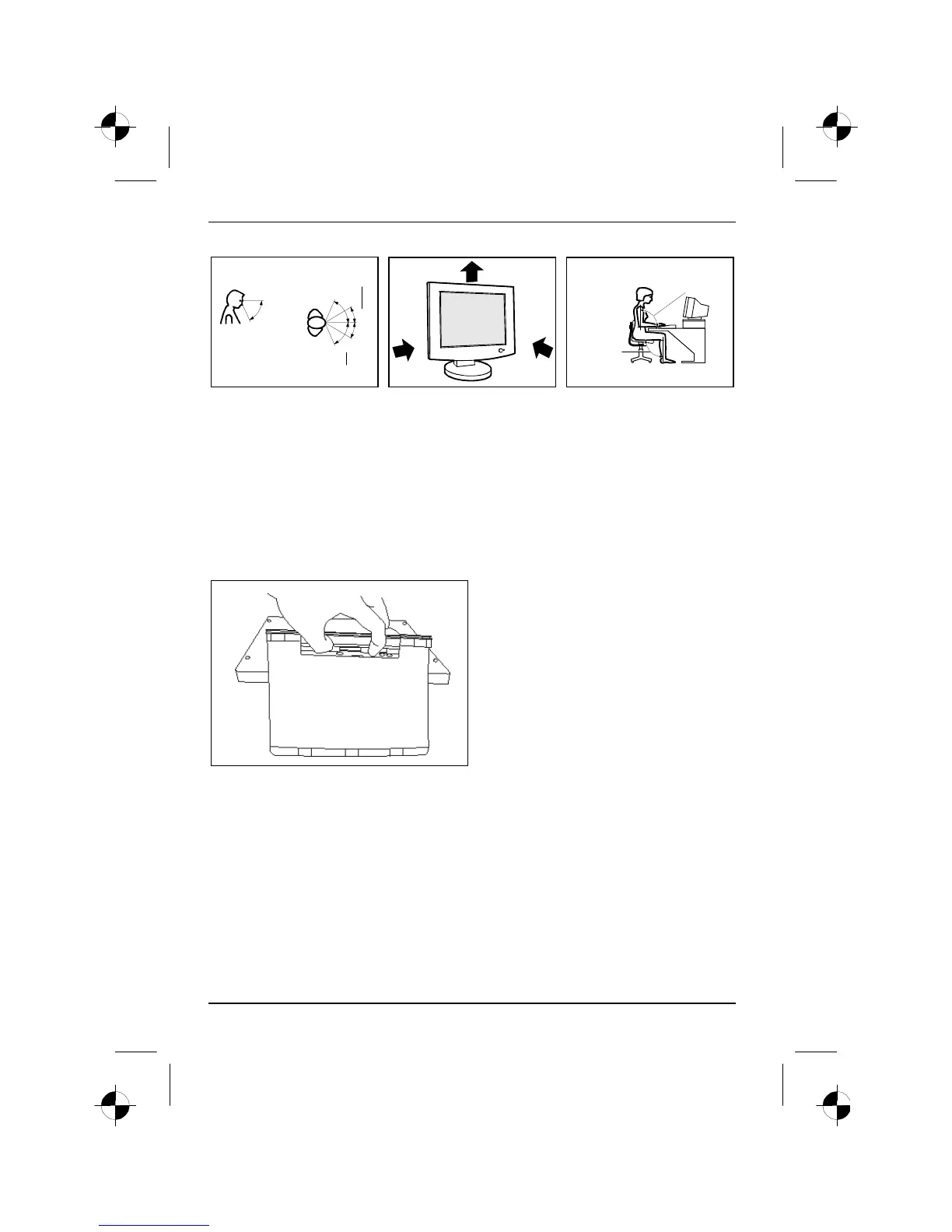
30°
30°
65°
65°
0°
60°
preferable viewing sector
permissible viewing sector
permissible
viewing sector
approx. 90°
and
more
approx. 90°
Position the monitor for
optimum viewing. The viewing
distance to the monitor should
be approximately 50 cm.
Keep ventilated areas clear. Remember to maintain correct
posture.
The typical monitor base allows you to adjust the tilt of the display by 4° forward and by 30° back.
Depending on the situation, the use of a swivel arm or wall bracket (VESA FPMPMI), are available
from specialised dealers, may be advisable. For this purpose the monitor base must be removed
(see chapter "Removing the monitor base").
Setting up the monitor
Your monitor is folded in its packing carton in
order to save space.
Ê Lay the monitor on its face on a soft
surface.
The monitor surface is susceptible to scratching!
Ê Fold out the monitor base.
Ê Slide the latch on the base to the middle
position and engage the monitor base.
Ê Place the monitor in an upright position.







 To Next Page