Colour monitor S7
12 - English A26361-K877-Z100-4-5E19
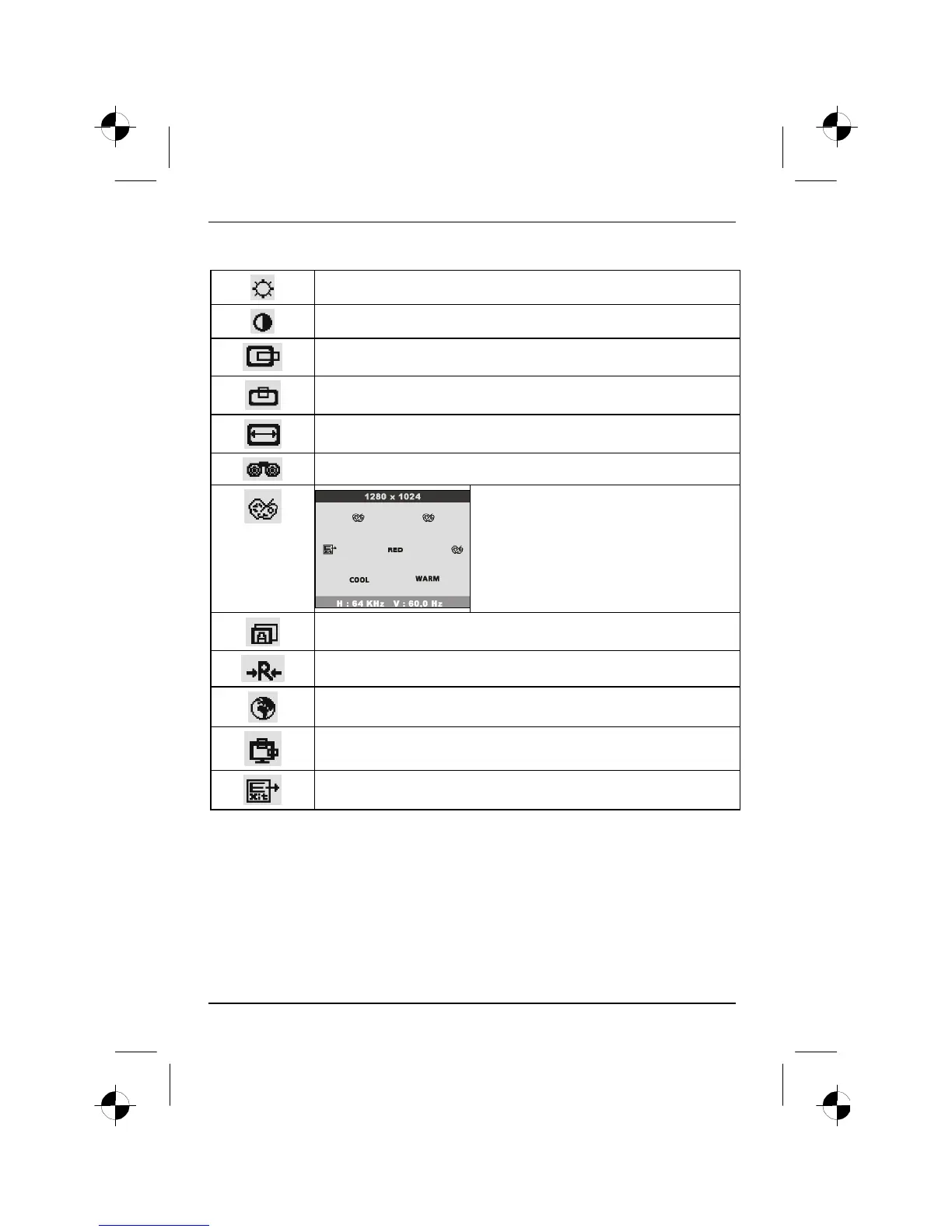
All possible adjustments of the monitor using the OSD menu are described in the following.
Setting the brightness of the display (BRIGHTNESS)
Setting the contrast of the display (CONTRAST)
Shifting the picture to the left or to the right (H.POSITION)
Shifting the picture up or down (V.POSITION)
Adjusting the horizontal size (H.SIZE)
Setting picture definition and eliminating picture interference (PHASE)
Adjusting the colours (COLOR SELECT)
Set one of the preset colour temperatures or
select the colours RED, GREEN and BLUE to
define the colour ratios.
Setting colour temperature to COOL (more blue)
Setting colour temperature to WARM (more red)
Performing auto-adjustment (AUTO)
Activating the factory settings (RESET)
Setting language for the OSD menu (LANGUAGE)
Setting position of the OSD menu to screen (OSD ADJUSTMENT)
Exiting the OSD menu (EXIT)







 To Next Page