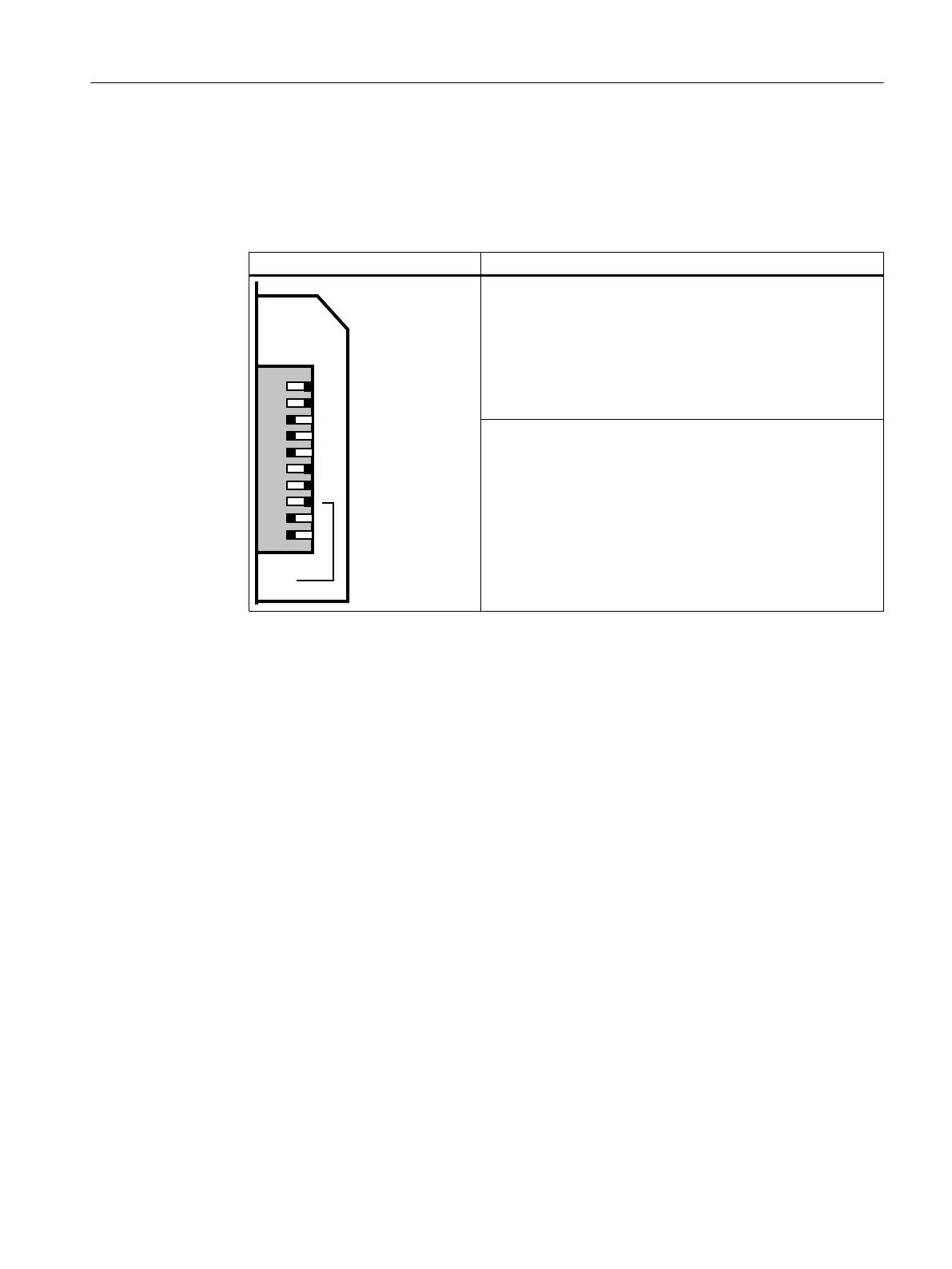
Procedure
1. Open the front panel of the Compact FF Link.
2. Set the desired PROFIBUS address using a screwdriver. If necessary, activate the ring
redundancy.
Example for setting the switch Notes
64
32
16
8
4
2
1
BUS
ADDRESS
ON
5,1*
PROFIBUS address
The PROFIBUS address represents the sum of the values of
all switches in the "ON" position (switch position to the right).
Example for setting the switch:
Switch setting = ON
64 + 32 + 2 +1 = PROFIBUS address 99
Default: PROFIBUS address 0
RING (not relevant for non-redundant operation)
You switch redundancy mode using the "RING" DIP switch:
● OFF: Coupler redundancy or non-redundant configuration
● ON: Ring redundancy
Activate for both Compact FF Links
Note on configuration:
The position of the "RING" switch during operation must match
the configuration of the integrated fieldbus coupler in HW Con‐
fig.
Mounting
5.4 Setting the PROFIBUS address and redundancy mode
Compact FF Link
Operating Instructions, 03/2015, A5E35651552-AA 31








 To Next Page