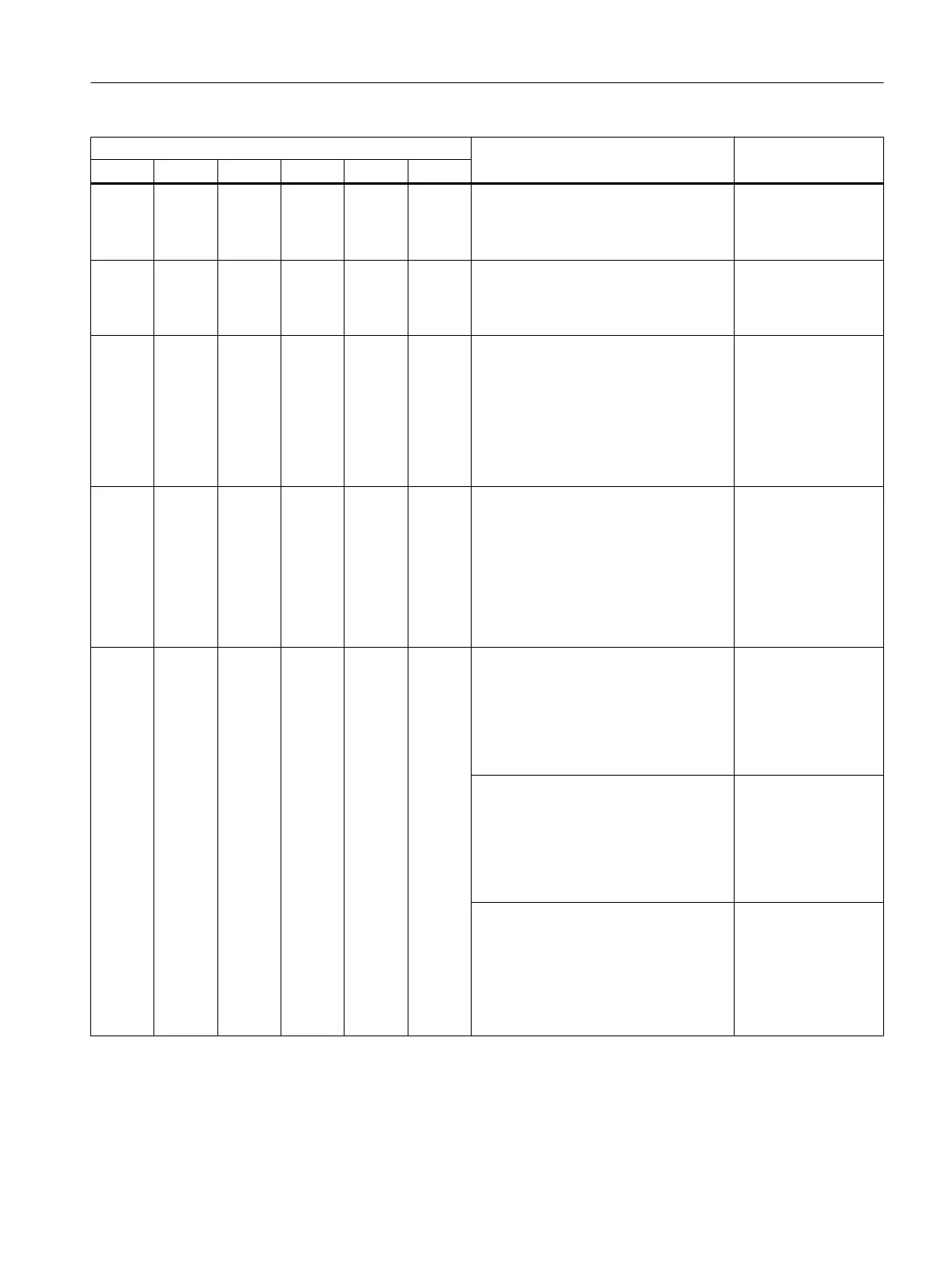
LEDs Meaning Solution
SF BF FF ACT FF BF DP ACT DP On
* * Off * Off Flash‐
es slow‐
ly
The FF segment is overloaded (flashing
frequency of 0.2 Hz).
Check the number of
connected FF devi‐
ces and their total cur‐
rent.
Off Flash‐
es rap‐
idly
Off Off Off On Startup:
The Compact FF Link is starting up (see
section "Startup behavior (Page 45)").
Loading of DP parameters complete.
Off Flashes Off * Off On Loading of DP parameters not com‐
plete.
No data exchange between PROFIBUS
and FF segment.
FF segment runs independently of
PROFIBUS. The schedule has been
downloaded. CiF runs with the most re‐
cently downloaded FF configuration.
Off On Off * Off On Loading of DP parameters not com‐
plete.
No data exchange between PROFIBUS
and FF segment.
FF segment runs with default bus pa‐
rameters.
After restoration of factory settings:
DP cable is not connected.
On Off Off Off Off On After startup:
Impermissible PROFIBUS address
Check the PROFI‐
BUS address set at
the DIP switch. See
section "Setting the
PROFIBUS address
and redundancy
mode (Page 30)".
The Compact FF Link is communicating
with the DP master and the FF devices.
● FF devices are exchanging data. At
least one FF device has an incorrect
Physical Device (PD) tag.
● A diagnostic message is available.
Evaluate the diagnos‐
tics of the Compact
FF Link and check
the reported FF devi‐
ces.
The settings that are downloaded to the
integrated field device coupler of the
Compact FF Link do not match the hard‐
ware configuration
Check the position of
the "RING" DIP
switch.
Check the configura‐
tion of the integrated
field device coupler in
the project.
Alarm, error, and system messages
11.1 Diagnostics using LEDs
Compact FF Link
Operating Instructions, 03/2015, A5E35651552-AA 59








 To Next Page