5-7
TP27, TP37 Equipment Manual
Release 01/00
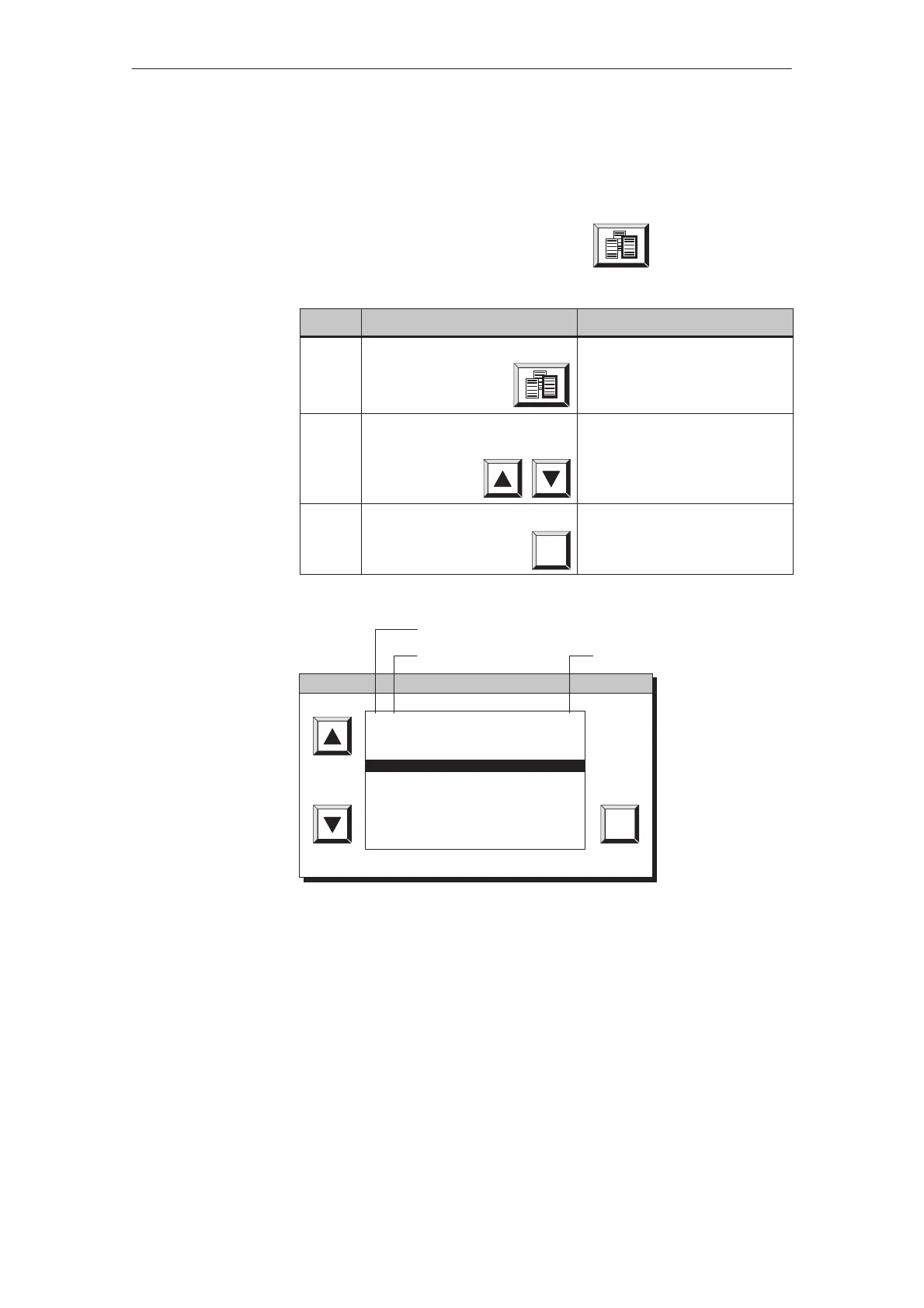
The password list contains all the passwords set up on the Touch Panel. The
only passwords displayed are those with a password level lower or equal to
that with which the user logged in on the Touch Panel. The supervisor pass-
word is not displayed.
Call in the password list by pressing the button
Step Action Result
1 Touch the button The password list window
opens (figure 5-3).
2 Use the arrow keys, if neces-
sary, to scroll through the list
The password and password
level at the current cursor posi-
tion are displayed in inverse
screen colors.
3 Terminate the action by pressing
ESC
The password list window is
closed.
ESC
1 1049
2 19FF27
3 1A740K
4 22CE51
5 3D36M1Z7
6 723
7 97BC1
8 A0YC3
9 MIRROR
3
4
4
1
8
5
4
1
1
Serial number
Password Password level
Figure 5-3 Password list
Viewing the
password list
Action
Password









 To Next Page