Setting parameters with the BOP20
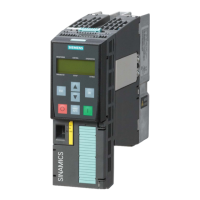
4.1 BOP20 overview
Basic Operator Panel 20 (BOP20)
Operating Instructions, 11/2017, A5E00809375A
21
Backlighting The backlighting can be set using p0007 in such a way that it switches itself off automatical-
ly after the set time if no actions are carried out.
Changeover active drive From the point of view of the BOP, the active drive is defined using p0008 or using the "Fn"
keys and "Arrow up".
The units are not displayed on the BOP.
Access level The access level for the BOP is defined using p0003.
The higher the access level, the more parameters can be selected via the BOP.
Parameter filter The parameter filter in p0004 can be used to filter the available parameters in accordance
with their particular function.
Selecting the status display Actual values and setpoints are displayed on the status display.
The status display can be set using p0006.
The user parameter list in p0013 can be used to select access parameters.
Unplug while voltage is
present
The BOP can be unplugged and plugged in again while the device is live.
• The ON and OFF buttons have a function.
Unplugging the BOP causes the drives to coast to a standstill.
When the BOP is plugged in again, the drives must be switched on again.
• The ON and OFF buttons have no function.
Unplugging and plugging the BOP in again has no effect on the drives.
Actuating keys The following applies to the "P" and "Fn" keys:
When used in a combination with another key, "P" or "Fn" must be pressed first and then






 To Next Page