Operating Manual SIGMA 2-16PK page 26 of 77
05/2007
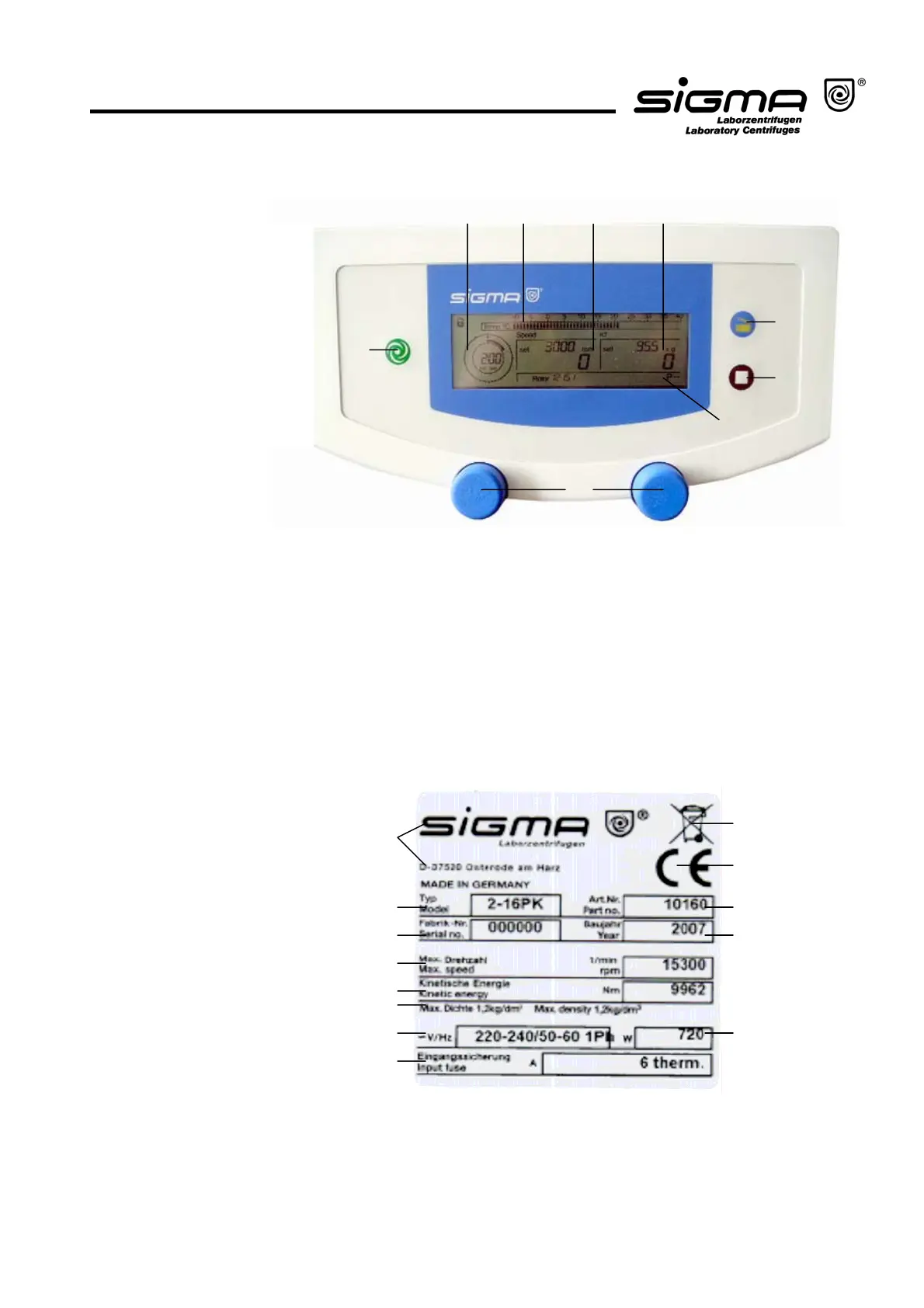
5.1.1.1 Operating Panel
The centrifuge is started directly via the operating panel. When the centrifuge is
switched on, all of the operating keys and displays will be illuminated for a short
time. It is now ready for operation.
5.1.1.2 Name Plate
1 Manufacturer and
registered office
2 Type name
3 Serial number
4 Max. speed
5 Kinetic energy
6 Max. density
7 Nominal voltage
8 Input fuse
9 Symbol for special disposal
(see chapter 8, page 51)
10 CE mark in accordance
with the directive 94/9/EC
11 Part number
12 Year of manufacture
13 Power consumption
Fi
. 5.3: O
eratin
Pane
1
4
9
10
13
Fi
. 5.4: Name
late
11
12
2
3
5
6
7
8
1
2345
6
7
8
9
1 Start key
2 Time display
3 Temperature scale
4 Speed display
5 RCF display
6 Lid key
7 Stop key
8 Display for rotor,
deceleration curve
and programs
9 Rotary knobs



 To Next Page