15 of 26
V 04.21_EN
STRAPEX STB 77
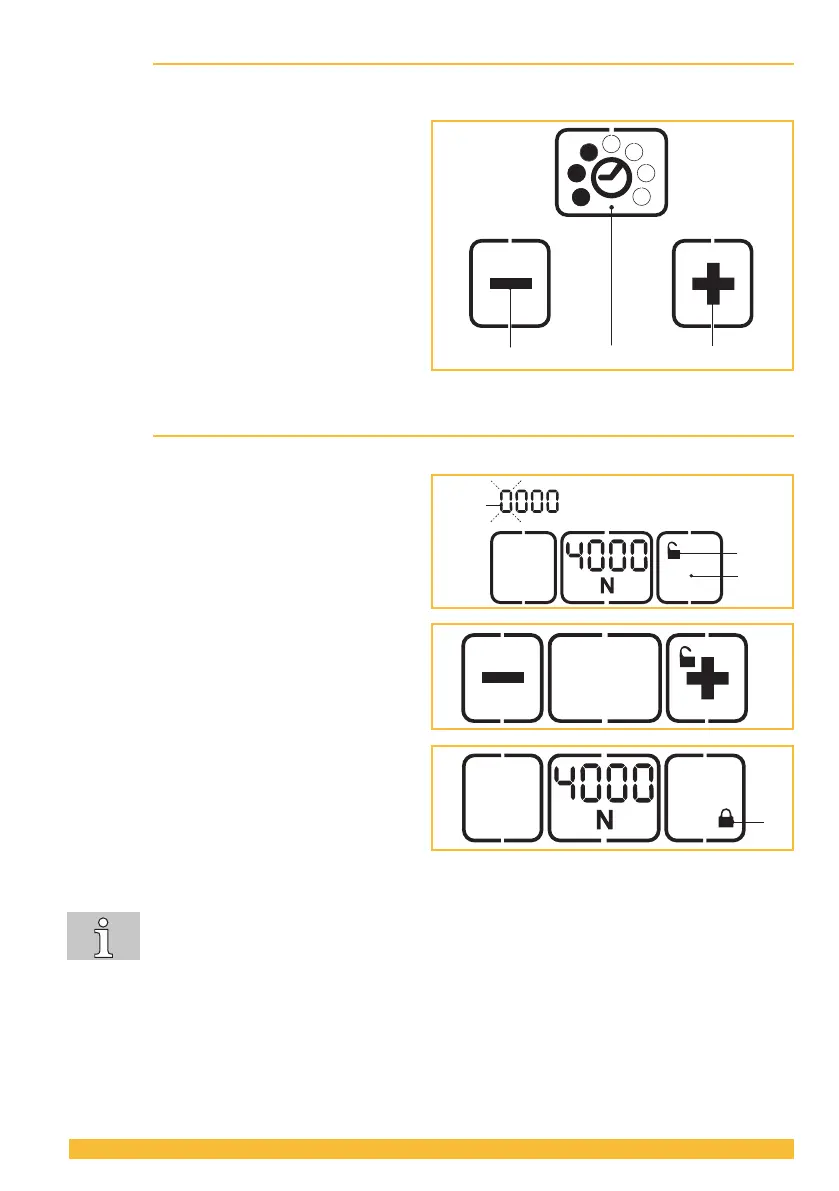
4.5 Setting welding time
Thesetweldingtimeisdisplayedcontinuouslybymeansoflleddotswhenthetoolisreadyforopera-
tion.
► Press the "Welding time" button (2).
– Unused displays disappear.
– Thelleddotsofthecurrentlysetwelding
timeashfor5seconds.
– + and – appear.
► Press the + (1) or – (3) button and hold down
until the desired welding time is displayed.
► Save: Press the "Welding time" button (2) or
wait 5 seconds.
4.6 Switching touch-pad lock on and o
The touch pad can be locked to prevent unwanted changing of the settings.
► Locking: Press button “touch-pad lock” (1) for
approx. 2 seconds.
– Thelocksymbol(2)andtherstdigit(3)
ofthedisplayashes.
– Unused displays are blanked out. Only
the +/– buttons and the lock symbol are
displayed.
► Pressthe+or–buttonuntiltherstdigit
indicates the desired value.
► Press the middle button to change to the next
digit.
► Repeat the procedure until the desired four-
digit code is displayed (factory setting 5878).
► Press the middle button.
– The touch-pad lock is now on, the lock
symbol (4) changes position and is shown
closed.
► Unlocking: Unlocking is done in the same
order as described above.
The standard code (factory setting) can be changed by your service centre to any four-
digit code if desired.
The favourite mode (Section 4.7) can be switched on even when the key lock is activated.
If the adjustment of the settings is not desired, the favourite level should be set in the
same way as the normal level.
2
1
3
4



 To Next Page