EasyManua.ls Logo

Silvercrest SBTF 10 D4 - User Manual

Silvercrest SBTF 10 D4
112 pages
Go to English
Print Icon
To Next Page IconTo Next Page
Loading...
IAN 289819
5
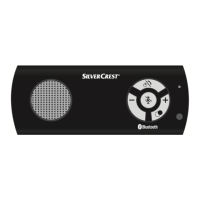
DISPOSITIVO VIVAVOCE SBTF 10 D4
La presente scheda informativa è parte integrante del
manuale di istruzioni. Conservarla con cura assieme al pre-
sente manuale di istruzioni. In caso di cessione del prodotto
a terzi, consegnare anche tutta la relativa documentazione.
Si prega di leggere le istruzioni per l'uso e di rispettare in
particolare le indicazioni relative alla sicurezza.
Funzione Auto-Power
La funzione Auto-Power consente la riaccensione automatica
dell'apparecchio e la connessione con un telefono cellulare
già noto, non appena viene attivato il sensore di vibrazioni
integrato. La funzione Auto-Power si attiva anche se
l'apparecchio è stato spento manualmente. Se l'appa-
recchio non si accende più automaticamente, occorre
disattivare la funzione Auto-Power.
La funzione Auto-Power al momento della consegna è
disattivata. Per ulteriori informazioni si prega di consultare
le istruzioni per l'uso.
Attivazione della funzione
Auto-Power
Per attivare la funzione
Auto-Power tenere premuto
il tasto
per circa
2 secondi.
Il LED di funzionamento/di
carica si accende breve-
mente di colore arancione.
Disattivazione della
funzione Auto-Power
Per disattivare la funzione
Auto-Power tenere nuova-
mente premuto il tasto
per circa 2 secondi.
Il LED di funzionamento/di
carica si accende tre volte
di colore arancione.
aflet_289819_SBTF10D4_LB5.indb 1 09.11.17 16:1

Table of Contents

Question and Answer IconNeed help?

Do you have a question about the Silvercrest SBTF 10 D4 and is the answer not in the manual?

Summary

Auto Power Function

Activate the Auto Power Function

Press and hold the button for about 2 seconds to activate the auto power function.

Disable the Auto Power Function

Press and hold the button again for about 2 seconds to disable the auto power function.

Warnings Used

Safety

Basic Safety Instructions

Essential guidelines for operating the device safely and preventing hazards.

Notes on the Radio Interface

Information regarding potential interference with medical devices and hearing aids.

Description of Components

Operation

Charging the Hands-Free Set

Step-by-step guide on how to charge the device's integrated battery.

Pairing the Hands-Free Set with a Compatible Mobile Phone

Guide to connecting your mobile phone to the hands-free set using Bluetooth.

Multipoint Function

Enables simultaneous connection with two mobile phones for private and business use.

Resetting the Hands-Free Set

Procedure to restore the device to factory default settings.

Troubleshooting

Changing the Fuse in the Car Charger Adapter

Kompernass Handels GmbH Warranty

Warranty Claim Procedure

Steps to follow for making a warranty claim, including required documentation.

Silvercrest SBTF 10 D4 Specifications

General IconGeneral
BrandSilvercrest
ModelSBTF 10 D4
CategoryAutomobile Accessories
LanguageEnglish

Related product manuals