GB
│
IE
│
9 ■
SEM 1100 C3
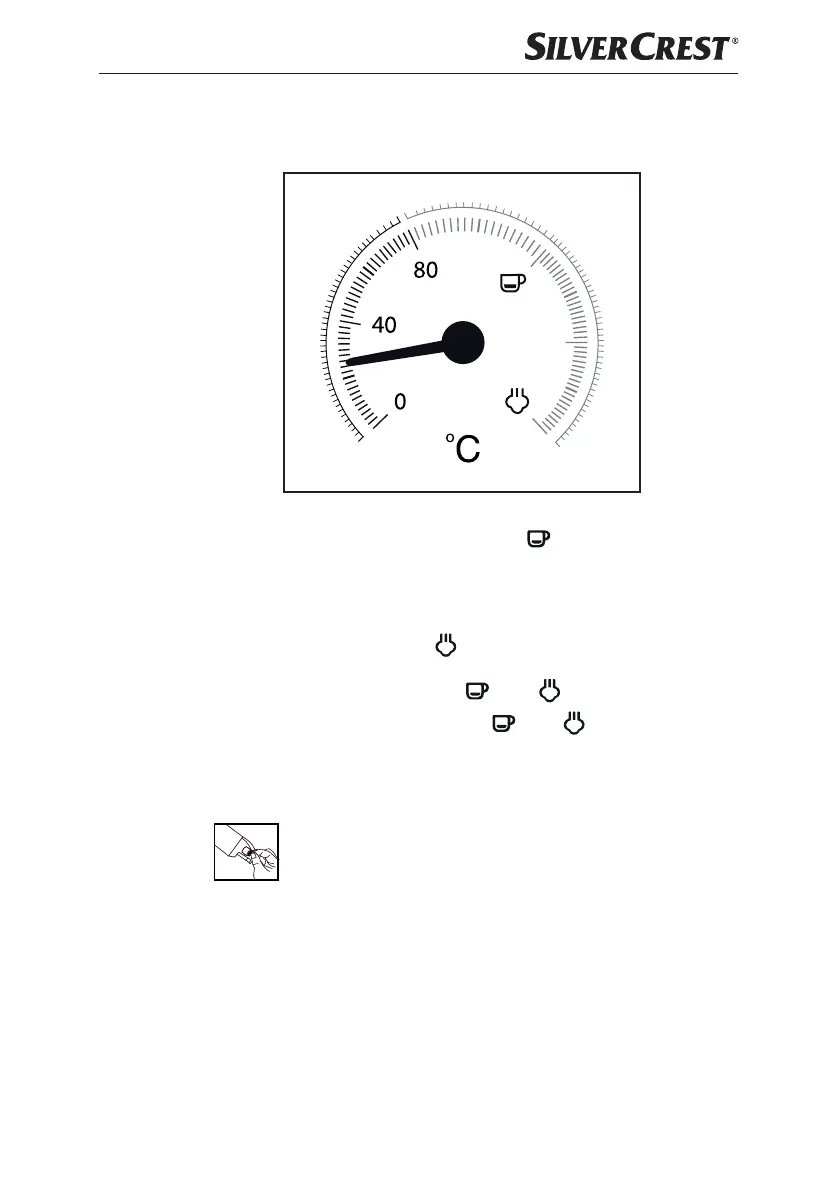
Temperature display
The temperature indicator 2 indicates how far the appliance has heated up.
As soon as you switch the appliance on, it starts heating up until the pointer is
approximately in the middle between 80°C and “ ”. The red operating lamp
z lights up. The “Espresso” control lamp t flashes green.
Once the pointer reaches the red portion of the scale, the temperature is high enough
to prepare an espresso. The “Espresso” control lamp t lights up permanently.
When you press the “Steam” button 4, the “Steam” control lamp 5 flashes
green. The appliance continues to heat up and the pointer rises higher until it
reaches the range of the scale between “
” and “ ”.
Once the pointer reaches the range between “ ” and “ ” the temperature is
high enough to produce steam. The “Steam” control lamp 5 lights up permanently.
First use
1) Pull out the water tank 9 and remove the orange transport lock
from the water outlet.
2) Clean the sieve holder i, the measuring spoon a, the espresso sieve o p,
the drip grille q and the water tank 9 as described in the section “Cleaning
and Care”.
3) Place the appliance on a level and heat-resistant surface. Ensure that a mains
power socket is in the vicinity.
4) Insert the drip grille q so that the red float e can protrude through the hole
in the drip grille q.
IB_353468_SEM1100C3_LB8.indb 9 22.12.2020 08:57:01





 To Next Page