EasyManua.ls Logo

Silvercrest SSTB 10 A1 - User Manual

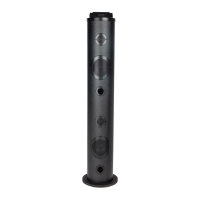
Silvercrest SSTB 10 A1
144 pages
Go to English
Print Icon
To Next Page IconTo Next Page
Loading...
IAN 281566
Bluetooth
®
-SOUNDTOWER / Bluetooth
®
SPEAKER
TOWER / STATION D’ACCUEIL COLONNE Bluetooth
®
SSTB 10 A1
STATION D’ACCUEIL COLONNE
Bluetooth
®
Mode d’emploi et consignes de sécurité
Bluetooth
®
-SOUNDTOWER
Bedienungsanleitung und Sicherheitshinweise
Bluetooth
®
SPEAKER TOWER
Operating instructions and safety instructions
TORRE DE SONIDO Bluetooth
®
Instrucciones de uso e indicaciones de seguridad
COLUNA DE SOM Bluetooth
®
Manual de instruções e indicações de segurança
Bluetooth
®
-SOUNDTOWER
Gebruiksaanwijzing en veiligheidsvoorschriften
Bluetooth
®
SOUNDTOWER
Návod k obsluze a bezpečnostní pokyny

Table of Contents

Other manuals for Silvercrest SSTB 10 A1

Questions and Answers

  • A
    Anthony BradleyAug 13, 2025
    Why can't I connect to my Silvercrest Speakers via Bluetooth?
    • C
      Cindy RossAug 13, 2025
      If you're having trouble establishing a Bluetooth® connection with your Silvercrest Speakers, try the following: 1. Ensure that Bluetooth® is enabled on your playback device. Consult your device's instructions for guidance. 2. The devices might not be paired. Pair them again, referring to the 'Pairing the device with a Bluetooth® playback device' chapter. 3. The distance between the devices might be too far. Keep the speaker within 10 metres of the playback device.
  • B
    Bruce PerryAug 16, 2025
    How to fix Silvercrest SSTB 10 A1 Speakers that won't turn on?
    • M
      Michael LongAug 16, 2025
      If your Silvercrest Speakers aren't turning on, it could be due to the following: * The mains adapter might not be properly connected. Ensure the adapter is correctly connected. * The socket might not be providing power. Check the house's mains fuse.
  • R
    Roy HarrisAug 20, 2025
    What to do if my Silvercrest Speakers remote control is not working?
    • J
      jenniferjohnsonAug 20, 2025
      If the remote control for your Silvercrest Speakers isn't working, consider these potential causes: * The remote might not be pointed correctly. Ensure it's aimed at the infrared sensor on the front of the device. * The remote might be too far away. Move it closer to the speakers. * The battery might be dead. Try replacing the battery.
  • M
    Melissa WilliamsAug 25, 2025
    Why is there no sound coming from my Silvercrest SSTB 10 A1 Speakers?
    • H
      Hunter CampbellAug 25, 2025
      If your Silvercrest Speakers aren't producing any sound, there are several possible reasons: 1. The volume on either the speakers or the device playing the audio might be too low. Try increasing the volume on both. 2. The playback might not have been started on your device. Make sure that the playback is running. 3. The wrong operating mode may be selected. Verify that the correct mode (AUX or Bluetooth®) is active.
  • S
    Stephen WrightAug 27, 2025
    Why is there no sound coming from my Silvercrest Stereo System?
    • T
      todd08Aug 27, 2025
      If there is no sound, check the following: ensure the volume on both the Silvercrest Stereo System and the playback device is not set to minimum; make sure playback has been started on the playback device; and verify that the correct operating mode (AUX or Bluetooth®) is selected.
  • L
    lwilliamsAug 31, 2025
    What to do if my Silvercrest Stereo System will not switch on?
    • M
      Mary HarrisSep 1, 2025
      If your device won't switch on, first ensure the mains adapter is correctly connected. If it is, check the house's mains fuse to make sure the socket is supplying power.
  • A
    Amber HillSep 4, 2025
    How to fix Bluetooth connection issues on Silvercrest Stereo System?
    • S
      sara71Sep 4, 2025
      If you're having trouble establishing a Bluetooth® connection, try the following: ensure Bluetooth® is activated on your playback device. Check the settings on your Bluetooth® device to ensure compatibility. Pair the devices again. Make sure that the device is no more than 10 metres away from the playback device. Also, check that Bluetooth® operation is activated on the speaker by pressing the button on the remote control or the FUNCTION button on the device.
  • A
    Anthony TurnerSep 7, 2025
    Why is the remote control not working with my Silvercrest Stereo System?
    • B
      Brianna NashSep 8, 2025
      If the remote control isn't working, ensure it's pointed towards the infrared sensor on the front of the device and that the distance between the remote control and the device is not too great. If it still doesn't work, replace the battery.

Summary

Introduction to the Bluetooth Speaker Tower

About These Operating Instructions

Provides details on the purpose and importance of the user manual.

Copyright and Liability Information

Details copyright protection and manufacturer's liability limitations.

Trademarks Used in Manual

Lists trademarks and their ownership.

Understanding Warning Symbols

Explains warning symbols (Danger, Caution, Note) used in the manual.

Intended Use of the Device

Specifies the product's intended purpose and limitations.

Safety Guidelines for Bluetooth Speaker

Basic Safety Guidelines

Essential safety rules for device operation, handling, and electrical connection.

Radio Interface Safety Precautions

Information on safety precautions related to wireless communication and radio waves.

Battery Safety Warnings

Important warnings and guidelines for handling batteries safely.

Initial Operation Setup

Unpacking and Package Contents Check

Steps for unpacking the device and verifying all components are included.

Packaging Material Disposal

Guidance on how to dispose of packaging responsibly.

Setup Location and Electrical Connection

Criteria for choosing a safe location and connecting the device to power.

Remote Control Battery Replacement

Steps for replacing batteries in the remote control.

Operating Components Overview

Main Unit Components (Figure A)

Identifies parts of the main unit using numbered labels.

Remote Control Components (Figure B)

Lists buttons and their functions on the remote control.

Included Accessories (Figure C)

Details included accessories such as the mains adapter.

Handling and Operation Guide

Device and Remote Button Operations

Explains how to use buttons on the device and remote control.

Device Power Control

Instructions for turning the speaker tower on and off.

Connecting Playback Devices Overview

General information on connecting external audio sources.

Connecting via 3.5 mm Jack Cable

Guide for connecting audio sources using a 3.5mm jack cable.

Connecting via Cinch Cable

Steps for connecting audio devices using RCA (cinch) cables.

Bluetooth Pairing Procedure

How to pair the speaker tower with Bluetooth® enabled devices.

Troubleshooting Common Issues

Power and Sound Problems

Common problems like the device not turning on or no sound.

Bluetooth Connection Problems

Diagnosing and resolving problems with Bluetooth connectivity.

Remote Control Malfunctions

Troubleshooting steps for when the remote control is unresponsive.

Cleaning the Bluetooth Speaker

Cleaning Precautions and Methods

Safe methods and materials for cleaning the device.

Storage and Disposal Guidelines

Storage Guidelines

Guidelines for storing the device when not in use.

Device Disposal Instructions

Instructions for disposing of the device responsibly.

Battery Disposal Information

Battery Disposal Guidelines

Proper methods for environmentally friendly battery disposal.

Appendix and Technical Data

Declaration of Conformity

Information on product compliance with EU directives.

Technical Data: Mains Adapter

Specifications for the QXS24C-120200 mains adapter.

Technical Data: Device Specifications

Detailed technical specifications of the speaker tower and remote control.

Warranty Information and Claims

Warranty Conditions and Scope

Details warranty terms, duration, claims, and coverage.

Warranty Claim Procedure and Service

Steps for making a claim and contact details for service.

Silvercrest SSTB 10 A1 Specifications

General IconGeneral
BrandSilverCrest
ModelSSTB 10 A1
Bluetooth Version4.2
Output Power10W
ConnectivityBluetooth, AUX
Frequency Response20 kHz
Power Supply5V DC
Weight0.5 kg

Related product manuals