34 GB/IE
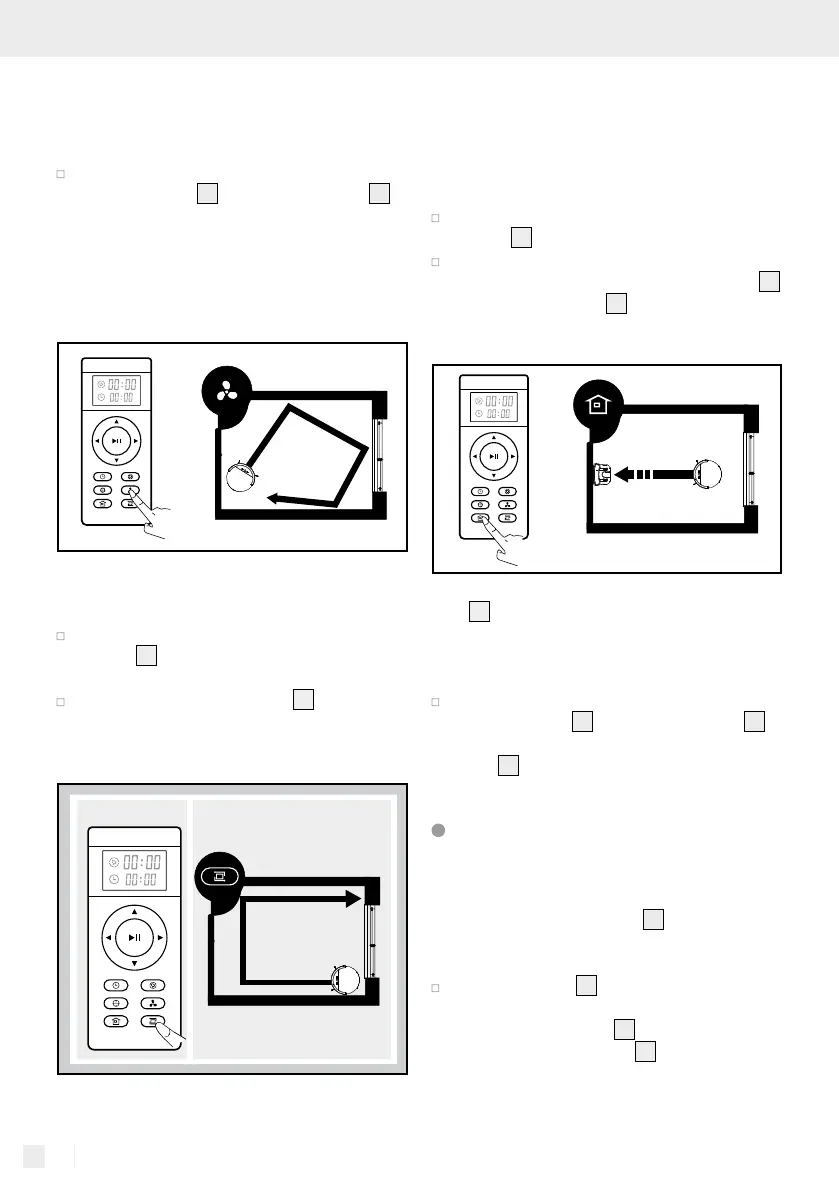
This mode is suitable for very dirty or very dusty ar-
eas. In spot cleaning mode, the product will focus
on one area to clean.
Press the “Spot mode” button on the robot
vacuum cleaner
1
or the remote control
43
to start this mode.
Note: Spot mode will end automatically, and the
robot vacuum cleaner enters standby mode.
MAX mode
This mode is suitable if the floor is very dirty or
dusty.
Press the “MAX mode” button on the remote
control
40
during cleaning. The suction will
increase for a deeper cleaning effect.
Press the “MAX mode” button
40
again to
switch to the current mode with normal suction.
Corner mode
This mode is suitable for cleaning the corners and
edges of a room. In “Corner mode”, the product
follows a barrier (for example a wall). This mode
ends automatically if the robot vacuum cleaner no
longer detects any walls or corners.
Press the “Corner mode” button on the remote
control
41
to start this mode.
To end this mode manually, press the “Start /
Pause” button on the robot vacuum cleaner
2
or the remote control
38
.
Home mode
Use this mode to return the product to the charging
dock
9
.
Note: The robot vacuum cleaner automatically re-
turns to the charging dock when the battery is low.
Press the “Home mode” button on the robot
vacuum cleaner
3
or the remote control
42
to
return the robot vacuum cleaner to the charging
dock
9
.
Using the mop function
Note: For optimal results, we recommend first
vacuuming, then using the mop function.
Note: Remove the water tank
20
from the robot
vacuum cleaner whilst it is charging.
Set up the frame
14
on the underside of the
robot vacuum cleaner. To do this, place the
four pins on the frame
14
into the designated
openings. Push the frame
14
with both hands
until it audibly clicks into place.


 To Next Page
 Loading...