37 GB/IE
Troubleshooting
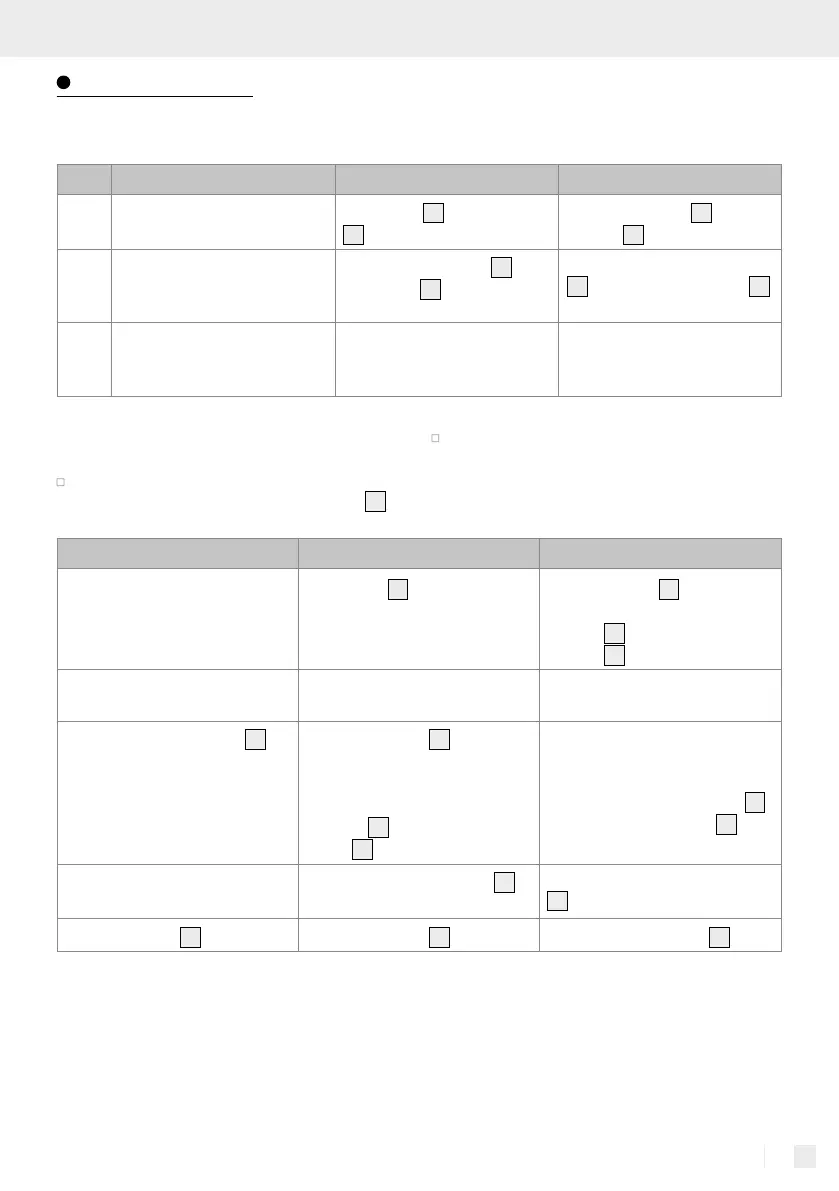
The robot vacuum cleaner frequently indicates
errors with a short beep:
No. Tone Cause Solution
01
·
The wheels
32
or side brushes
30
are not working.
Check the wheels
32
or side
brushes
30
.
02
··
The anti-drop sensors
31
and
the bumper
4
are not working.
Clean the anti-drop sensors
31
and shake the bumper
4
to remove any foreign objects.
03
···
The robot vacuum cleaner has
stopped moving.
Carry the robot vacuum
cleaner to a different location
and restart it.
Note: If the suggested solutions do not solve the
problem, proceed as follows:
Reset the robot vacuum cleaner by switching it off
and back on again using the power switch
5
.
If the robot vacuum cleaner still does not work
after this reset, please contact the service centre.
Fault Possible cause Solution
The robot vacuum cleaner keeps
crashing into objects.
The bumper
4
is pushed in and
cannot spring back.
Tap the bumper
4
10-20 times
to release any dirt under the
bumper
4
, or loosen the
bumper
4
.
The run time of the robot vacuum
cleaner is too short.
The battery is not fully charged. Recharge the robot vacuum
cleaner.
The “Start / Pause“ button
2
does not light up whilst charging.
- The mains cable
11
with mains
adapter is not properly connected.
- A foreign object e.g. animal
hair is blocking the charging
contact
10
on the charging
dock
9
.
- Check that the mains adapter is
suitable for this robot vacuum
cleaner.
- Clean the charging contact
10
on the charging station
9
.
The suction power of the robot
vacuum cleaner has decreased.
The high performance filter
27
is
dirty or moist.
Clean the high performance filter
27
or replace it with a new one.
The dust collector
19
is spilling dirt. The dust collector
19
is too full. Empty the dust collector
19
.


 To Next Page
 Loading...