11
GB
8. Operation
The device can be operated using the but-
tons on the operating panel1 or using the
remote control18. The buttons and func-
tions are largely identical. In the following,
operation using the remote control is de-
scribed.
Button lock
• Press and hold the –14 and +13 but-
tons on the operating panel1 for ap-
prox. 1 second to lock the buttons on
the operating panel. The symbol ap-
pears in the display2.
• Press and hold the
–14 and +13 but-
tons for approx. 1 second to cancel the
button lock. The symbol goes out in
the display2.
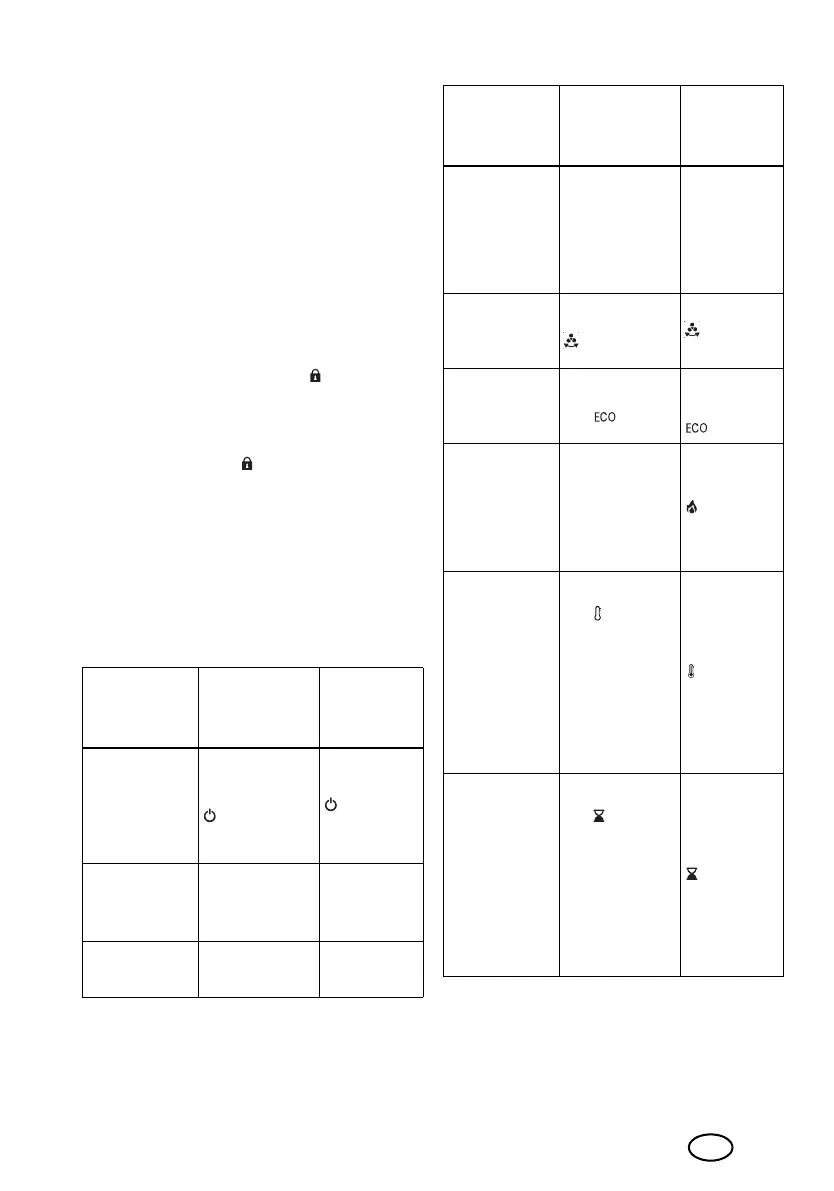
8.1 Overview of the button
functions
You can control the following functions with
the buttons on the device and the remote
control:
Function
Operating
panel but-
ton
Remote
control
button
Switching on
the device /
switching to
standby
mode
Press the
12 button
Press the
27 but-
ton
Increasing
values/pow-
er
Press the
+13 button
Press the
+20 but-
ton
Reducing val-
ues/power
Press the
–14
button
Press the
–19 button
Operating
panel button
lock
Press the
+13 and
–14 button
for approx.
1 second
–
Swivel func-
tion
Press the
17 button
Press the
26 but-
ton
ECO mode
Press the but-
ton 11
Press the
button
24
Selecting the
heat output
Press the
+13 or
–14 button
several times if
necessary
Press the
22 but-
ton
Setting the
thermostat
Press the
but-
ton 16 and
after that press
the button
+13 or
–14 several
times if neces-
sary
Press the
21 but-
ton
Switching the
Timer on/off
Press the
but-
ton 15 and
after that press
the button
+13 or
–14 several
times if neces-
sary
Press the
25 but-
ton
Function
Operating
panel but-
ton
Remote
control
button
__459215_2401_Turmheizluefter_B6.book Seite 11 Donnerstag, 13. Juni 2024 11:19 11







 To Next Page