8
GB
Troubleshooting
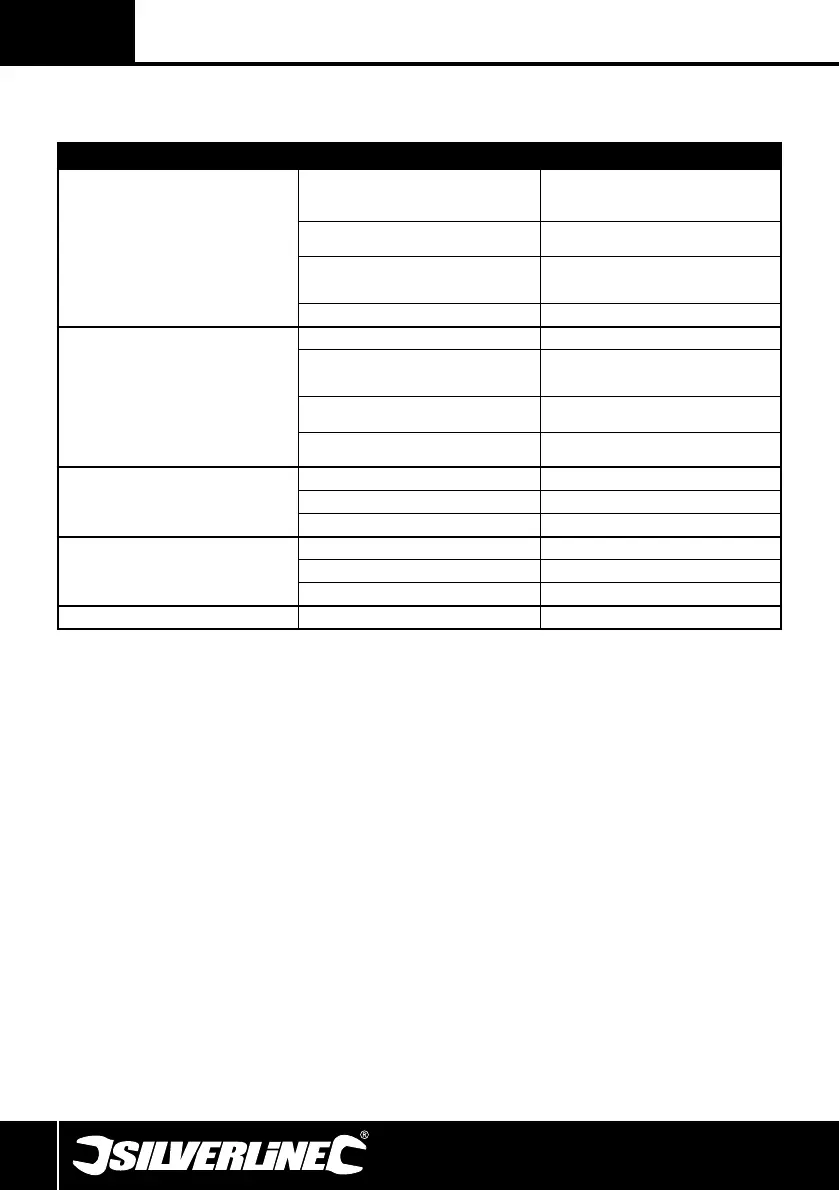
Problem Possible Cause Solution
Drill press will not start
Mains connection not correct Check mains plug is fully inserted in socket and socket is
switched on. If RCD is fitted check that it is reset/on
Mains plug fuse blown Check fuse in mains plug and replace if necessary with
same value
Pulley Cover (4) not closed Ensure Pulley Cover is fully closed and securely fastened. If
necessary also check the safety switch mechanism inside the
Pulley Cover is not damaged.
On/Off Switch (3) faulty or another tool fault Contact your Silverline dealer or authorised service centre
Abnormal or high levels of operating noise
Incorrect belt tension Adjust tension (see Adjusting Speed)
Spindle needs lubricating Apply grease to the internal spindle between the Chuck (7)
and Spindle Pulley (8). Contact your Silverline dealer or an
authorised service centre if necessary
Worn or damaged pulley drive belt Replace belt. Contact your Silverline dealer or www.
toolsparesonline.com for a replacement belt.
Loose screws or other fittings Check body of tool and inside Pulley Cover to make sure all
parts are secure and correctly fitted
Drill bit smoking and excessive heat
Speed setting incorrect Change speed (see Adjusting Speed)
Blunt drill bit Replace or sharpen drill bit
Material or drill bit should not be drilled dry Use lubricant or cutting fluid
Drill bit wobble or run out
Bent drill bit Replace drill bit
Drill bit not centrally located in Chuck Re-fit drill bit in chuck
Worn spindle bearings or other parts Contact your Silverline dealer or an authorised service centre
Drill bit binds in workpiece Pulley belt has incorrect low tension Adjust tension (see Adjusting Speed)
Original Instructions
PDF Compressor Pro


 To Next Page