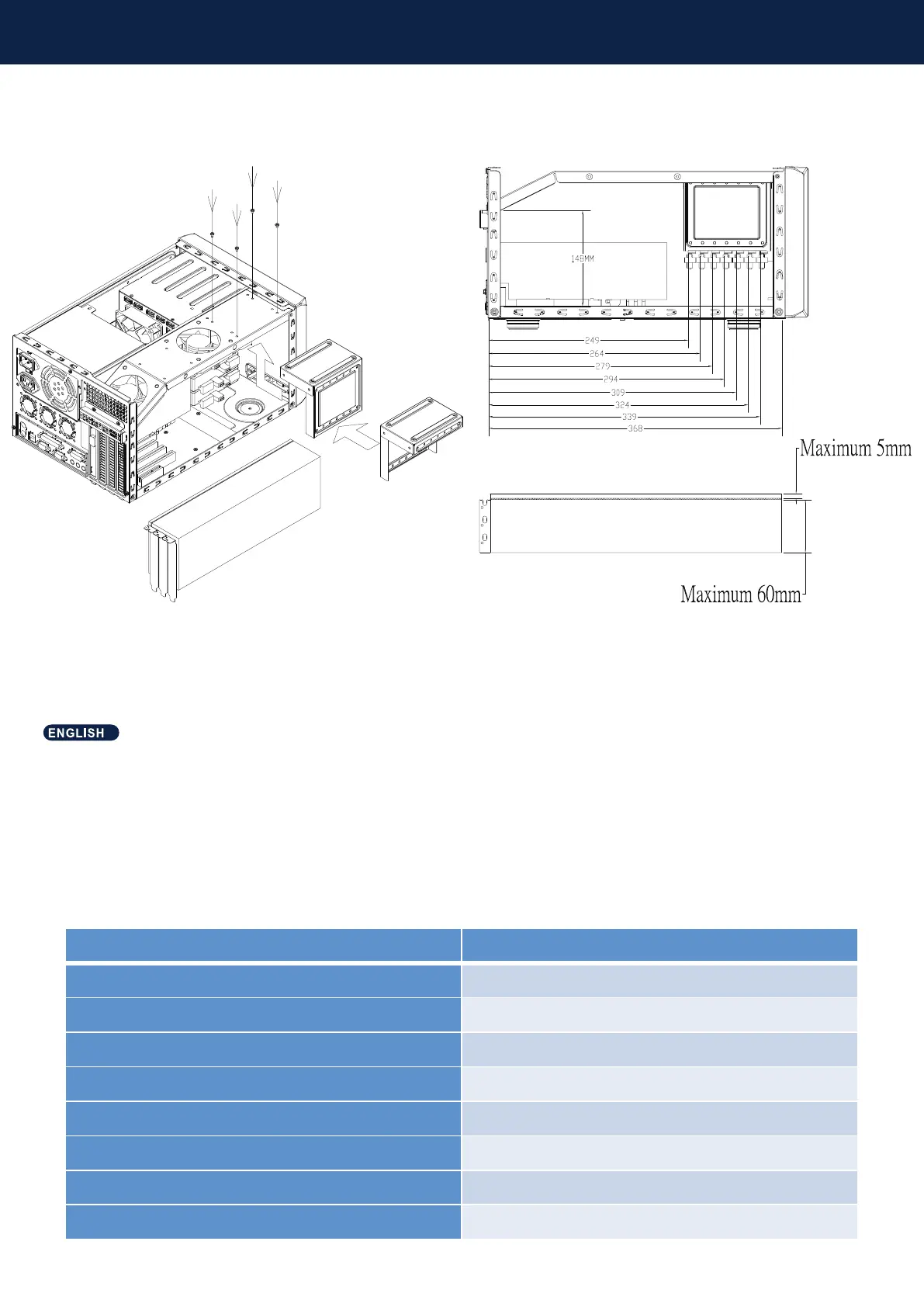
COMPONENT RESTRICTIONS
1. If the graphics card is installed in the first and second PCIe slots on the motherboard, the 2.5" hard disk tray needs to be
adjusted accordingly.
2. The length of the graphics card correlates to the number of 2.5" drives under the fan tray, the following table shows the 2.5"
drives and the length limitation for the graphics card. Height limitation is 148mm.
3. Width limitation: In terms of PCB thickness, the rear of the graphics card is limited to 5mm at most, and the front 60mm.
4. When the graphics card is installed in the first and second slots on the motherboard, the thickness of the front component is
up to 60mm. If it is installed in the third and fourth slots, the thickness should be reduced accordingly.
Number of 2.5" drives Graphics card length
No 2.5" drive installed 368mm
First 2.5" drive installed 339mm
Second 2.5" drives installed 324mm
Third 2.5" drives installed 309mm
Fourth 2.5" drives installed
294mm
Fih 2.5" drives installed
279mm
Sixth 2.5" drives installed
264mm
Seventh 2.5" drives installed
249mm



 To Next Page