EasyManua.ls Logo

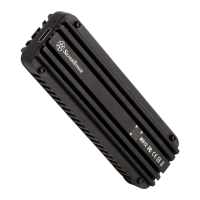
SilverStone MS12 - User Manual

SilverStone MS12
10 pages
Print Icon
To Next Page IconTo Next Page
Loading...
www.silverstonetek.com
20Gbps SuperSpeed+ USB 3.2 Type-C to NVMe M.2 SSD enclosure
MS12
Question and Answer IconNeed help?

Do you have a question about the SilverStone MS12 and is the answer not in the manual?

Summary

Product Preparation and Installation

Step 1: Remove Top Cover

Instructions to remove the top cover with the SilverStone logo from the MS12.

Step 2: Take Out PCB

Instructions to remove the PCB from its housing or packaging.

Step 3: Apply Thermal Pad

Attach thermal pads of specified thickness and color to the PCB based on SSD type.

Step 4: Install M.2 NVMe SSD

Install the M.2 NVMe SSD onto the PCB and secure it with screws.

Step 5: Remove Release Film

Remove the plastic release film from the thermal pads on the covers.

Step 6: Reassemble PCB into Enclosure

Reinsert the assembled MS12 PCB back into the main enclosure.

Step 7: Secure Top Cover

Attach and secure the top cover to the enclosure with screws to complete assembly.

Warranty Information

Pre-Use Safety Warning

Warning about heat absorption by the aluminum exterior and cooling down period.

Warranty Terms and Conditions

Details the 1-year limited warranty and general terms for product defects and usage.

Additional Contacts and Support

Provides contact information for warranty service in different regions and additional support.

Summary

Product Preparation and Installation

Step 1: Remove Top Cover

Instructions to remove the top cover with the SilverStone logo from the MS12.

Step 2: Take Out PCB

Instructions to remove the PCB from its housing or packaging.

Step 3: Apply Thermal Pad

Attach thermal pads of specified thickness and color to the PCB based on SSD type.

Step 4: Install M.2 NVMe SSD

Install the M.2 NVMe SSD onto the PCB and secure it with screws.

Step 5: Remove Release Film

Remove the plastic release film from the thermal pads on the covers.

Step 6: Reassemble PCB into Enclosure

Reinsert the assembled MS12 PCB back into the main enclosure.

Step 7: Secure Top Cover

Attach and secure the top cover to the enclosure with screws to complete assembly.

Warranty Information

Pre-Use Safety Warning

Warning about heat absorption by the aluminum exterior and cooling down period.

Warranty Terms and Conditions

Details the 1-year limited warranty and general terms for product defects and usage.

Additional Contacts and Support

Provides contact information for warranty service in different regions and additional support.

SilverStone MS12 Specifications

General IconGeneral
Storage drive sizeM.2 \
Number of storage drives supported1
Supported storage drive interfacesPCI Express 3.0, Serial Attached SCSI
USB versionUSB 3.2 Gen 2x2
USB connectivityYes
USB connector typeUSB Type-C
USB connector genderFemale
MaterialAluminum
Product typeSSD enclosure
Product colorBlack
LED indicatorsData, Power
ChipsetASMedia ASM2364
Data transfer rate20 Gbit/s
Harmonized System (HS) code84733080
Weight and Dimensions IconWeight and Dimensions
Depth33.3 mm
Width106.15 mm
Height15.3 mm
Weight53 g
Cable length0.3 m

Related product manuals