SD5K
www.simmonsdrums.net
3
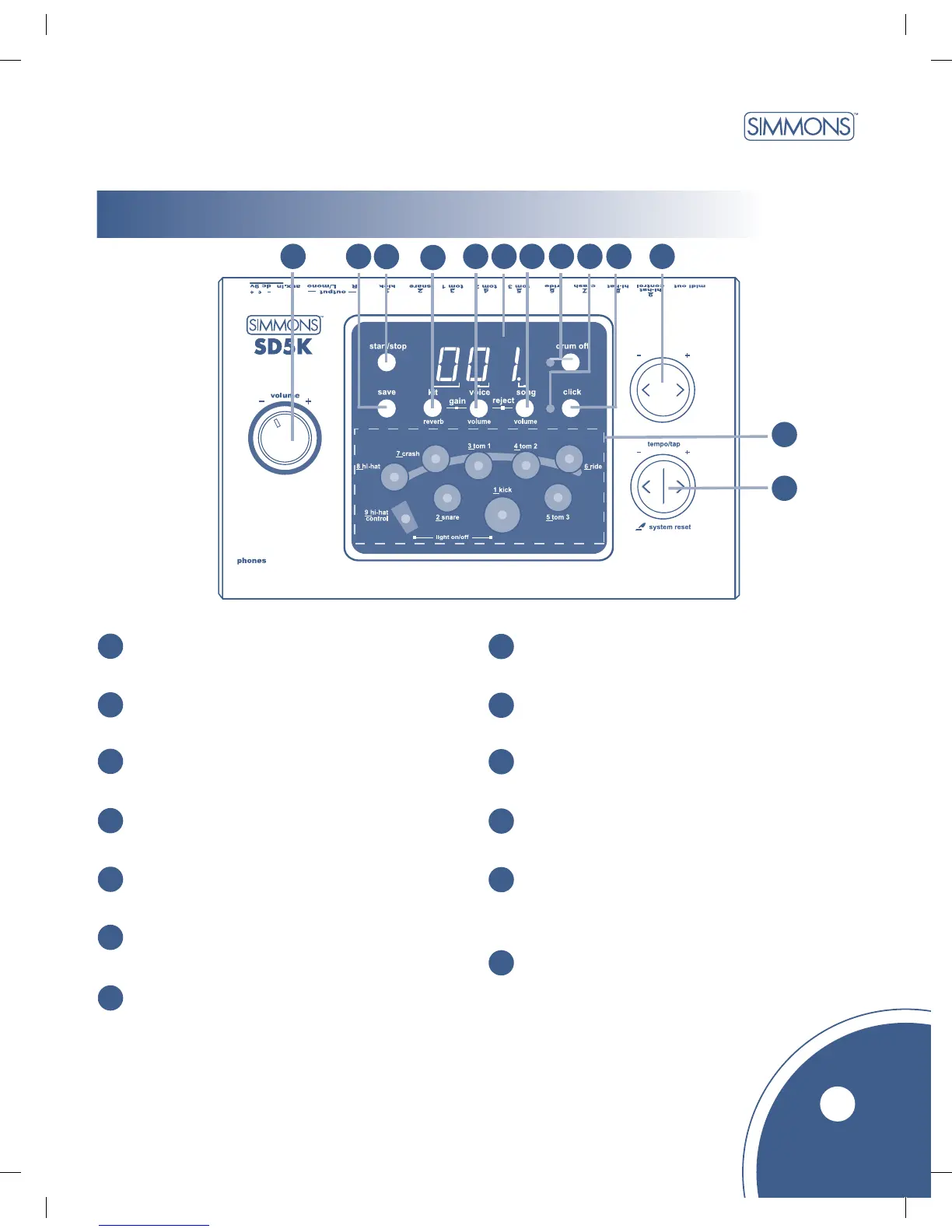
module Controls
Front Panel
Volume Knob
Controls headphones and line output volume.
1
2
[save] Button
Saves User Kit settings.
3
[start / stop] Button
Starts and stops the selected song.
4
[kit / reverb] Button
Displays the drum kit number or reverb setting.
5
[voice / volume] Button
Displays the voice number, volume value, or pitch value.
6
3 Digit LED Display
Displays the parameters of current menu mode.
7
[song / volume] Button
Displays the song number or accompaniment volume value.
[drum off] Button and Indicator
Turns on and turns off the song’s drum track.
8
9
Beat Indicator
Displays metronome or song beat.
10
[click] Button
Turns metronome on and off.
11
[+] and [ - ] Buttons
Changes the value of the selected parameter.
12
Pad Select Buttons and Indicators
In Voice Mode, it selects and displays current pad.
In Song Mode, it displays which pads are being
triggered by the Drum Track.
13
[tempo - / +] and [tap] Buttons
Changes current tempo.
1
2
3
4
5
6
7
8
9
10
11
12
13



 To Next Page