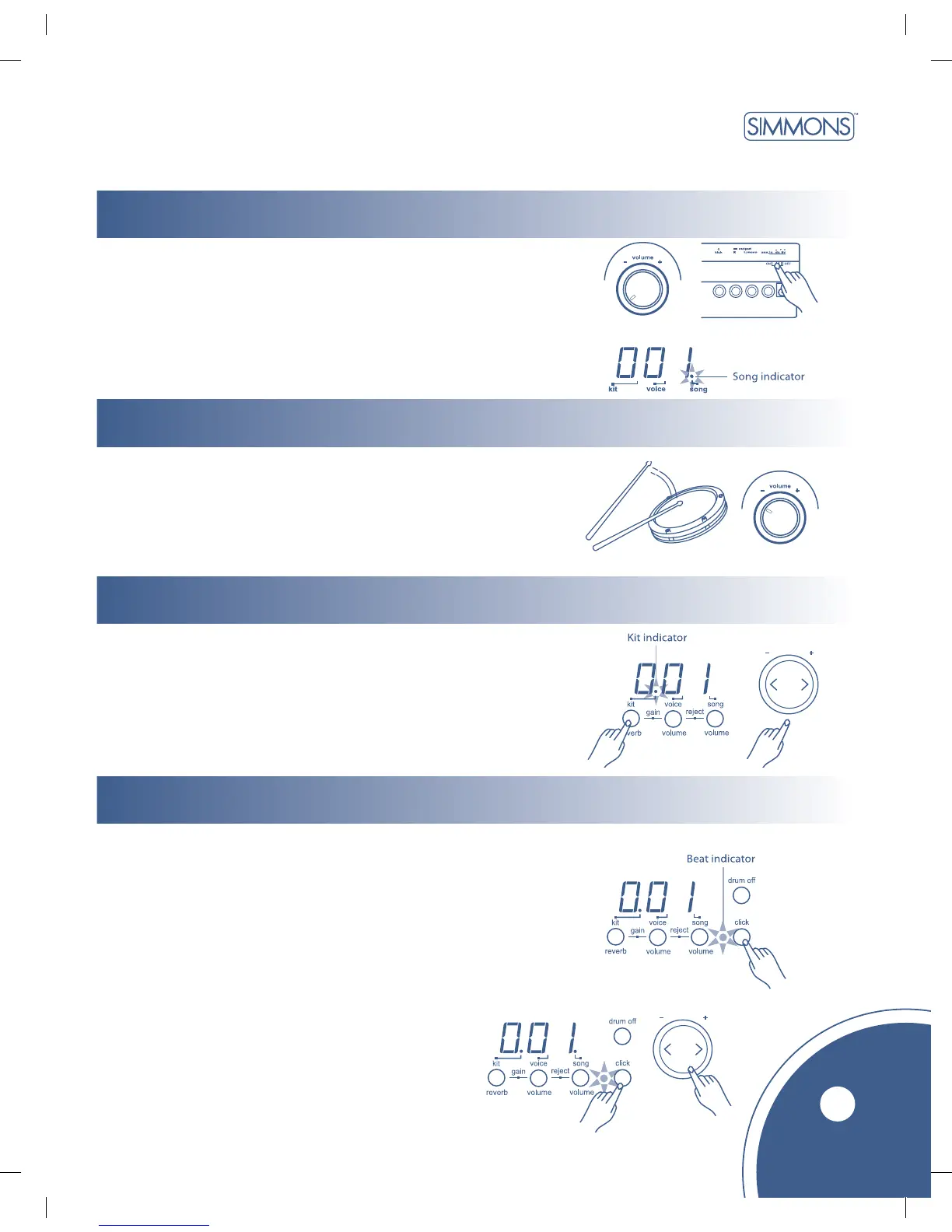
Power Switch
functions
main volume
selecting a drum kit
metronome
7
After confirming that all connections have been completed,
rotate the volume knob to the left (minimum volume level)
before switching the power on.
Set the power switch to “ON” position. The song indicator
lights up and the display will show song number 001.
While hitting a pad, gradually rotate the volume knob
until a comfortable volume level is reached.
The unit comes with 22 (001-022) preset drum kits
and 10 user kits (023-032). (Reference kit list: page 15.)
1. Press [kit] button
The Kit indicator lights up and the display will show the current kit number.
2. Press [ + ] or [ - ] buttons to select the drum kit number
(001–032) you want to use.
1. Press the [click] button to start the metronome.
The beat indicator flashes and the click sound will play.
2. Press the [tempo +] or [tempo - ] buttons to set the metronome beat.
3. Press the [click] button again to stop the metronome.
Adjust the volume of the click sound by holding down the
[click] button and press the [ + ] or [ - ] buttons to adjust
the volume of the click sound; the metronome will
automatically play. To cancel metronome, press
[click] again.
Click sound volume will be reset
to default on next power-up.



 To Next Page