EasyManua.ls Logo

Simplex 4090-9001 - User Manual

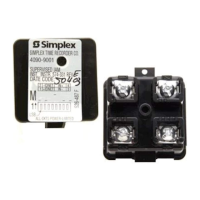
Simplex 4090-9001
2 pages
Print Icon
To Next Page IconTo Next Page
Loading...
Mechanically Installing the Supervised IAM
Install the Supervised IAM into a UL Listed single-gang, 4-inch square, or 4-inch octagonal electrical box
(not supplied) using Figure 4 as a reference. Mount the Supervised IAM to the electrical box as follows:
1. Insert the Supervised IAM into the electrical box; the attached field wiring holds the Supervised IAM
in place inside the electrical box.
2. Secure the cover to the back box using the two #6/32 flathead screws.
Note: Simplex offers semi-flush and surface covers (ordered separately) with a light pipe. The cover(s)
with light pipe allow viewing of the communications LED without taking the cover off. Installation
of the 4090-9806 semi-flush cover and 4090-9807 surface cover are detailed in publication 4090
IDNet
Semi-Flush/Surface Covers and IAM Bracket Installation Instruction (574-796).
Figure 4. Supervised IAM Back Box Installation
4090-9001 Supervised IAM
Installation Instructions
574-331
Rev. E
574-331
Rev. E
2000 Simplex Time Recorder Co., Westminster, MA 01441-0001
All specifications and other information shown were current as of publication, and are subject to change without notice.
IDNet
is a trademark of the Simplex Time Recorder Company.
MAPNET II
Communication Net is protected by U.S. Patent No.4,796,025.
UL Listed
Single-Gang
Electrical Box
(Not Supplied)
Cover
(Not Supplied)
Field Wiring
4090-9001
Supervised IAM
Assembly
#6/32 Flathead Screw
(Not Supplied)
Cautions and Warnings
DO NOT INSTALL ANY SIMPLEX PRODUCT THAT APPEARS DAMAGED. Upon unpacking
your Simplex product, inspect the contents of the carton for shipping damage. If damage is apparent,
immediately file a claim with the carrier and notify Simplex.
ELECTRICAL HAZARD - Disconnect electrical power when making any internal adjustments or repairs.
Servicing should be performed by qualified Simplex Representatives.
STATIC HAZARD - Static electricity can damage components. Ground yourself before opening or
installing components.
Introduction
IDNet
The 4090-9001 Supervised Individual Addressable Module (IAM) provide four-state status information
(NORMAL, OPEN, CURRENT-LIMITED, and SHORT) to the 4010 Fire Alarm Control Panel (FACP)
via the IDNet
channel. The IDNet channel provides the communication link between Supervised IAM
and 4010 FACP and powers the entire IAM circuitry. A typical application for this module would be to
monitor a waterflow switch.
MAPNET II
The 4090-9001 Supervised IAM provides three-state status information (NORMAL, OPEN, and ALARM)
to the host FACP via the MAPNET II channel. Applications that require current limit sensing are not
compatible with MAPNET II channels (Tamper/Waterflow on the same IAM, Manual release/abort, etc.).
The MAPNET II channel provides the communication link between the Supervised IAM and host 4100, or
4120, or 4020 FACP and powers the entire IAM circuitry.
Installation
Supervised IAM installation consists of the following:
Setting the Supervised IAMs address
Making electrical connections to the Supervised IAM
Mechanically installing the Supervised IAM
Front View Rear View
Label
DIP Switch
(Under Re-sealable Label)
LED
Terminal
Note: The LED flashes approximately once every three seconds to indicate valid
communications with the FACP.
Figure 1. Supervised IAM Installation

firealarmresources.com
Question and Answer IconNeed help?

Do you have a question about the Simplex 4090-9001 and is the answer not in the manual?

Summary

Mechanically Installing the Supervised IAM

Cautions and Warnings

DO NOT INSTALL ANY SIMPLEX PRODUCT THAT APPEARS DAMAGED

Inspect product for shipping damage and file claim if apparent.

ELECTRICAL HAZARD

Disconnect power before internal adjustments or repairs. Servicing by qualified personnel only.

STATIC HAZARD

Ground yourself before opening or installing components to prevent static damage.

Introduction

IDNet

Module provides four-state status to 4010 FACP via IDNet channel.

MAPNET II

Module provides three-state status to host FACP via MAPNET II channel.

Installation

Setting the Supervised IAMS Address

Making Electrical Connections to the Supervised IAM

4010 FACP (IDNet Channel)

4100;4120;4020 FACP (MAPNET II Channel)

Overview

The Simplex 4090-9001 Supervised Individual Addressable Module (IAM) is a device designed to provide status information to a Fire Alarm Control Panel (FACP). It supports two communication channels: IDNet and MAPNET II.

Function Description

The primary function of the 4090-9001 Supervised IAM is to monitor an initiating device, such as a waterflow switch, and report its status to a compatible FACP.

  • IDNet Channel (for 4010 FACP): When connected to a 4010 FACP via the IDNet channel, the IAM provides four-state status information: NORMAL, OPEN, CURRENT-LIMITED, and SHORT. The IDNet channel also powers the entire IAM circuitry and provides the communication link.
  • MAPNET II Channel (for 4100, 4120, or 4020 FACP): When connected to a host FACP (4100, 4120, or 4020) via the MAPNET II channel, the IAM provides three-state status information: NORMAL, OPEN, and ALARM. It's important to note that applications requiring current limit sensing (e.g., tamper/waterflow on the same IAM, manual release/abort) are not compatible with MAPNET II channels. Similar to IDNet, the MAPNET II channel provides the communication link and powers the IAM circuitry.

Important Technical Specifications

  • Address Codes:
    • IDNet channel (4010 FACP): Supports address codes 1 through 250.
    • MAPNET II channel (4100, 4120, or 4020 FACP): Supports address codes 1 through 127.
  • Wiring:
    • IDNet and MAPNET II lines are 18 AWG twisted pair (shield recommended).
    • Maximum allowable run from FACP to the farthest device: Not to exceed 2500 feet.
    • Maximum total wire (including all T-Taps) from FACP: 10000 feet.
    • Maximum wire length for the initiating device circuit: 400 feet, #18 AWG.
    • Wiring is supervised and power-limited.
  • Mounting: The Supervised IAM is designed to be installed into a UL Listed single-gang, 4-inch square, or 4-inch octagonal electrical box (not supplied). It is secured to the back box using two #6/32 flathead screws.
  • Status Indication: The device includes an LED that flashes approximately once every three seconds to indicate valid communications with the FACP.

Usage Features

  • Address Setting: Each Supervised IAM requires a unique address, which is set via an eight-position DIP switch located under a re-sealable label. Position 1 is the least significant bit (LSB), and position 8 is the most significant bit (MSB). A small screwdriver or pen can be used to set the switches. The device address should be written on the re-sealable label for troubleshooting purposes. DIP switch in "1" position is "ON," and "0" position is "OFF."
  • Electrical Connections: Input and output signals connect to the Supervised IAM via terminals 1-4. When connecting two wires to a single terminal, one wire should be positioned on each side of the terminal screw. It is crucial not to loop wire under terminals; wire runs must be broken to provide supervision.
  • Configuration:
    • For 4010 FACP (IDNet Channel): Configuration is done using the 4010 Fire Alarm - Installation and Programming (574-187) and 4010 Fire Alarm - Installing, Operating, and Programming Instructions (574-052). Refer to 4010 panel label 526-444 for the appropriate revision.
    • For 4100/4120/4020 FACP (MAPNET II Channel): Configuration is done using the 4100, 4120, or 4020 Programmer's Report. The Supervised IAM address and location must match the address listed in the specification sheets of the FACP.
  • Optional Covers: Simplex offers semi-flush and surface covers (ordered separately) with a light pipe. These covers allow viewing of the communications LED without removing the cover. Installation details for the 4090-9806 semi-flush cover and 4090-9807 surface cover are provided in publication 4090 IDNet™ Semi-Flush/Surface Covers and IAM Bracket Installation Instruction (574-796).

Maintenance Features

  • Troubleshooting Aid: The re-sealable label on the device allows for writing down the IAM's address, which can assist in troubleshooting the system.
  • Safety Precautions:
    • Electrical Hazard: Always disconnect electrical power when making any internal adjustments or repairs. Servicing should only be performed by qualified Simplex Representatives.
    • Static Hazard: Static electricity can damage components. Users should ground themselves before opening or installing components.
  • Damage Inspection: Upon unpacking, inspect the carton contents for shipping damage. If damage is apparent, immediately file a claim with the carrier and notify Simplex. Do not install any Simplex product that appears damaged.

Simplex 4090-9001 Specifications

General IconGeneral
BrandSimplex
Model4090-9001
CategoryFire Alarms
LanguageEnglish

Related product manuals