EasyManua.ls Logo

Simplicity 1613H - Drive Belt Replacement

Simplicity 1613H
60 pages
Print Icon
To Next Page IconTo Next Page
To Previous Page IconTo Previous Page
Loading...
Troubleshooting
DRIVE
BELT
REPLACEMENT
1.
Park
the
tractor
on
a
level
surface.
Turn
off
PTO
and
engine
and
remove
key.
Remove
mower
as
described
under
“Mower
Removal”.
2.
Lock
parking
brake
to
relieve
belt
tension
at
idler
pulley.
3.
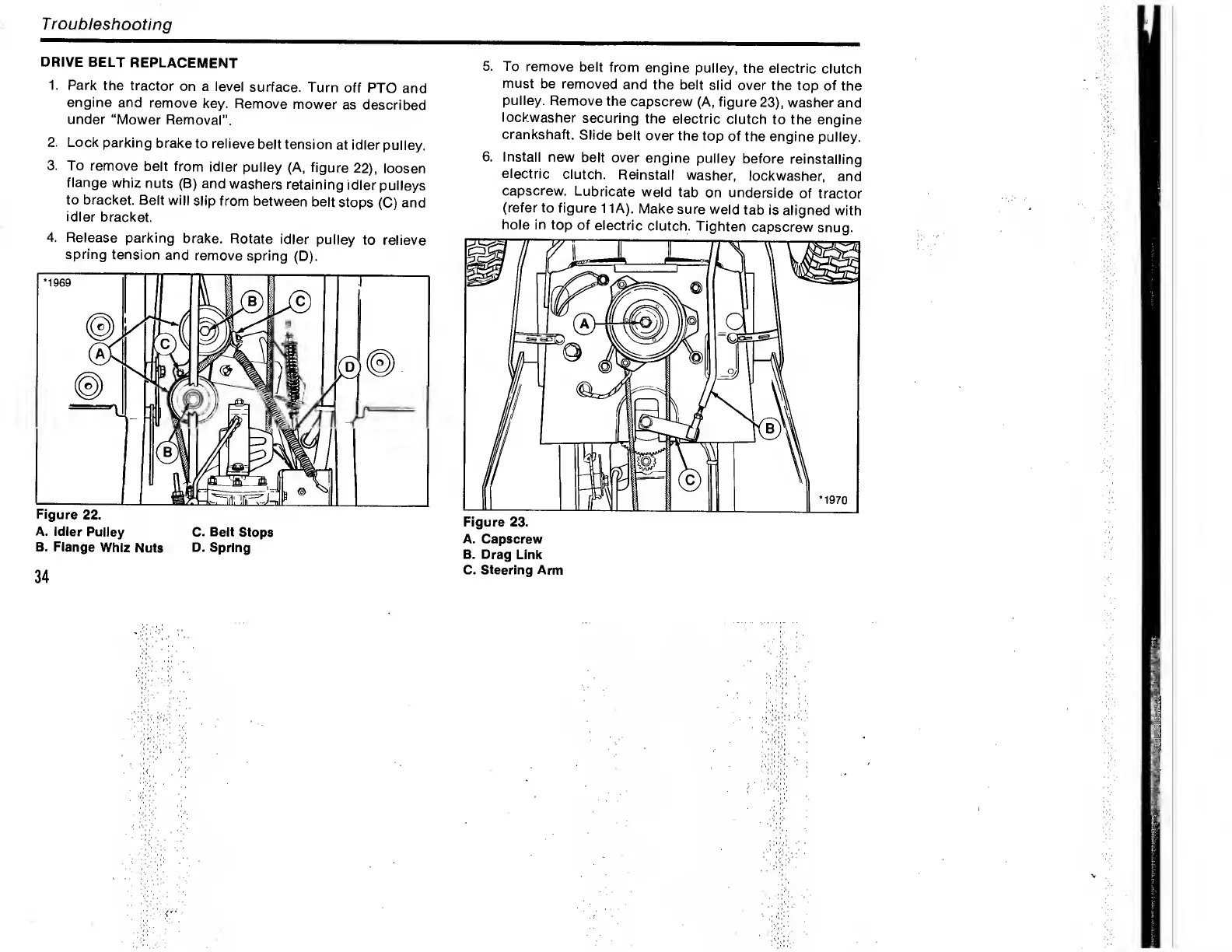
To
remove
belt
from
idler
pulley
(A,
figure
22),
loosen
flange
whiz
nuts
(B)
and
washers
retaining
idler
pulleys
to
bracket.
Belt
will
slip
from
between
belt
stops
(C)
and
idler
bracket.
4.
R
elease
parking
brake.
Rotate
idler
pulley
to
relieve
spring
tension
and
remove
spring
(D).
A.
Idler
Pulley
C.
Belt
Stops
B.
Flange
Whiz
Nuts
D.
Spring
5.
To
remove
belt
from
engine
pulley,
the
electric
clutch
must
be
removed
and
the
belt
slid
over
the
top
of
the
pulley.
Remove
the
capscrew
(A,
figure
23),
washer
and
lockwasher
securing
the
electric
clutch
to
the
engine
crankshaft.
Slide
belt
over
the
top
of
the
engine
pulley.
6.
Install
new
belt
over
engine
pulley
before
reinstalling
electric
clutch.
Reinstall
washer,
lockwasher,
and
capscrew.
Lubricate
weld
tab
on
underside
of
tractor
(refer
to
figure
11A).
Make
sure
weld
tab
is
aligned
with
hole
in
top
of
electric
clutch.
Tighten
capscrew
snug.
A.
Capscrew
B.
Drag
Link
C.
Steering
Arm
34

Related product manuals