EasyManua.ls Logo

Simplicity 1613H - Page 43

Simplicity 1613H
60 pages
Print Icon
To Next Page IconTo Next Page
To Previous Page IconTo Previous Page
Loading...
Troubleshooting
44"
Mower
Drive
Belt
1.
Mower
does
not
need
to
be
removed
to
install
a
new
belt.
However,
for
easier
access,
mower
can
be
removed
following
steps
in
“Mower
Removal
and
Installation
.
2.
If
mower
is
not
removed,
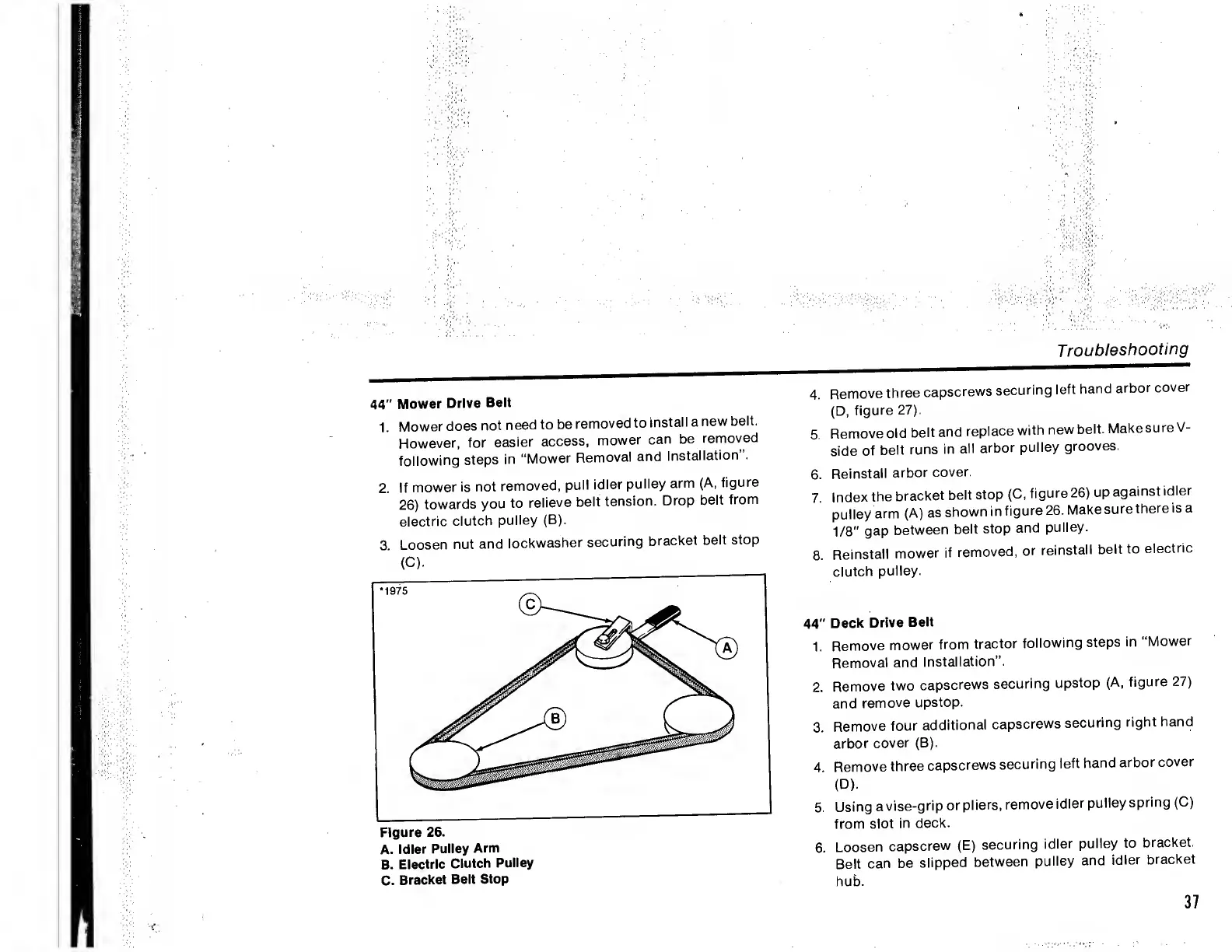
pull
idler
pulley
arm
(A,
figure
26)
towards
you
to
relieve
belt
tension.
Drop
belt
from
electric
clutch
pulley
(B).
3.
Loosen
nut
and
lockwasher
securing
bracket
belt
stop
(C).
A.
Idler
Pulley
Arm
B.
Electric
Clutch
Pulley
C.
Bracket
Belt
Stop
4.
Remove
three
capscrews
securing
left
hand
arbor
cover
(D,
figure
27).
5.
Remove
old
belt
and
replace
with
new
belt.
Make
sure
V-
side
of
belt
runs
in
all
arbor
pulley
grooves.
6.
Reinstall
arbor
cover.
7.
Index
the
bracket
belt
stop
(C,
figure
26)
up
against
idler
pulley
arm
(A)
as
shown
in
figure
26.
Make
sure
there
is
a
1/8"
gap
between
belt
stop
and
pulley.
8.
Reinstall
mower
if
removed,
or
reinstall
belt
to
electric
clutch
pulley.
44"
Deck
Drive
Belt
1.
Remove
mower
from
tractor
following
steps
in
“Mower
Removal
and
Installation”.
2.
Remove
two
capscrews
securing
upstop
(A,
figure
27)
and
remove
upstop.
3.
Remove
four
additional
capscrews
securing
right
hand
arbor
cover
(B).
4.
Remove
three
capscrews
securing
left
hand
arbor
cover
(D).
5.
Using
a
vise-grip
or
pliers,
remove
idler
pulley
spring
(C)
from
slot
in
deck.
6.
Loosen
capscrew
(E)
securing
idler
pulley
to
bracket.
Belt
can
be
slipped
between
pulley
and
idler
bracket
hub.
37

Related product manuals