EasyManua.ls Logo

SimPure DB10 - Page 11

SimPure DB10
15 pages
Print Icon
To Next Page IconTo Next Page
To Previous Page IconTo Previous Page
Loading...
Typical
Installation
The
following
illustration
is
an
example
of
a
typical
installation
showing
the
SimPure®
DB
Whole
House
Filter
Housing connected
to
your
home's
incoming
main
water
supply.
Suppose
you
do
not
already
have
an
isolation valve
near
the
proposed
DB
Whole
House
Filter
location.
In
that
case,
it
is
recommended
to
install
a
valve
before
the
filter
to
allow
easy
and
quick
filter
changes.
Ensure
the
filter
housing
is
protected
from
the
sun
and
freezing
conditions,
which
can
cause
cracking
of
the
housing
and
water
leaks.
Pressure
relief
valve
Push
to
release
pressure
before
removing
filter
bowl
Recommened
to
fit
Pipe
union
inlet
valve
to
allow
for
easy
filter
change
Check
Space
Requirements
Choose
a
position
after
the
water meter
and
after
any
pressure
tanks
(if
applicable).
Determine
and
check
the
filter
housing's
size
and
position
for
proper
installation
into
the
chosen
space and
remember
to
leave
enough
space
around
the
system
for
changing
filters
and
maintenance.
If
mounting
close
to
the
ground,
don't
forget
to
leave
at
least
2-inches
of
clearance
between
the
filter
bowl
and
the
floor
to
allow
access
to
drop
the
filter
bowl
and
change
the
filter
cartridge.
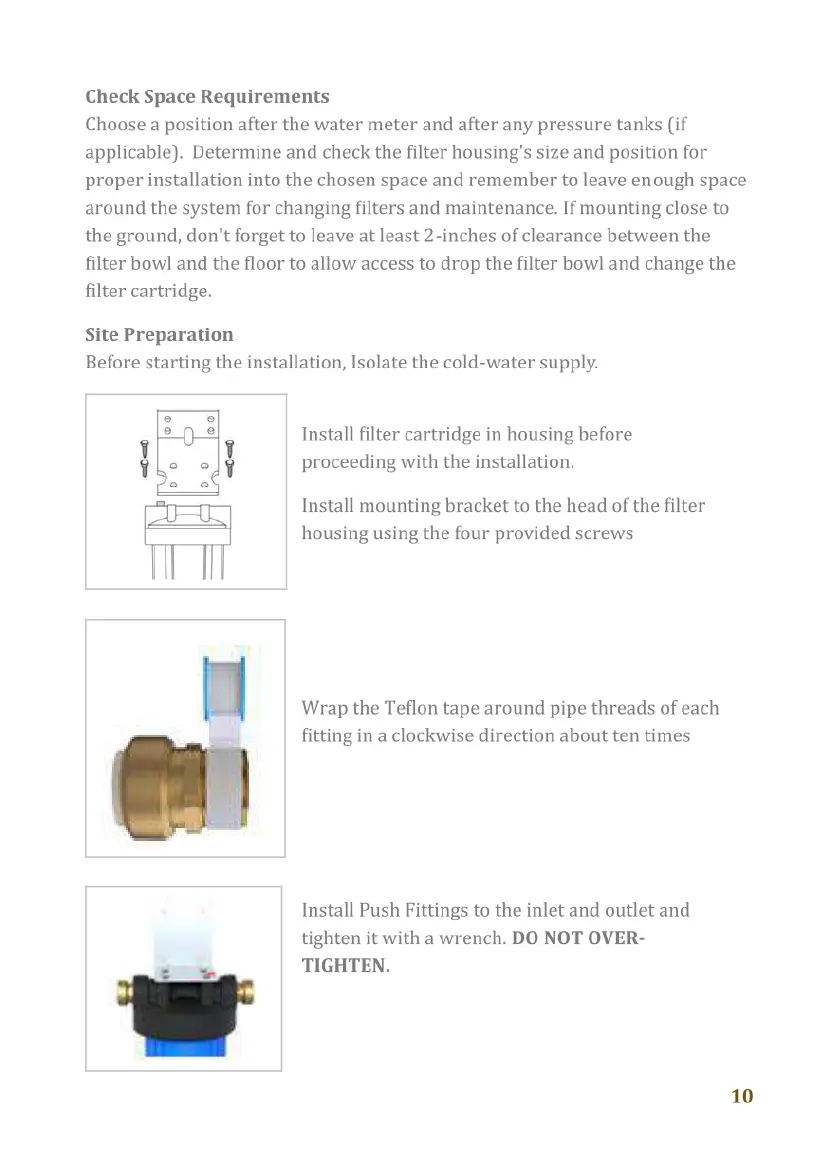
Site
Preparation
Before
starting
the
installation,
Isolate
the
cold-water
supply.
Install
filter
cartridge
in
housing
before
proceeding
with
the
installation.
Install
mounting
bracket
to
the
head
of
the
filter
housing
using
the
four
provided
screws
Wrap
the
Teflon
tape
around
pipe
threads
of
each
fitting
in
a
clockwise
direction
about
ten
times
Install
Push
Fittings
to
the
inlet
and
outlet
and
tighten
it
with
a
wrench.
DO
NOT
OVER-
TIGHTEN.
10

Related product manuals