34
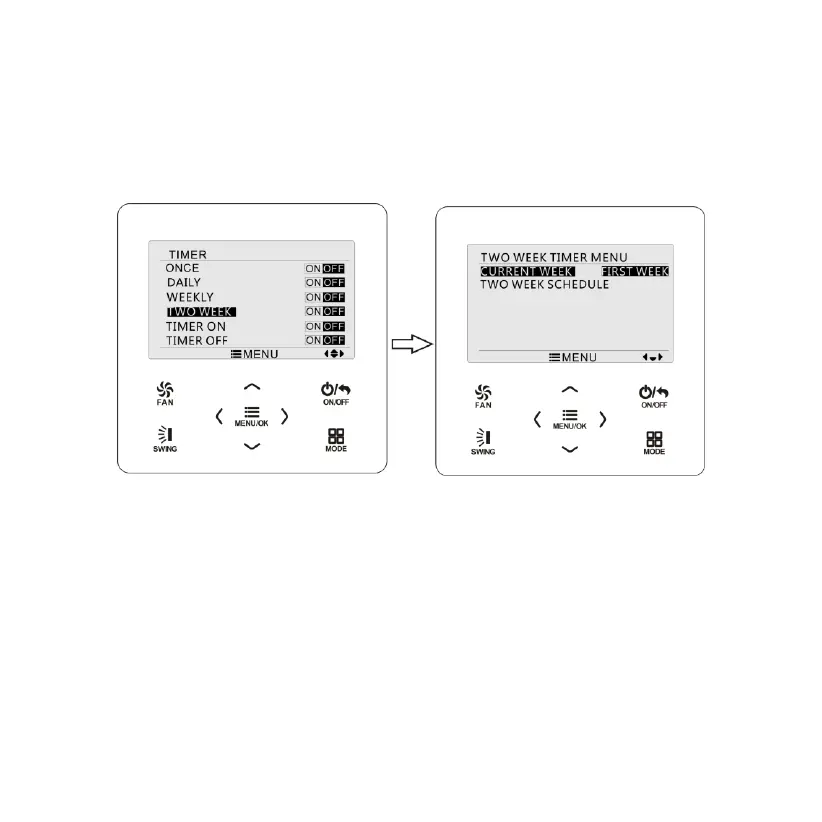
then press “
<
” or “
>
” button to set current week as first week or
second week. Press MENU button to save current week setting. Please
refer to Fig. 15.
Fig. 15 Setting of current week
After entering two week timer menu page, press “
∧
” or “
∨
” button to
select the two week schedule option and then press MENU button to
enter two week timer programming. After entering two week timer setting
page, press “
<
” or “
>
” button to select the day to be set. Then press
MENU button to enter timer programming of that day. Press “
<
” or “
>
”
button to select the item to be set. Press “
∧
” or “
∨
” button to adjust the



 To Next Page