1. Slicer Program Manual
Reference
-
Font used in the printer GUI and the user manual is the “NANUM” font provided by NAVER.
1.1 Basic UI Elements
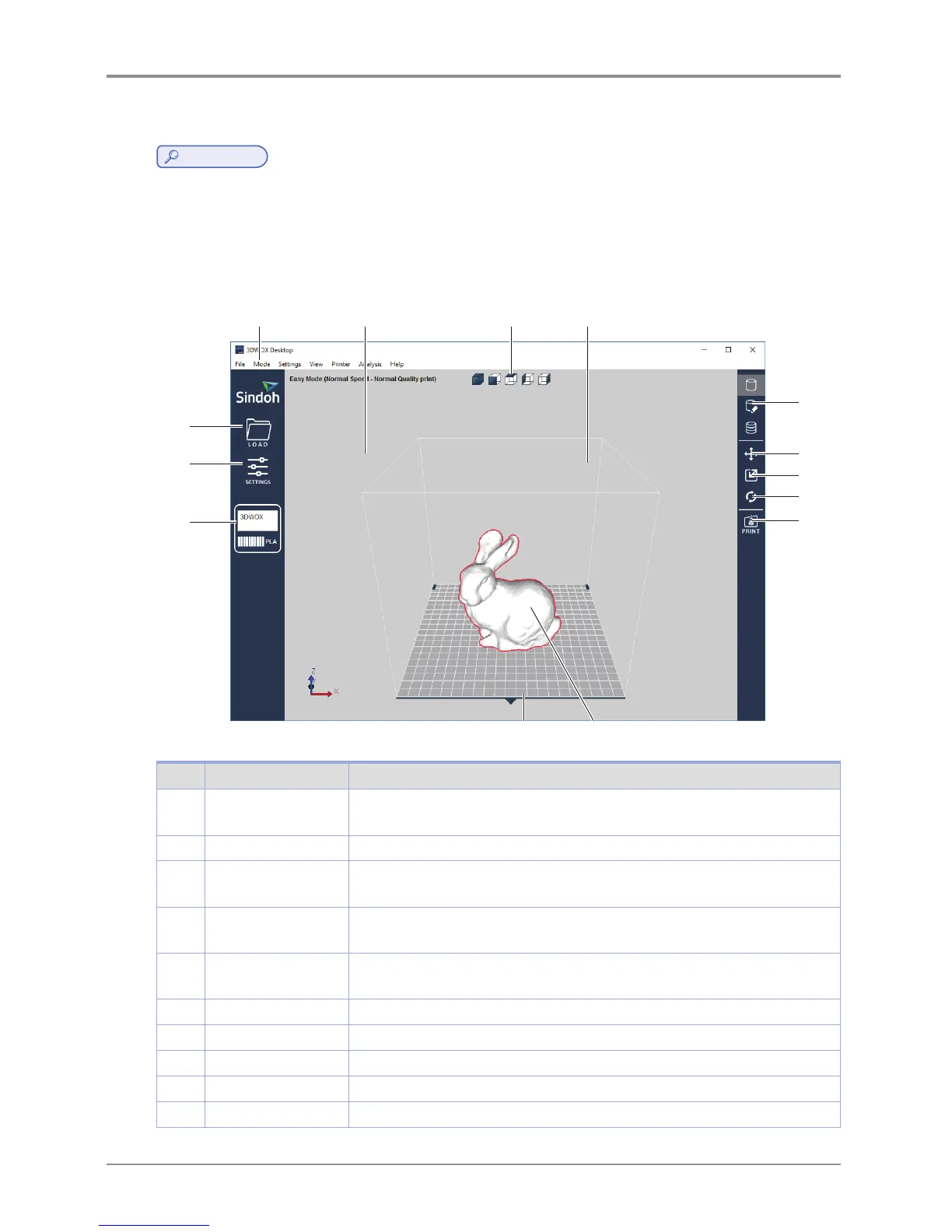
After installation is complete, double click on the icon created on your desktop, a screen similar to the following appears.
Explanation are the following.
1 2 3
4
5
14
13
12
6
7
8
9
11 10
No. Name Explanation
1 Standard menu bar Most program functions are available in this menu bar. Opening files,Loading
preset values, Exporting program values and more functions available.
2 3D view Displays a reconstructed 3D model loaded on the program.
3 Select view angles You may look at the three-dimensional view from the front, back, left, right, up,
and down based on the selected angle.
4 Printer Domain In 3D view, displays actual printer domain showing the location and size of the
model.
5 View Mode
Selection button
On the screen 3 types of viewing modes are available. 3D Model Viewer,
Support Edit Viewer, Layer Viewer are available.
6 Position button Moves model in direction of 2 axes.
7 Scale button Changes the model’s size. (zoom or change length)
8 Rotation button Rotates object on set angles based on 3 axis.
9 Print button Connects to a printer to print a sliced model over the network.
10 3D model 3D model data displayed on the screen.



 To Next Page