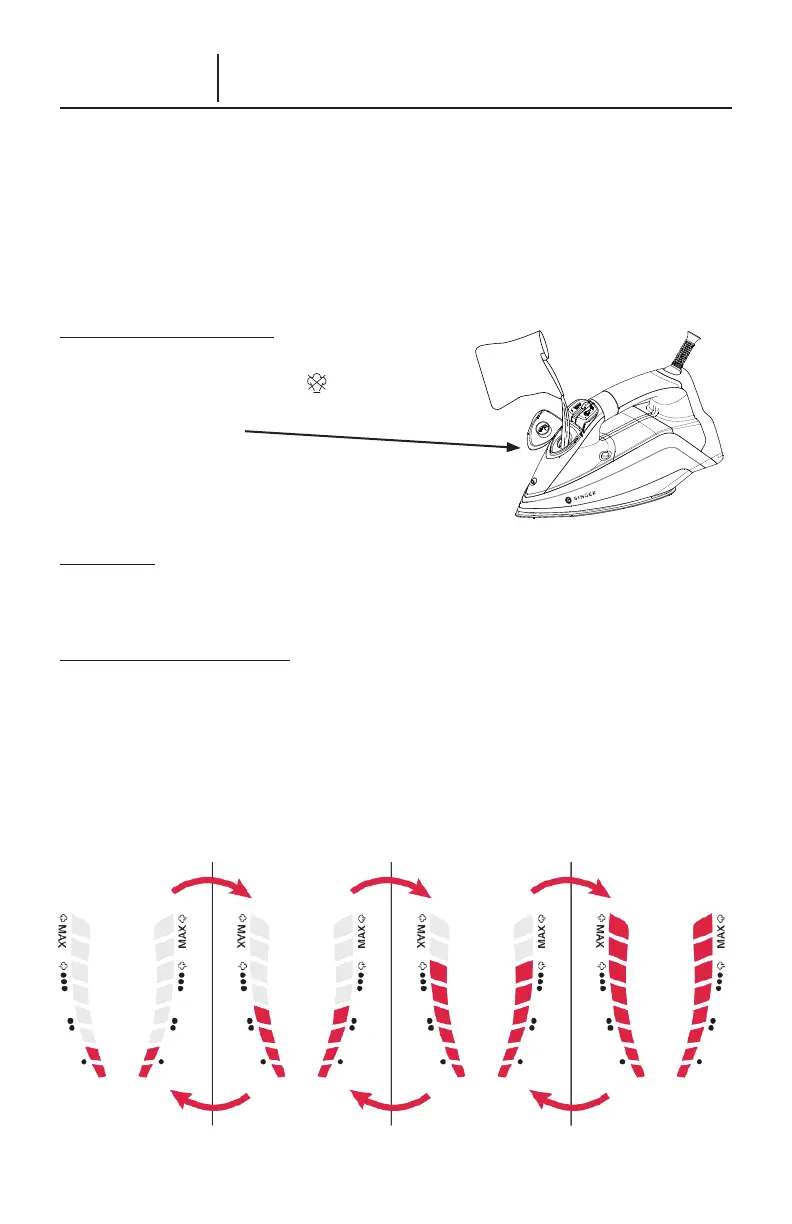
INCREASE TEMPERATURE:
Turn Temperature
Control Dial to the Right
DECREASE TEMPERATURE:
Turn Temperature
Control Dial to the Left
ENGLISH – 5
Using Your SteamLogic Steam Iron
1. This appliance is designed to use normal tap water. Use of other liquids may damage
the appliance.
2. Plug in the appliance to an appropriate electrical outlet.
6WDUWLURQLQJZKHQLFRQVRQWKHGLVSOD\SDQHOVWRSEOLQNLQJ7KLVLQGLFDWHVWKHVHOHFWHG
temperature has been reached and the iron is ready for use.
4. Always unplug the appliance after use.
FILL THE WATER TANK
1. Unplug the Power Cord from electrical outlet.
0RYH6WHDP6HOHFWRUWRWKHSRVLWLRQ
2SHQ:DWHU7DQN'RRUDQGÀOO:DWHU7DQNZLWK
ZDWHUWR0D[OHYHO
4. Close the Water Tank Door.
5. Plug in Power Cord to electrical outlet and turn
the Temperature Control Dial to the right to
switch on the appliance.
IMPORTANT: Never add fabric conditioner, starches or any other chemicals to water in your
LURQ(QVXUH\RXULURQLVVZLWFKHGRIIDQGXQSOXJJHGIURPHOHFWULFDORXWOHWEHIRUHÀOOLQJ
SET THE TEMPERATURE
The appliance has different temperature settings to handle different fabrics. Turn the
Temperature Control Dial to the right to switch the appliance on. The appliance will start
DW/RZ
•,I\RXZDQWWRLQFUHDVHWKHLURQLQJWHPSHUDWXUHWXUQWKH7HPSHUDWXUH&RQWURO
'LDOWRWKH5LJKWDQG,URQZLOOF\FOHWKURXJKWKHVHTXHQFHIURP´/RZ
•µWR´0HGLXP••µ
WR´+LJK
•••µWR´0$;µ
Turn the Temperature Control Dial to the Left to decrease ironing temperature from
´0$;µWR´+LJK
•••µWR´0HGLXP••µWR´/RZ•µ



 To Next Page