© Jul 2020 7-2 GTJZ0612&0812&1012&1212 Operation Manual
OPERATING THE MACHINE
In case of emergency, failure or loss of power, you can
activate the machine’s emergency pull/drag feature by
following these steps:
1. Wedge the tires to prevent the machine from rolling.
2. Ensure the area is free of obstructions.
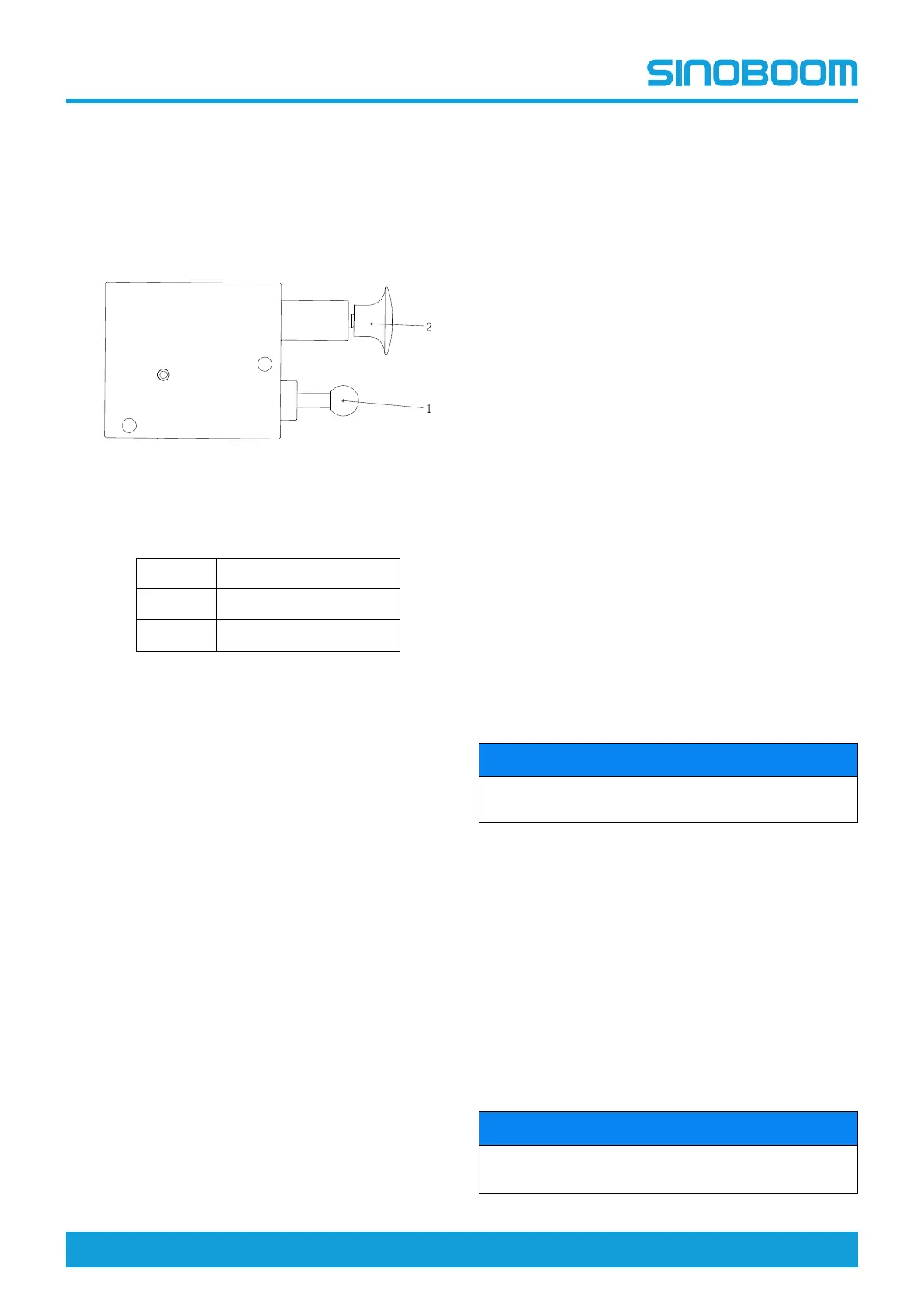
3. Locate the manual brake release valve installed at
the rear of the chassis.
Figure 7-1
Table 7-1
No.
Description
1
change valve
2
manual pump
4. Press down the reversing valve 1, and then
repeatedly push and pull the hand pump 2, until the
push is not moving.
5. At this time the brake is released, force can push
the machine sliding.
6. Pull out the reversing valve 1.
7. The machine brakes reliably.
OPERATING ON THE
GROUND
Before operating the machine:
1. Switch the key switch on the ground controller to
the ground control position.
2. Pull the emergency stop button on the ground con-
troller out to the ON position.
3. Ensure the battery is connected to the machine be-
fore operating the machine.
To adjust the platform position:
1. Operate the lifting/lowering switch on the ground
controller to control the lifting and lowering functions
of the platform.
2. The ground controller will be unable to control the
machine’s driving and steering functions.
OPERATING ON THE
PLATFORM
Before operating the machine:
1. Switch the key switch on the ground controller to
the platform control position.
2. Pull the emergency stop button on the ground con-
troller and platform controller out to the ON position.
3. Ensure the battery is connected to the machine be-
fore operating the machine.
To adjust the platform position:
1. Press the lifting/lowering button of the platform con-
trol box, which will illuminate the button.
2. Press and hold the enabling key.
3. Operate the handle according to the lift symbol on
the control panel.
To activate the steering function:
1. Press the driving and steering button, which will illu-
minate the button.
2. Press and hold the enabling key.
3. Use the button switch at the top of the control han-
dle to turn the steering wheel.
NOTICE
Use the platform controller’s color-coded arrow to de-
termine the direction of the wheel rotation.
To drive the machine:
1. Press the driving and steering button. The button
should illuminate.
2. Press and hold the enabling key.
3. To speed up, move the handle slowly away from the
center.
4. To slow down, move the handle slowly to the center
position.
5. Stopping causes the control handle to return to the
center position or releases the enabling key. Use
the platform controller’s color-coded arrow to deter-
mine the driving direction.
NOTICE
Raising the platform and keeping it in the raised posi-
tion limits the speed of the machine.



 To Next Page