16
GB
16
How to use
Grinding beans (mill only mode)
1 1
Place a filter in the basket and
attach the basket to the main
unit
2 2
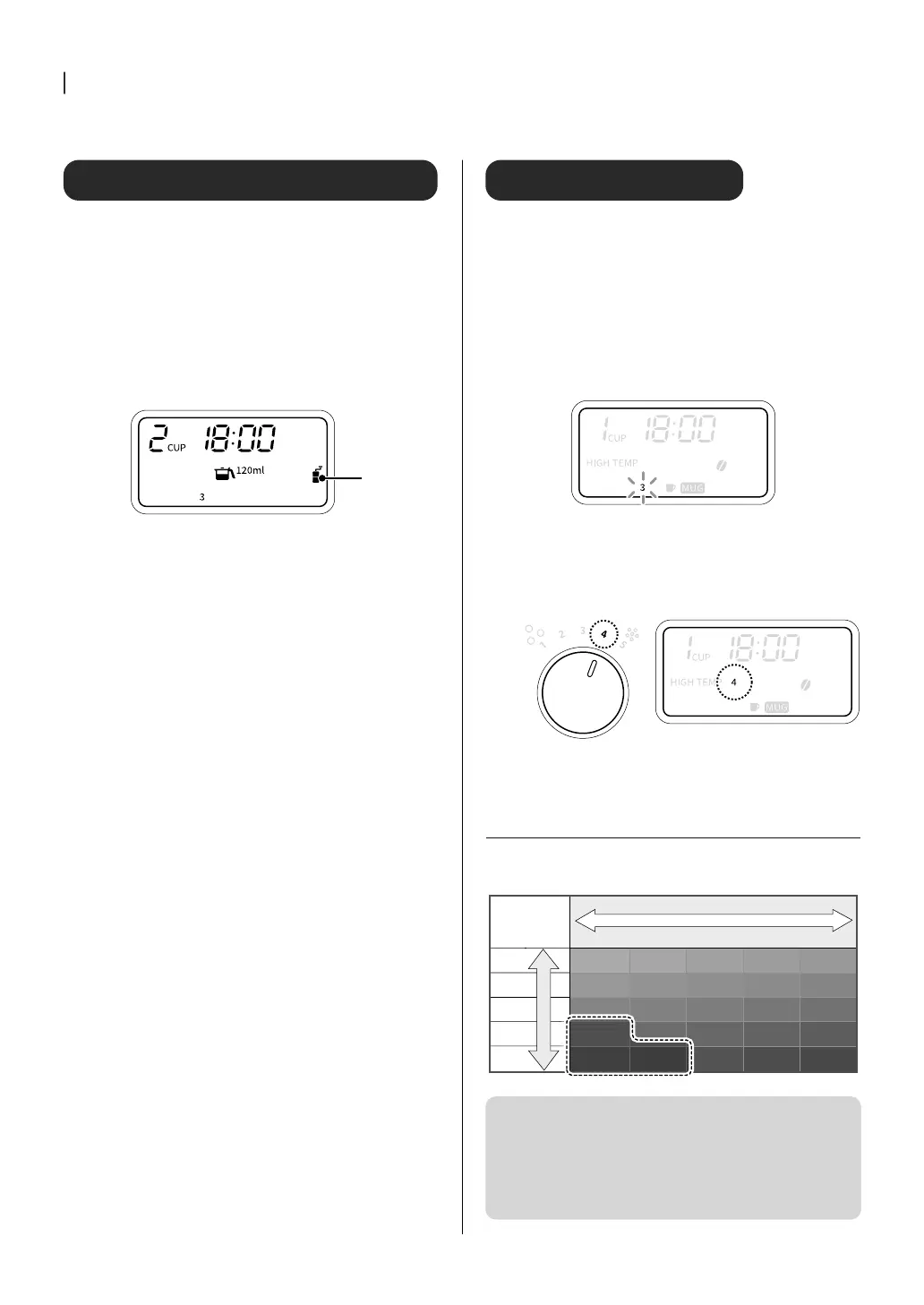
Press the “MODE” button to
select the mill only mode
Make sure that the mill only mode icon
appears on the display.
Mill only
mode
3 3
Press the “SIZE” button and
select the amount of brewing
In the mill only mode, “MUG” cannot be
selected by pressing the “SIZE” button.
4 4
Press the
▲
/
▼
buttons to set
the number of cups
The number of cups dispensed depends on
the size you choose.
[120ml] : 2 to 6 cups
[180ml] : 2 to 4 cups
[ICE 60ml] : 3 to 6 cups
5 5
Press “START/CANCEL” button
to start
Start the mill and grind the beans. The
“START/CANCEL” button lights up during
operation.
6 6
Detach the basket from the
main unit
Detach the basket from the main unit, and
then take out the coffee grounds with the
filter.
Set the grinding time
The mill's operating time is set according to the number of cups.
The position of the GRIND LEVEL dial determines how much of the
coarse grind is applied. For coarse grind, grind more; for fine grind,
grind less.
If you set the grinding time in advance according to the position of
the GRIND LEVEL dial, you can set the amount of coffee grounds
close to the recommended amount.
①①
Press and hold the “COURSE” button (about 2
seconds)
Grinding time will blink.
②②
Select grinding time
Press the
▲
/
▼
buttons to select 1-5. The longer the mill
runs, the more beans are ground.
Example: When the GRIND LEVEL dial is at the “4”
position
Set grinding time to [4]
③③
Press the “COURSE” button to confirm
Grinding time lights up.
X
The coffee seems too strong (too weak)
The mill's operating time can be adjusted to control how strong
the coffee is by the amount of beans being ground.
1
2
3
4
5
1 2 3 4 5
Depending Depending
on the type on the type
of beans, coffee grounds of beans, coffee grounds
may overflow.may overflow.
GRIND LEVEL dial
Grinding time
Set
Coarse ground Fine ground
Long
Short
RecommendedRecommended
RecommendedRecommended
RecommendedRecommended
RecommendedRecommended
RecommendedRecommended
It is not possible to make a coarse grind coarser (less grounds) or
a fine grind finer (more grounds).
When the GRIND LEVEL dial is set to “1” to “2” for the coarse
grinding side and GRIND LEVEL is set to [4] to [5], coffee grounds
may overflow from the filter depending on the number of cups
and the type of beans. In case of a high number of cups (120 ml /
60 ml ice: more than 4 cups, 180 ml: more than 3 cups), shorten the
GRIND LEVEL to [3] or less and adjust the grinding time.


 To Next Page