17
GB
Using the timer, operation can be started at a
scheduled time.
The clock must be set to use the timer.
“Set the clock”
Page
11
1 1
Attaching parts and preparing
coffee beans / grounds
See steps 1 through 3 of the procedure.
“How to Use”
Page 12
Note
Be sure to be prepared to brew coffee.
Failure to do so may cause coffee to overflow during
brewing, resulting in equipment failure and staining
of the surrounding area.
2 2
Setting up the brewing
See steps 1 through 5 of the procedure.
“Brewing coffee”
Page
14
3 3
Press the (timer) button
(timer) icon lights up and the timer
(scheduling) starts.
When the (timer) icon is displayed,
press the
(timer) button again to
cancel the timer (scheduling).
4 4
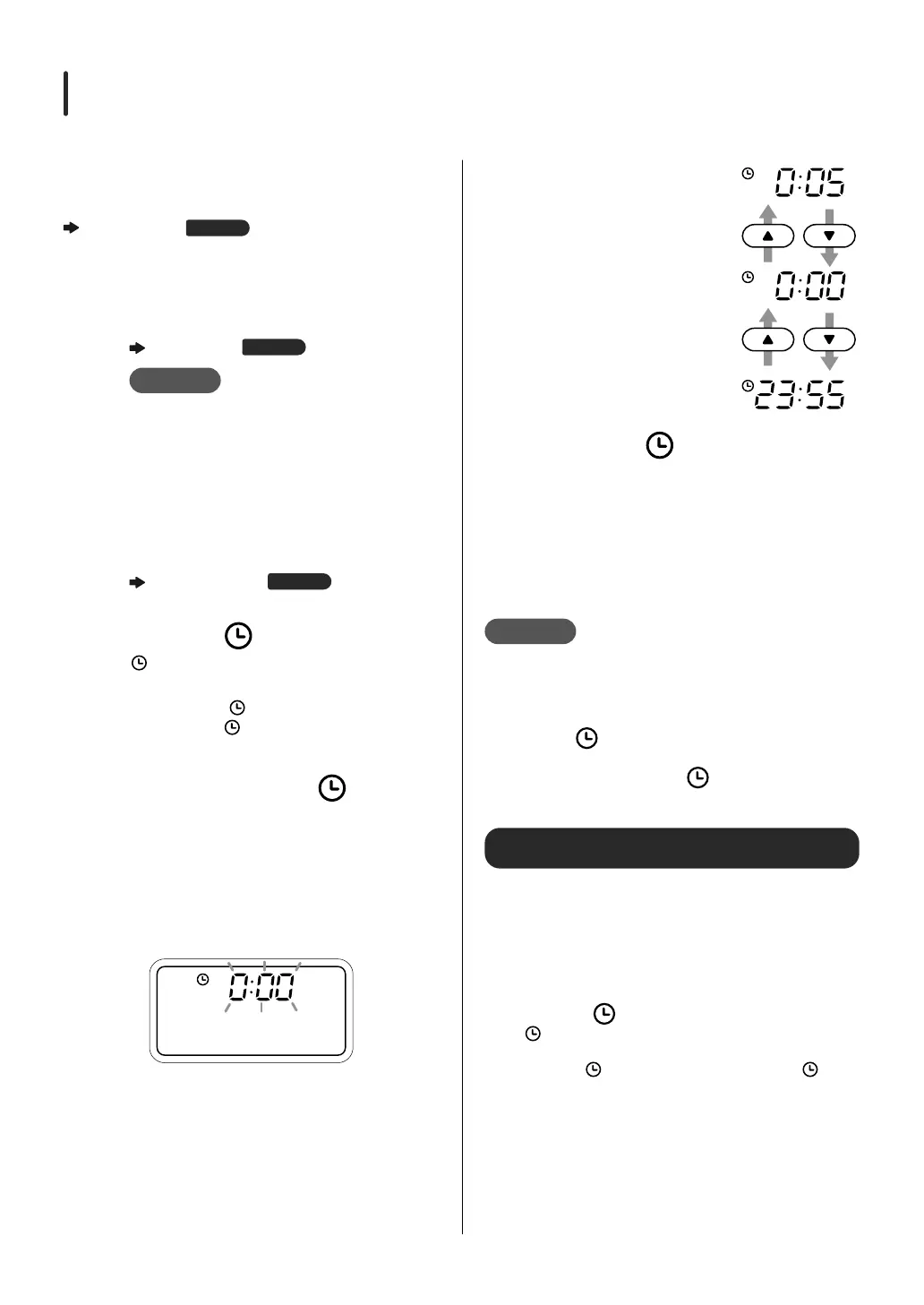
Press and hold the (timer)
button (at least 3 seconds) to
switch to the timer setting
mode
When the mode is switched to the timer
setting mode, the time display blinks.
5 5
Set the time
Press the
▲
/
▼
buttons
to set the time. Pressing
the button changes the
time in 5-minute
intervals. Press and
hold to count up/down
continuously.
6 6
Press the (timer) button to
set the time
The time changes from blinking to lit,
and the time is set. During the timer
(scheduling), the scheduled time is
displayed.
You can change the brewing settings
even during the timer (scheduling).
Note
If the power plug is unplugged from the power
outlet, the timer (scheduling) setting will be
reset and the timer (scheduling) will not be
executed.
While the (timer) icon is lit, pressing the
“START/CANCEL” button will not start the timer.
To brew coffee, press the
(timer) button to
cancel the timer (scheduling).
To use the timer (scheduling) repeatedly
Once the timer is set, the set time is retained unless
the power plug is unplugged from the outlet.
①①
Press one of the buttons to go to the display
for brewing coffee (the display showing the
number of cups and the size of the cup)
②②
Press the (timer) button
(timer) icon lights up and the timer (scheduling)
starts.
When the (timer) icon is displayed, press the (timer)
button again to cancel the timer (scheduling).
Using the Timer (scheduling)


 To Next Page