11
GB
11
How to use
Cleaning the unit
If you are using it for the first time or if you have not
used it for a while, please clean it before use.
①①
Washable parts can be removed from the main
unit for cleaning
“Cleaning”
Page
18
②②
Drain the washed parts thoroughly before
attaching them to the main unit
③③
Fill the water tank with 6 cups of water and
attach it to the main unit
④④
Set the server on the warming plate
⑤⑤
Set mode, size, course, and number of cups
Press the “MODE” button to set (ground).
Press the “SIZE” button for 120 ml
Press the “COURSE” button to set [HIGH TEMP]
Press
▲
/
▼
buttons for 6 cups
⑥⑥
Press “START/CANCEL” button to start
⑦⑦
Wait about 30 minutes for the unit to cool
down, then dump the hot water out of the
server and rinse with water
⑧⑧
Repeat steps
③
through
⑦
once or twice
At the beginning of use, the plastic parts may have a plastic
odor due to the heat generated.
It will lessen with use, but if this is a concern, clean with water
or hot water once or twice before use.
If you are still concerned, perform a citric acid cleaning.
“Citric acid cleaning inside the main unit”
Page
19
About the plastic odor
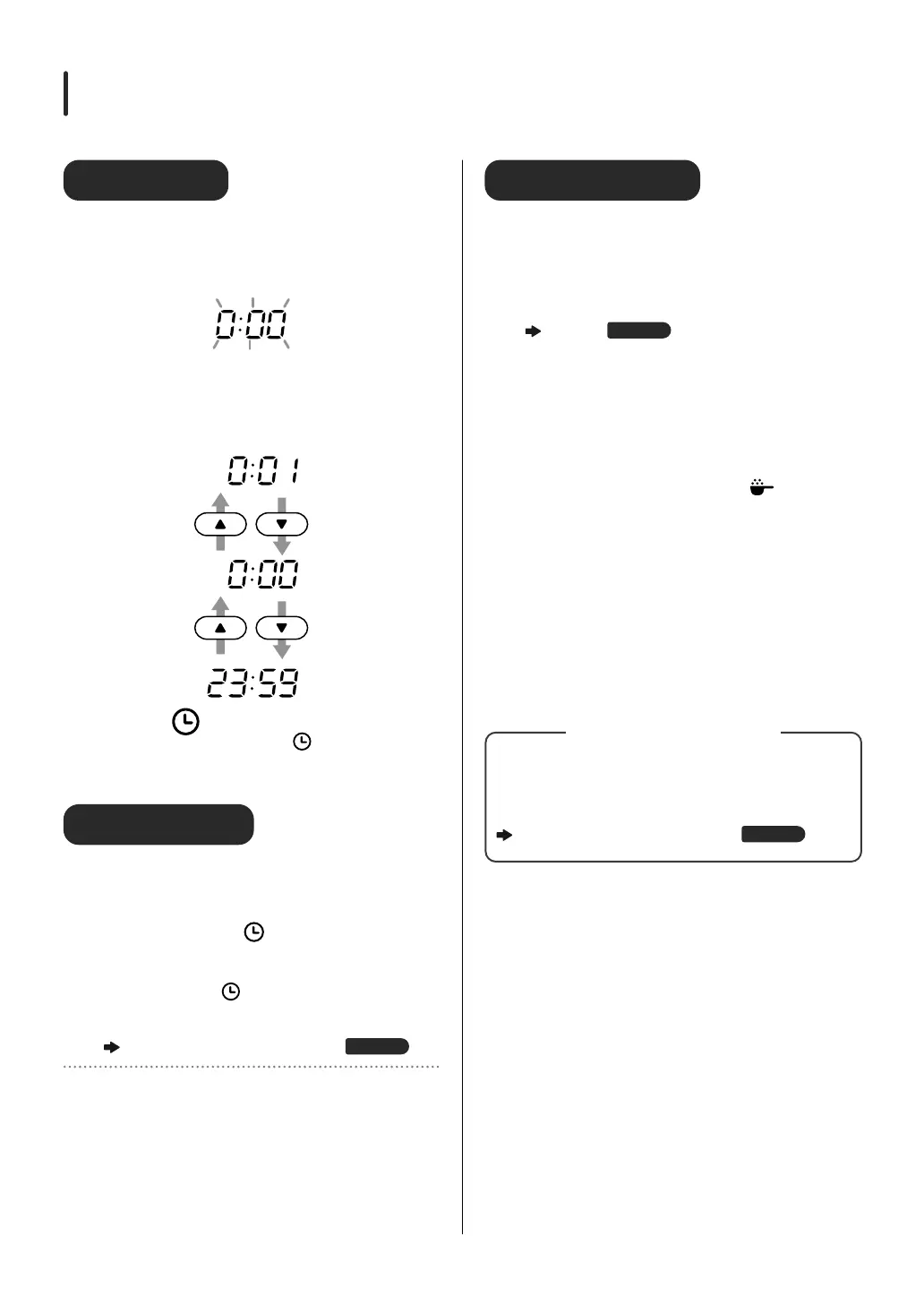
Performing Initial Settings
Set the clock
①①
Insert the power plug securely all the way into
the outlet
The clock will automatically enter the clock setting
mode, and [0:00] will blink.
②②
Set the clock
Press the
▲
/
▼
buttons to change the time in one-
minute intervals. Press and hold (1 second or more) to
move up/down 10 minutes continuously.
③③
Press the (timer) button to confirm
Once the clock is set, press the (timer) button to
confirm.
When only [ : ] blinks, the setting is complete.
Reset the clock
If the clock is out of sync, re-set it using the following
method.
①①
Press and hold the (timer) button (approx.
3 seconds) while the operation/display is off to
switch to clock setting mode
Press and hold the (timer) button while the timer is
“on” to enter the timer setting mode.
②②
Set the clock
“Set the clock” Step
②
and thereafter
Page
11
X
Clock Memory Retention
If the power plug is unplugged from the outlet for approximately
one week, the clock will reset to factory setting.


 To Next Page