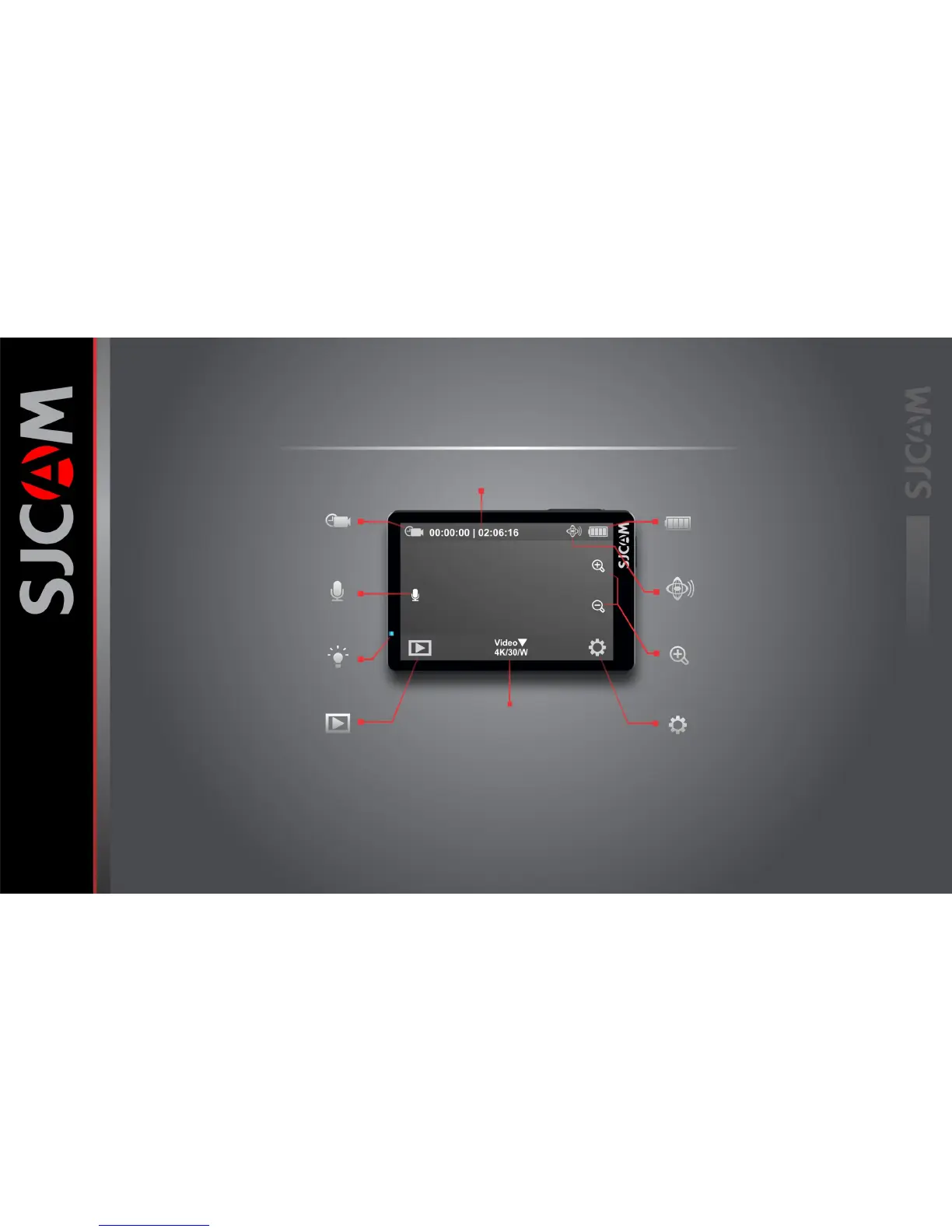
The Main Screen
Battery Indicator
Gyro ON/OFF
Zoom Controls
Go to Settings
Icon will show what mode you are currently in.
The options will vary depending on the mode.
Indicates when the microphone is active.
Tap to disable the microphone.
Tap this icon to go to the camera’s gallery and
view the videos and photos you have recorded.
Tap this icon to go to the camera’s gallery and
view the videos and photos you have recorded.
Displays approximate power left on the
battery. Battery blinks when almost empty.
An indicator showing that the Gyro Sensor
is active. Will not show when turned off.
Tap the (+) or (-) magnifying glass icons to change
the digital zoom factor.
Tap this icon to make changes to the setting
for the selected mode, or for General options.
Current Mode Icon
Microphone Active Icon
Status Indicator Light
Go to Playback Mode
MODE IN USE
Resolution/Framerate
Tap/Swipe Up to show other Mode options.
The Main Screen has many nested menus
available by tapping or swiping.
You can also hide all the icons on screen
to use the viewfinder without the
onscreen icons and indicator labels by
tapping anywhere in the middle.
Elapsed Time | Time left on card



 To Next Page