www.skcltd.com 210-PMTXM Issue L Page 21
Operating the Pocket Pump in Constant Pressure Mode
2) Setting the Pump Back Pressure
Ensure that the pump is set to Constant Pressure mode and that the battery is fully charged.
Set up the sample train as specified in the sampling method and connect to the pump air inlet port.
Press [
] to start the pump running.
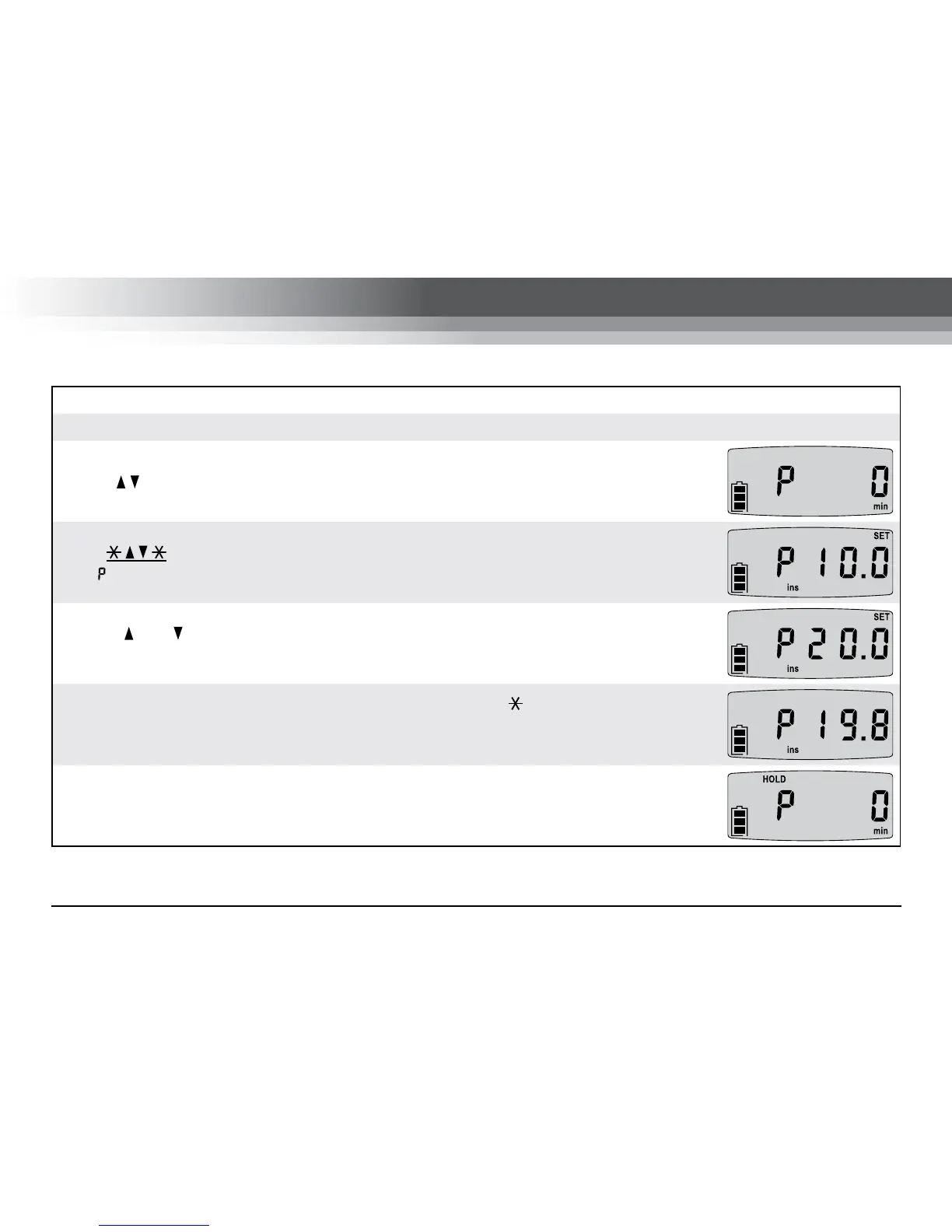
Press . The LCD screen will show the back pressure setting screen with ‘SET’
and ‘ ’ flashing.
Use the and buttons to set the required back pressure in inches of water or mm
of mercury on the LCD screen.
When the required back pressure has been set press the button to return to RUN
mode. The pump will now maintain the back pressure to within ±0.5 inches of water.
The individual tube flow rates can now be calibrated.
The pump run-time data is recorded during the flow rate setting and calibration
operations. Before starting a sample run reset the run-time data.


 To Next Page