9
2.1 Prepare the Mount for Polar Alignment
2.2 Polar Alignment of the CQ350-PRO mount
Prior to operating the CQ350-PRO mount, it must be polar-aligned.
1. Set up the CQ350-PRO mount, counterweights, and telescope as described in PART I. It
is recommended to polar-align the CQ350-PRO mount with all equipment installed.
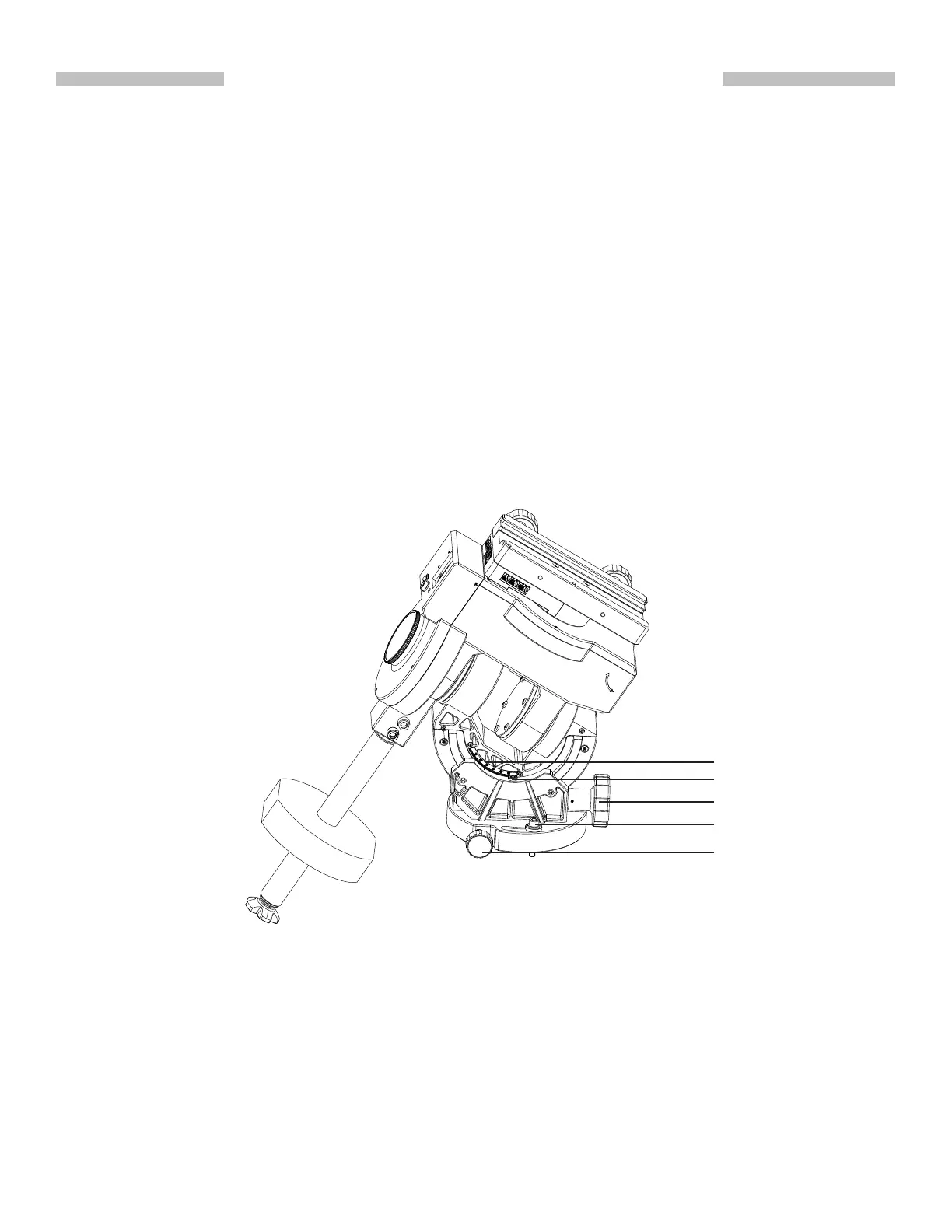
2. Slightly loosen the tripod’s upper knob and both azimuth locking screws and then use the
azimuth adjustment knobs to put the azimuth locking screws to the middle of the slots
(Fig 2.1a). Tighten the azimuth locking screws slightly.
PART II : POLAR ALIGNMENT
Fig. 2.1a
3. Loosen the arch locking screws (Fig 2.1a) on both sides of the CQ350-PRO mount, and
then tighten them slightly.
4. Tighten the tripod’s upper knob and then loosen it by 1/4 of a turn.
5. Move the tripod to roughly align the R.A. axis to true north (or south for observing in
south-ern hemisphere).
6. Install the handle on the latitude jackscrew and use it to set the latitude dial reading to local
latitude (Fig 2.1a).
The Please refer to the Synscaninstruction manual as for the Synscan aided polar alignment
procedure.
Latitude AdjustmentKnob
Azimuth adjustment
knob
Azimuth locking screw
Latitude Dial
Arch Locking Screw











 To Next Page