6
PART I: Installation of the WAVE150i Mount
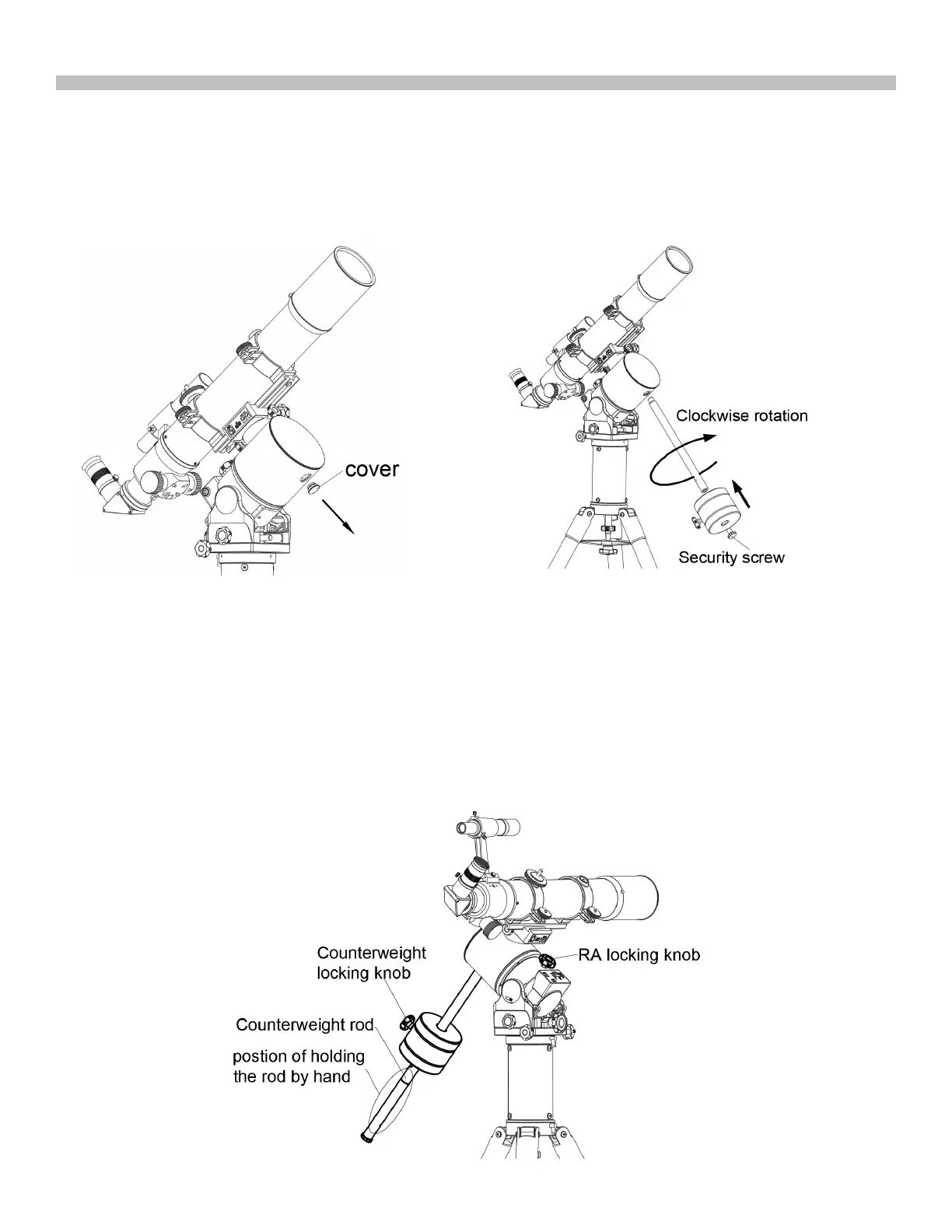
1.4 Install counterweight
Counterweight is optional unless the telescope and accessories are very heavy.
1. Remove the cap on the mount and keep it in a safe place.
2. Thread in the longer of the two counter weight rods, adding the short one if necessary. Turn clockwise to tighten.
3. Remove the security cap on the rod. Slide the counterweight onto the rod and tighten the locking knob. Thread in
the security screw immediately.
)LJ6b
)LJ6a
)LJ6
1.5 Balance of the Payload
The Wave 150i mount can support unbalanced payload in both R.A (Azimuth) and declination
(Altitude) axes. But balancing (even partially) the payload can provide the following benefits:
* Higher stability, especially when the supporting area of the tripod is small.
* Less power consumption.
* Higher tracking performance.
1.5.1 Balance of the R.A. Axis in EQ Mode
* Use your left hand to hold the counterweight rod firmly and use the right hand to fully release the R.A.
locking knob.
)LJ
7











 To Next Page