SJRT Compact Series
Engine Powered December 2007 Page 49
TM
Section 3 - Operation Start Operation
3.8-7 To Select Drive Torque
1. High Torque: Select high torque when climbing
grades, traveling on rough terrain or when loading
or unloading aerial platform. To activate high
torque, select lift/torque/drive switch or torque
switch to “
” high torque (low speed) position.
WARNING
Aerial platform must be in fully retracted
position when operated on any grade.
Driving while elevated on any grade may
result in death or serious injury.
2. Low Torque: Select low torque when traveling
on flat surface. To activate low torque, select
lift/torque/drive switch or torque switch to “
”
low torque (high speed) position.
WARNING
To protect against unintended movement
of the aerial platform, push in the
emergency stop button after you have
arrived at your desired location or
elevation.
3.8-8 To Extend or Retract Manual Extension
Platform
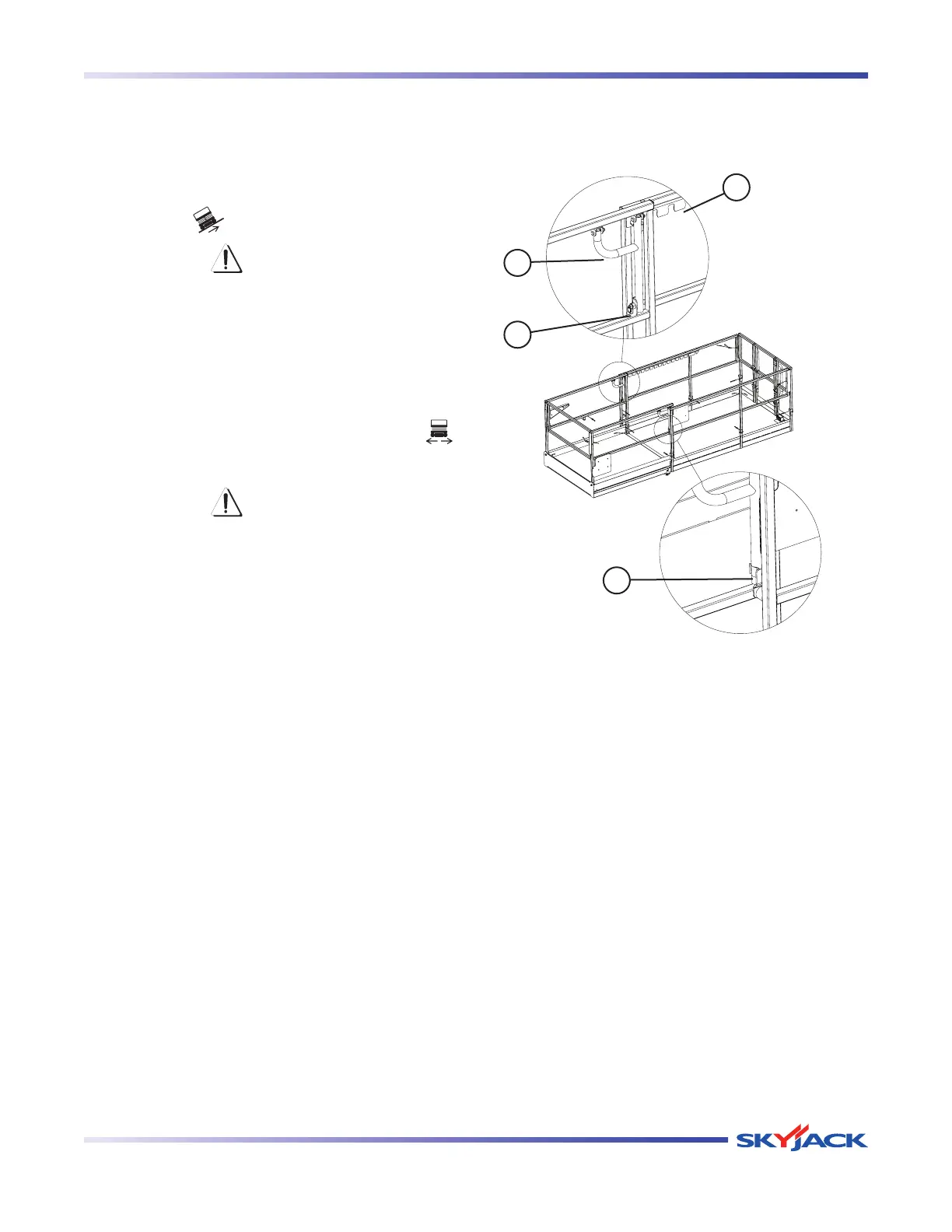
Figure 3-7. Manual Extension Platform
1. To extend/retract manual extension platform, pull
out the pull pin (item 1), lift push bars (item 2) up
from the gripper clip (item 3) then push/pull the
push bar handle until desired extension/retraction
is reached.
2. Ensure push bar rests in one of the slots in the
extension interval (item 4). Fasten push bar down
into the gripper clip and ensure pull pin is locked
in place.
2
4
3
1




 To Next Page