©2015 Skyline Exhibits
Printed in U.S.A. PN36547-A
12
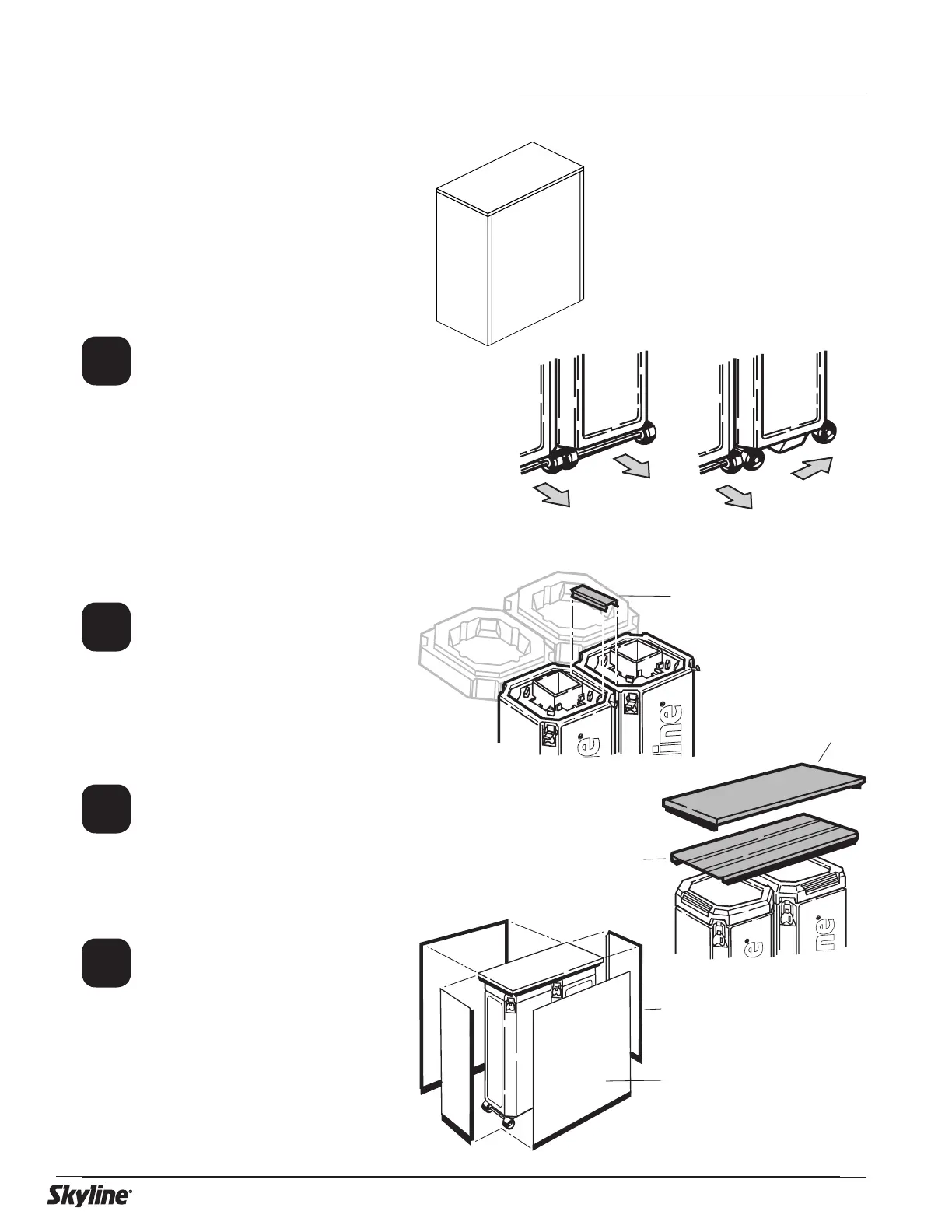
Open case lids and use case con-
nector bracket to attach cases
together. Replace lids and lock.
For a stationary table, position
cases with wheels facing opposite
direction.
For a moveable table, position
cases with wheels facing the same
direction.
Unfold table top and place on
cases. Place cover on table top.
Attach end panels to magnetic
strip on table top cover.
Attach front/back panels to mag-
netic strip on table top cover and
to magnetic strips on end panels.
Case table is used for product dis-
play or working surface.
The cases
become the structure
for the
table
and are covered with panels that
are stored inside the case. Can have
single or double case tables.
Stationary table
Moveable table
Case connector bracket
Table top
Front panel
End panel
Cover panel
1
2
3
4
Case Table – Transporter Case



 To Next Page
 Loading...