GB 10
7. The OSD menu – installation
2. Installation
The installation menu contains all the required settings for adapting the satellite system and saving
the channels.
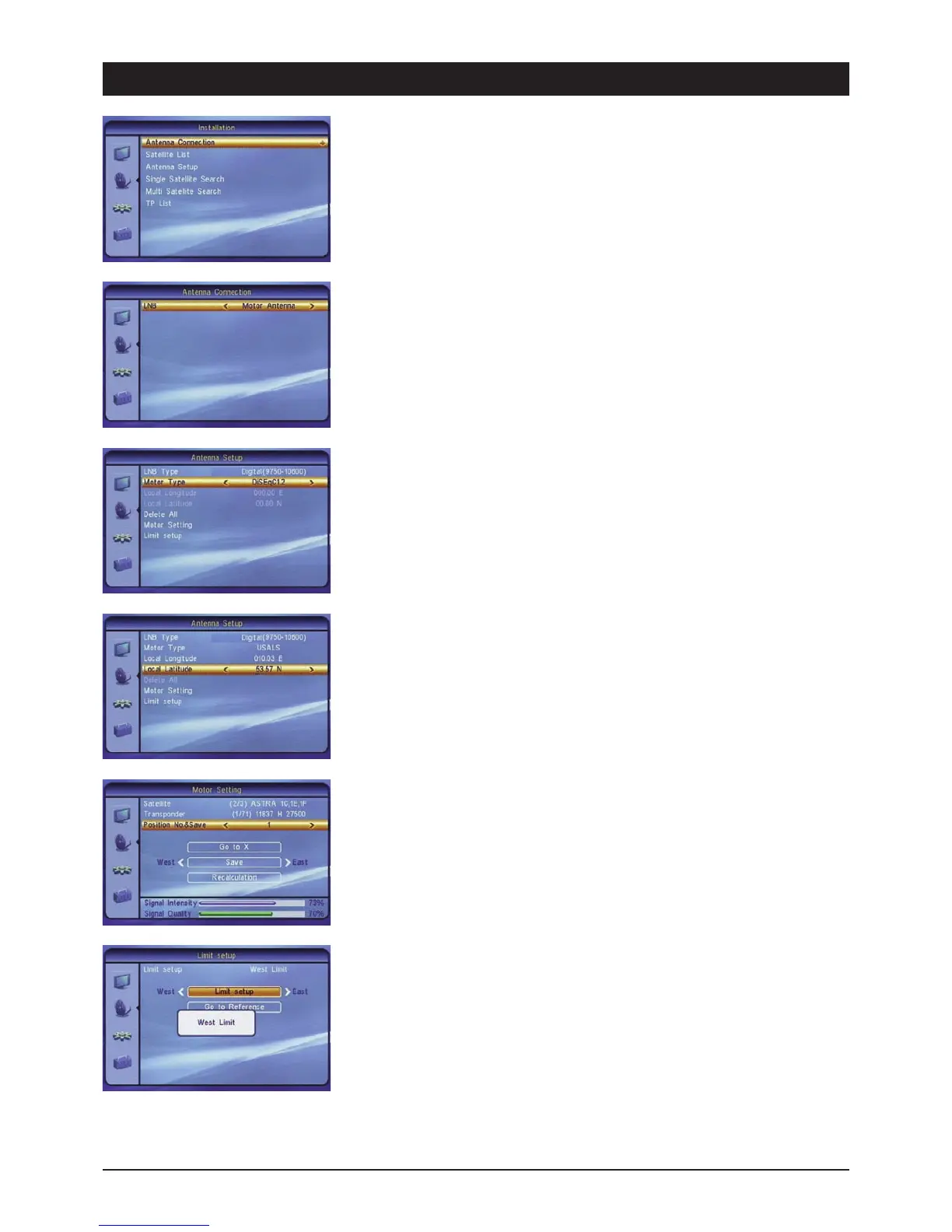
2.1 Antenna connection
2.1.1 Rotating system (DiSEqC-LNB required) or permanent alignment
If the device is to be used to control systems which are capable of receiving more than one
satellite, it is necessary to use a DiSEqC-LNB instead of a universal LNB.
If you own a motor-controlled rotating system, select the option rotating system in the antenna
connection menu.
Subsequently open the antenna setting menu and select the LNB and rotor type. If you are not
sure whether you own a DiSEqC 1.2 or DiSEqC 1.3 (USALS) rotor, please refer to the operating
instructions of your antenna rotor.
If you own an USALS rotor, you can enter the coordinates of the antenna location under the local
longitude and latitude (e.g. Hamburg 10.03 E and 053.57 N). Press the OK button prior to entering
the coordinates.
Delete all: For deleting all the stored satellite positions. After deleting all the stored position, you
have to reset the positions for the DiSEqC 1.2.
Rotor settings (DiSEqC 1.2):
Satellite: Select the desired satellite for setting the rotating system. Note: If any satellites are
missing here, add them to the satellite list menu.
Transponder: It is possible to select a pre-programmed transponder to search for the satellite.
Position & saving: Allocate a position number to each satellite. Important: After successful
alignment of the satellite, you have to confirm the number via the OK button!
Note: You can skip the following points if you are using an USALS rotor. The satellite positions have
already been stored automatically.
Go To X: In order to facilitate the search for further satellites, you can directly access already
stored positions from the list. The reference value represents the central position and should face
due south.
West/East: Use the 왗왘 control buttons to move the antenna westwards or eastwards. Always
observe the signal indicators. Note: If a signal level is not achieved during the search, select
another transponder.
Recalculation: This is where the internal counter for the individual satellite positions is
recalculated starting from the central position of the rotor (south). Deviations can occur over time
due to frequent rotation, mechanical tolerances and external influences (wind).
It is possible to restrict the swivel range of the antenna in order to prevent obstacles causing
damage to it. Under the limit setting select a direction (westerly or easterly limit) and press the
OK button. The following selection is used for controlling the antenna to the outermost rotating
range. Use the 왗왘 control buttons for rotation. Use the OK button to confirm both limits one
after the other.



 To Next Page