IDP 600 Terminal Series - Hardware Guide
© SkyWave Proprietary 15 T200, Version 02
3.3.3 Analog Input
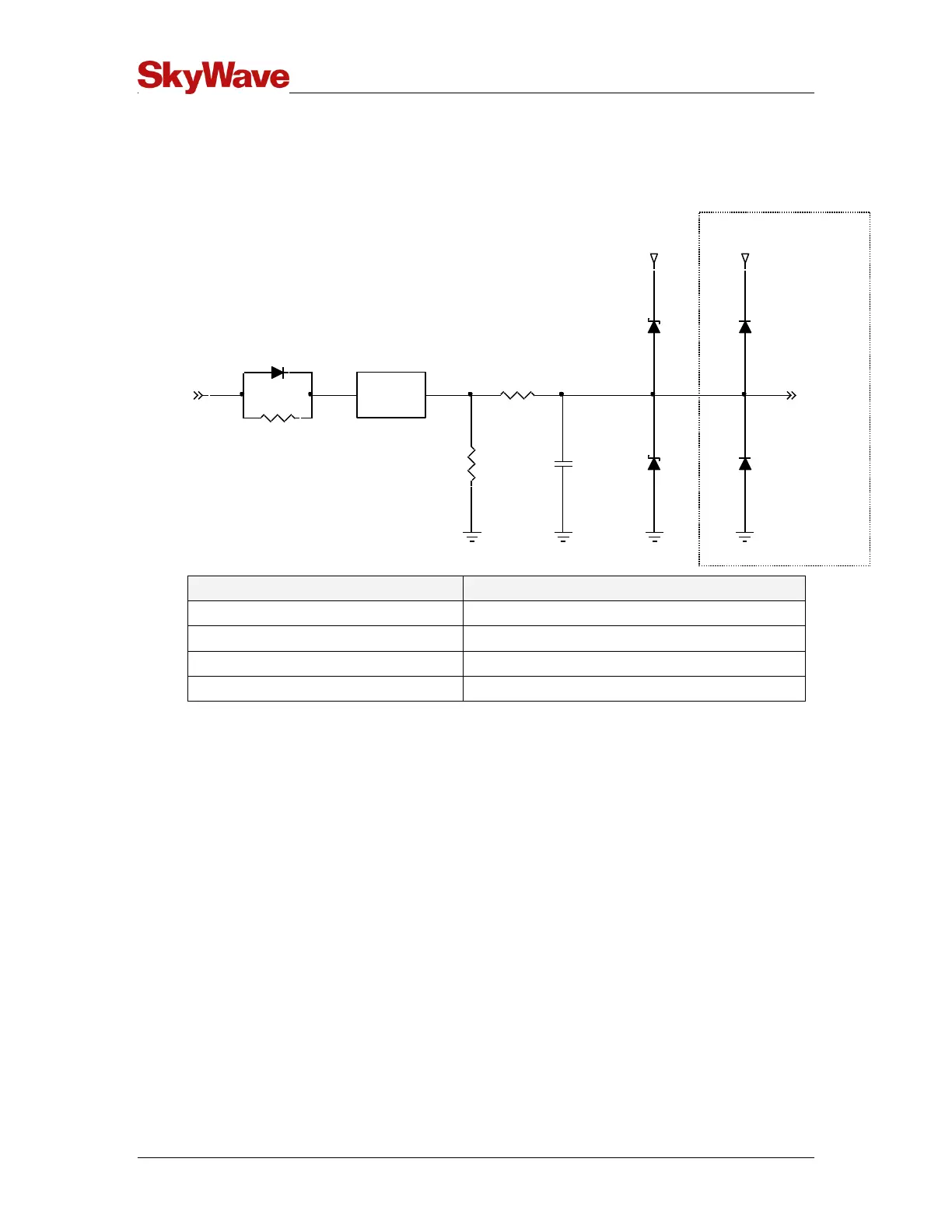
Figure 14 contains a schematic of the I/O when configured as an analog input.
Figure 14 Analog Input
3.3.4 Input Bandwidth
When used as a digital or analog input, the I/O circuitry's bandwidth is ≥ 1 kHz.
Note: This does not imply that the terminal software has a sample rate > 1 Hz.
3.3.5 Output Bandwidth
When used as a digital output (either a push-pull or open drain) the I/O circuitry's
bandwidth exceeds 100 Hz.
Note: This does not imply that the terminal software has the capability of generating
high rate pulse trains at frequencies > 10 Hz.
3.3.6 Pass-Through Mode
A terminal can be configured for pass-through mode when there is no application
firmware present. A block diagram of pass-through mode is shown in Figure 15. In pass-
through mode, the terminal connects the modem's serial interface to the terminal's
RS-232 port.
ADC
1M
3V
1nF
1k
3V
LIMITER
ANALOG
INPUT
1k
3V
ARM PROCESSOR



 To Next Page