EasyManua.ls Logo

Slamtec RPLIDAR A1 - Application Notes; Retrieving scanning data from an RPLIDAR

Slamtec RPLIDAR A1
32 pages
Print Icon
To Next Page IconTo Next Page
To Previous Page IconTo Previous Page
Loading...
28 / 32
Copyright (c) 2009-2013 RoboPeak Team
Copyright (c) 2013-2017 Shanghai Slamtec Co., Ltd.
Retrieving scanning data from an RPLIDAR
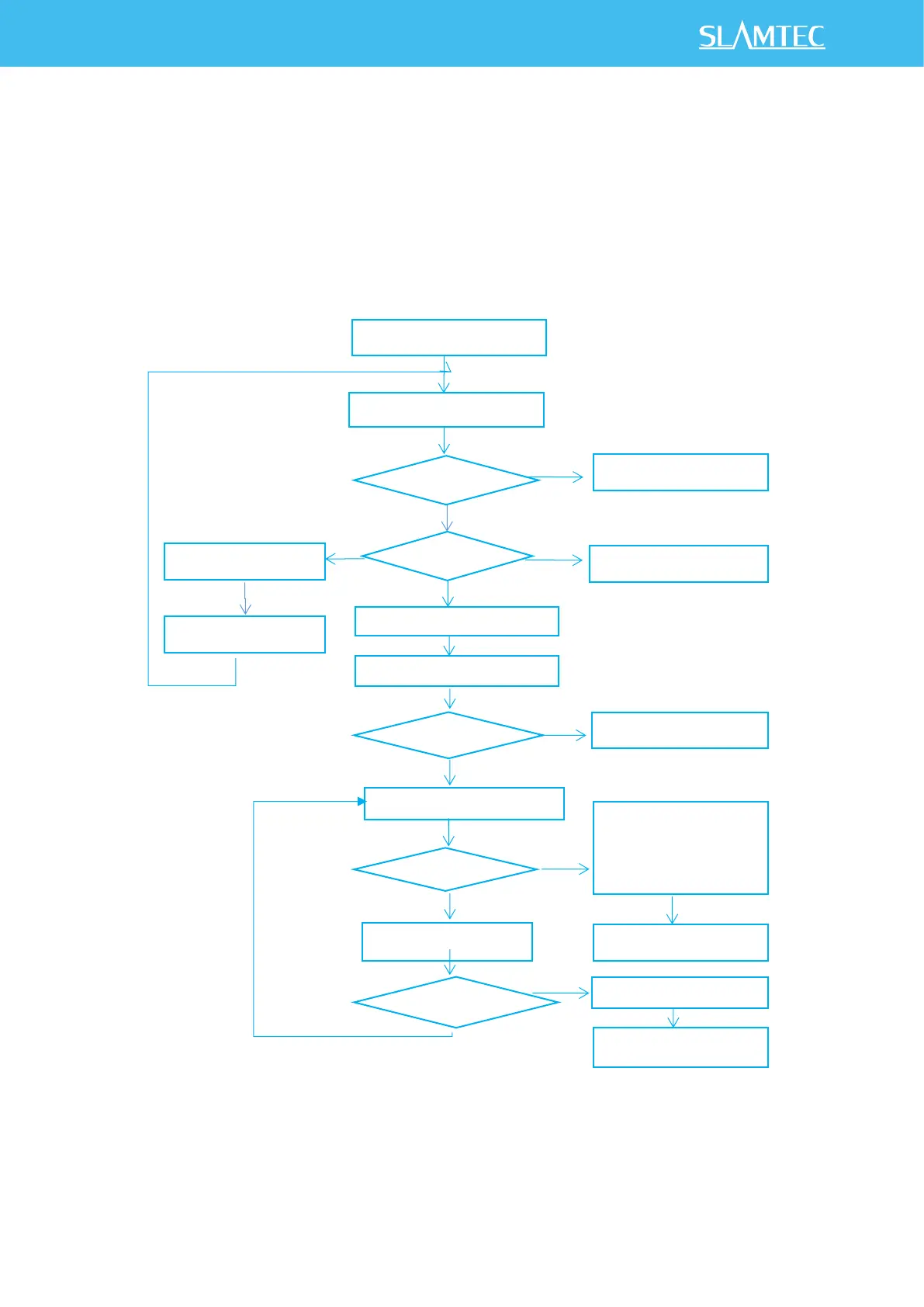
It is recommended that a host system always follows the below sequence to enable
RPLIDA’s scanning operation and retrieve the scanning data. Before sending a SCAN
request, the host system should send a GET_HEALTH request in advance to query
the RPLIDAR’s health status. In case RPLIDAR is in the Protection Stop state, the host
system can send a RESET request to try to escape the Protection Stop state. Please
refer to the SDK code for implementation details.
Figure 5-1 Recommendation for Starting RPLIDAR Scanning and Data Retrieving

Application Notes
Send a GET_HEALTH request
Receive timeout?
Communication Error
Protection Stop?
Send a RESET Request
Wait for 2ms
RPLIDAR hardware failure
Send a SCAN Request
RPLIDAR powered up
Receive timeout?
Communication Error
Wait the Response Descriptor
Receive Measurement Sample
Receive timeout
Send a GET_HEALTH
request, check health
status
Process sample data
End of operation?
Send a STOP request
Wait for 1ms
No
Yes
≥N
1st
No
Yes
Check motor status
Yes
No
No
No
Yes

Other manuals for Slamtec RPLIDAR A1

Related product manuals