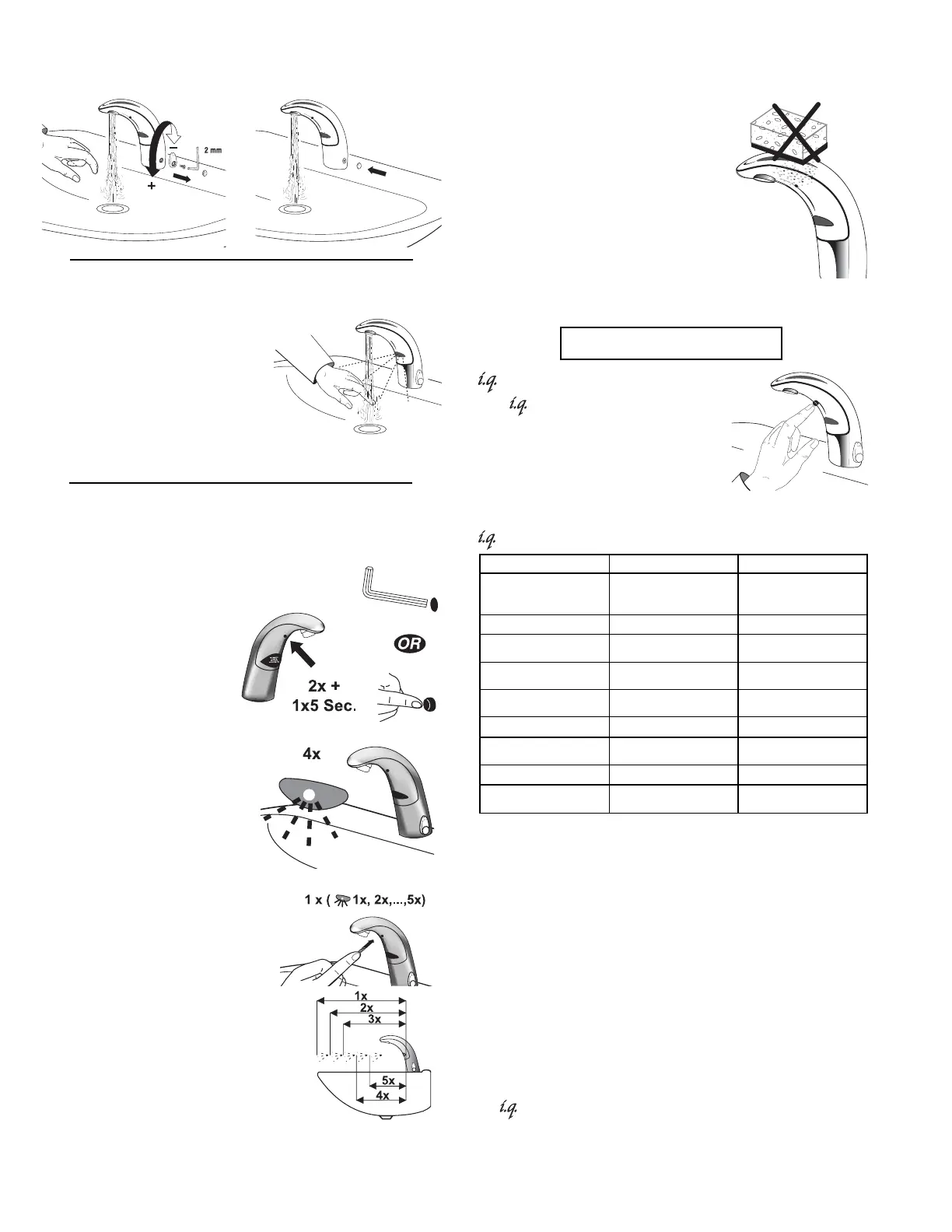
TO
FIX
TEMPERATURE
Set to desired position. Remove Handle. Plug hole with Cap.
4
OPERATION
As the user’s hands enter the
beam’s effective range, the
beam is reflected back into the
sensor receiver and activates
the solenoid valve allowing
water to flow from the Faucet.
Water will flow until the hands
are removed or until the Faucet
reaches its automatic time out
limit setting.
CARE AND CLEANING OF CHROME AND
SPECIAL FINISHES
DO NOT use abrasive or chemical
cleaners (including chlorine bleach)
to clean Faucets that may dull the
luster and attack the chrome or
special decorative finishes. Use
ONLY mild soap and water, then
wipe dry with clean cloth or towel.
While cleaning the bathroom tile,
protect the Faucet from any
splattering of cleaner. Acids and
cleaning fluids will discolor or
remove chrome plating.
MANUAL RANGE ADJUSTMENT
Note:
use
Manual
Range
Adjustment
only
when
desired
range
cannot
be
obtained
with
Auto
Ra
nge
Adjustment
in
Step
7.
Push button two (2) times
(double click).
Push again for five (5)
seconds until LED flashes
four (4) times.
Then release button and
wait five (5) seconds.
-Click FEATURE
The -Click feature is a button on
the underside of the Faucet spout
that allows the user to place the
Faucet into the following function
modes: Continuous Run, Temporary
Off, Permanent Off, optional Twenty-
Four Hour Sentinel Rinse and Auto Set Range Adjustment.
-Click SETTINGS
Continuous Run
Water flows from 1 - 20 minutes constantly — for easy
filling of sink, pail or for hygienic handwashing. Default
setting is two (2) minute run time.
Temporary OFF
Water flow is deactivated up to two (2) minutes — for
convenient cleaning of sink and faucet.
Permanent OFF
The faucet is totally deactivated for safety and energy
saving reasons during long absence.
Twenty-Four Hour Sentinel Rinse
Sentinel Rinse occurs every twenty-four (24) hours from
last use to keep fixture fresh during periods of nonuse.
Auto Set Range Adjustment
All Faucets feature the Auto Set function.
The detection area is automatically adapted to the sink
where the Faucet is installed and this occurs upon initial
power up. Thus reflection is prevented and a maximum of
user convenience provided.
Push and hold button in as
Faucet continuously cycles
through the following five (5)
range settings.
One
(1)
flash
=
longest
range
Two
(2)
flashes
=
long
range
Three
(3)
flashes
=
medium
range
Four
(4)
flashes
=
short
range
Five
(5)
flashes
=
shortest
range
Release button at desired
setting. Then water will flow for
four (4) seconds signaling
confirmation of setting. Wait an
additional ten (10) seconds
before using Faucet.
Function Press Button LED Signal
Continuous Run — 2 minute
default setting (adjustable from
1 - 20 minutes)
1 time for 2 seconds
or consult Factory
5 short flashes
RESET: 1 time
Temporary Off 2 times (double click)
5 short flashes followed by
periodic flashing
RESET:
1 time or will reset
automatically after 2 minutes
Permanent Off Consult Factory
Periodic flashing and then 2
long flashes
RESET: 1 time
24 Hour Sentinel Rinse 1 time for 24 seconds 2 short flashes
RESET: 1 time for 24 seconds 5 short flashes
Auto Set Range Adjustment
2 times (double click) and then
1 time for 5 seconds
4 short flashes —wait for 4
second water flow
ADDITIONAL FEATURES



 To Next Page