EasyManua.ls Logo

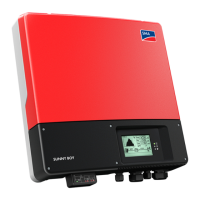
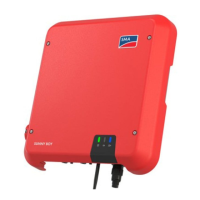
SMA SUNNY BOY 3.0 - User Manual

SMA SUNNY BOY 3.0
112 pages
Print Icon
To Next Page IconTo Next Page
Loading...
SUNNY BO
Y
SBxx-1AV-41-BE-en-12 | Version 1.2ENGLISH
Operating manual
SUNNY BOY 3.0 / 3.6 / 4.0 / 5.0 / 6.0

Table of Contents

Other manuals for SMA SUNNY BOY 3.0

Questions and Answers

  • A
    Alexandra BowmanSep 23, 2025
    Why is my SMA SUNNY BOY 3.0 Inverter 'WLAN connection lost'?
    • V
      vfergusonSep 23, 2025
      A lost WLAN connection can occur if the WLAN router or WLAN Access Point is no longer active, or if it is out of range or not functioning correctly. If this message is displayed often, improve the WLAN connection by using a WLAN repeater.
  • J
    Justin MccallAug 23, 2025
    How to fix WLAN connection issues on SMA Inverter?
    • D
      Douglas HarringtonAug 25, 2025
      If you're experiencing issues with the WLAN connection on your SMA Inverter: * Make sure that the SSID, WLAN password, and encryption method have been entered correctly. * Verify that the WLAN router or WLAN Access Point is within range and functioning correctly. * If the issue persists, consider improving the WLAN connection by using a WLAN repeater.
  • J
    Jordan BaileyAug 25, 2025
    What does 'Insulation failure > Check generator' mean on SMA SUNNY BOY 3.0?
    • P
      Patrick StewartAug 26, 2025
      This message indicates that the inverter has detected a ground fault in the PV array. Check the PV system for ground faults.
  • M
    madison24Aug 27, 2025
    Why does my SMA SUNNY BOY 3.0 Inverter show 'DC overvoltage > Disconnect generator'?
    • C
      Christine SanchezAug 27, 2025
      This message indicates an overvoltage at the DC input. Immediately disconnect the inverter from all voltage sources. Check whether the DC voltage is below the maximum input voltage of the inverter. If the DC voltage exceeds the maximum input voltage of the inverter, ensure that the PV array has been correctly rated or contact the installer of the PV array. If this message is repeated frequently, contact the Service.
  • M
    Megan JohnsonAug 27, 2025
    What does 'PE conn. missing > Check connection' mean on SMA SUNNY BOY 3.0 Inverter?
    • L
      Lauren SmithAug 27, 2025
      This message indicates that the grounding conductor is not correctly connected. Ensure that the grounding conductor is correctly connected.
  • T
    toni16Sep 18, 2025
    What does 'Package error rate' mean on SMA Inverter?
    • J
      Justin SimonSep 18, 2025
      This message indicates a package error rate. Ensure that with an Ethernet connection, the network cable and the network connector are not damaged. If necessary, increase the data query intervals. If necessary, reduce the number of devices in the network.
  • H
    harrisonwilliamSep 14, 2025
    What does 'Network busy' mean on SMA Inverter?
    • M
      Mark LawsonSep 14, 2025
      This message indicates that the network is busy. Increase the query intervals. If necessary, reduce the number of devices in the network.
  • A
    Angela HallSep 15, 2025
    What does 'Network overloaded' mean on SMA SUNNY BOY 3.0?
    • R
      rogerskurtSep 16, 2025
      This message indicates that the network is overloaded. Reduce the number of devices in the network. If necessary, increase the data query intervals.
  • A
    anthonyhaasSep 6, 2025
    What does 'Bridged strings detected' mean on SMA Inverter?
    • R
      Ryan JamesSep 6, 2025
      This message indicates that the DC inputs A and B are connected in parallel.
  • M
    michaelclarkSep 3, 2025
    What does 'DC overcurrent > Check generator' mean on SMA SUNNY BOY 3.0?
    • M
      Michele DavisSep 3, 2025
      This message indicates overcurrent at the DC input. If this message is displayed frequently, ensure that the PV array has been correctly rated and wired.

Summary

Information on this Document

Validity

Document validity for specific firmware versions.

Target Group

Specifies intended users and required skills for qualified persons.

Levels of Warning Messages

Explains different warning message levels like DANGER, WARNING, CAUTION, NOTICE.

Symbols in the Document

Explains common symbols used throughout the manual.

Safety

Intended Use

Defines the proper and intended use of the Sunny Boy inverter.

Important Safety Instructions

Contains critical safety instructions that must be saved and followed.

Product Overview

Product Description

Provides a detailed description of the inverter's design and components.

Symbols on the Product

Explains various symbols found on the inverter and their meanings.

Interfaces and Functions

Lists and describes the product's interfaces and functions.

LED Signals

Explains the meaning of different LED signals and their states.

Mounting

Requirements for Mounting

Details requirements for the mounting location and environmental conditions.

Mounting the Inverter

Step-by-step guide for physically mounting the inverter.

Electrical Connection

Overview of the Connection Area

Identifies and labels all connection points on the inverter.

AC Connection

Covers requirements and procedures for AC connection.

Connecting the Network Cables

Procedure for connecting network cables for communication.

DC Connection

Covers requirements and assembly for DC connection.

Commissioning

Commissioning Procedure

Step-by-step guide for commissioning the inverter and system.

Commissioning the Inverter

Specific steps for commissioning the inverter itself.

Selecting a configuration option

Guide for choosing configuration methods like installation assistant.

Operation

Establishing a connection to the user interface

Details methods for connecting to the inverter's user interface.

Logging In and Out of the User Interface

Procedures for logging into and out of the inverter's user interface.

Starting the Installation Assistant

Guide to the step-by-step assistant for initial inverter configuration.

Changing Operating Parameters

Guide to changing inverter operating parameters for optimization.

Disconnecting the Inverter from Voltage Sources

Troubleshooting

Forgotten Password

Procedure to unlock the inverter using a Personal Unlocking Key (PUK).

Event Messages

Lists event numbers, causes, and corrective measures for troubleshooting.

Checking the PV System for Ground Faults

Procedures for identifying and rectifying ground faults in the PV system.

Decommissioning the Inverter

Technical Data

DC;AC

Technical specifications for DC input and AC output.

General Data

Provides general specifications like dimensions, weight, and environmental data.

Protective Devices

Lists the built-in protective devices and their functions.

Contact

EU Declaration of Conformity

SMA SUNNY BOY 3.0 Specifications

General IconGeneral
BrandSMA
ModelSUNNY BOY 3.0
CategoryInverter
LanguageEnglish

Related product manuals