EasyManua.ls Logo

SMAR IF302 - Page 26

SMAR IF302
46 pages
Print Icon
To Next Page IconTo Next Page
To Previous Page IconTo Previous Page
Loading...
IF302 - Operation and Maintenance Instruction Manual
3.10
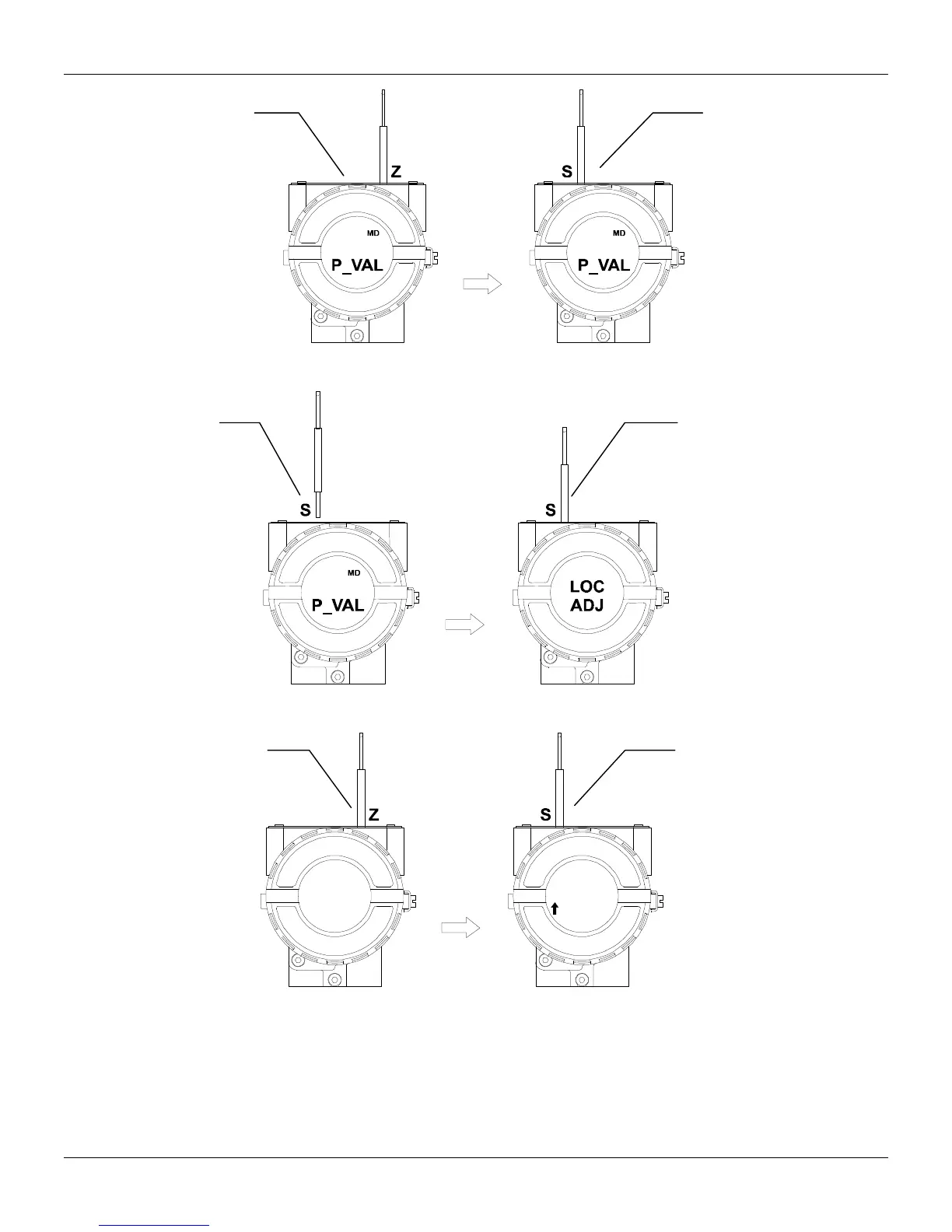
Place the
magnetic
tool in orifice
S
and wait
during 5
seconds.
In order to
start the local
adjustment,
place the
magnetic tool
in orifice
Z
and wait until
letters
MD
are
displayed.
5.00 5.00
Figure 3.11 - Step 1 - IF302
Insert the
magnetic
tool in orifice
S
once more
and
LOC
ADJ
should
be
displayed.
Remove
the
magnetic
tool from
orifice
S
.
5.00
Figure 3.12 - Step 2 - IF302
This parameter is
used to calibrate the
lower current point. I
n
order to range the
lower value, simply
insert the magnetic
tool in orifice
S
as
soon as lower is
shown on the display.
An arrow pointing
upward ( ) increment
the value and an
arrow pointing
downward (
)
decrement the value.
In this option (P_VAL)
is showed with its
respective value
(if you to want that it
keeps static, put the
tool in S orifice and
stay there.
P_VAL
5.00
LOWER
3.8
Figure 3.13 - Step 3 - IF302