USB/AUX mode
USB mode
Connecting a device
You can use the USB port to connect an
external audio source to your audio system
basic. More information is available from
any qualified specialist workshop, e.g. a
smart Centre or a smart service centre.
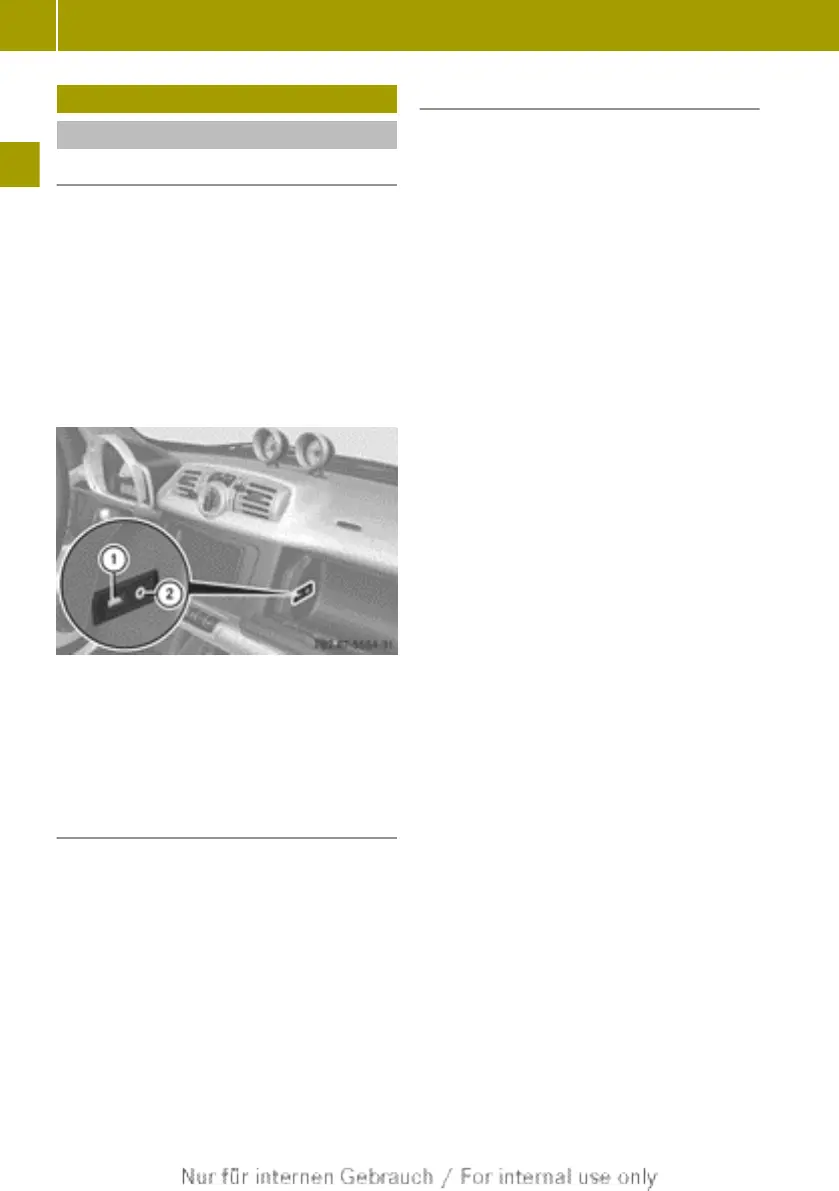
A USB socket is fitted on the left-hand side
of the stowage compartment on the front-
passenger's side and can be used to connect
an external audio device (e.g. MP3 player)
or a USB storage medium.
:
USB port
;
AUX port
i
Media is only recognised in the FAT32
file system and not in the NTFS file sys-
tem.
Activating the USB socket
X
Press the Õ button.
X
Press the : button to select Media and
press 9 to confirm.
X
If necessary, press the 9 button to
select USB and press 9 to confirm.
The main menu appears. The USB menu
item is shown at the bottom left of the
display.
i
If you insert a USB medium during radio
mode, the USB medium is activated auto-
matically and the first track on the
medium is played.
USB menu
The following settings can be made in the
USB menu:
R
select an active partition
R
normal track sequence
R
random track sequence
R
random folder sequence
R
display metadata
R
activate/deactivate the traffic
announcements
Selecting an active partition
The Select Active Partition menu item
makes it possible to display the partitions
of the device that is connected to the USB
port and to select the active partition.
X
Press the : or = button to select
USB and press 9 to confirm.
X
Press the : or 9 button to select
Select Active Partition and press
9 to confirm.
The available partitions are displayed.
X
Press the : or 9 button to select
the desired partition and press 9 to
confirm.
Normal track sequence
X
Press the : or = button to select
USB and press 9 to confirm.
X
Press the : or 9 button to select
Normal Track Sequence and press 9 to
confirm.
The activated option is indicated by a
dot.
X
Press % to exit the menu.
Symbol for normal track sequence :
appears in the display.
16
USB/AUX mode
>> Audio.



 To Next Page