Audio system basic
The audio system basic contains the fol-
lowing functions:
R
Radio (FM/AM)
R
Radio Broadcast Data System (RBDS) and
radio text
R
AUX and USB socket (Y page 96)
!
Please be sure to read the operating
instructions for the audio system basic
before using the unit. Familiarize your-
self with the various functions of the
unit so that you are able to operate it
easily, reliably and correctly at any
time.
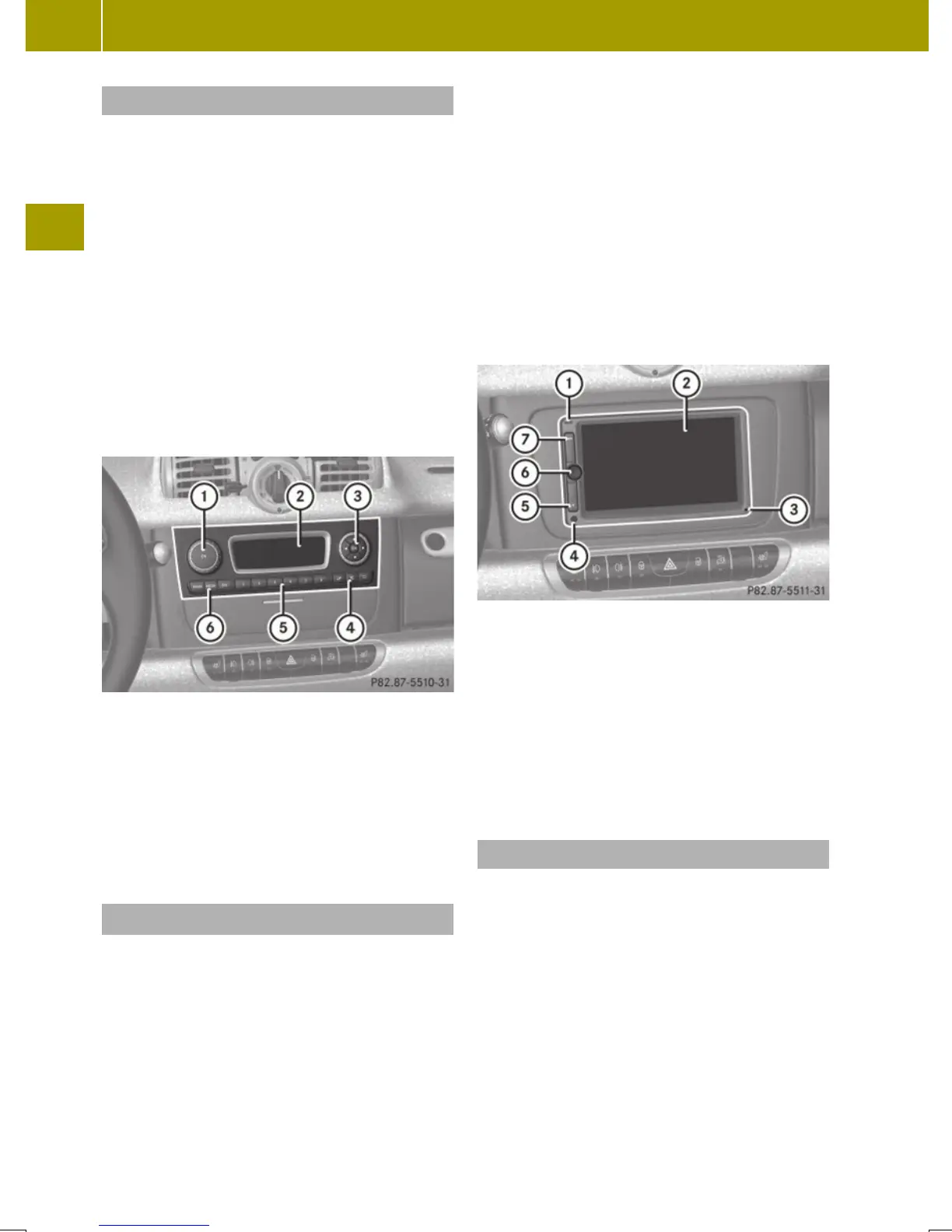
:
On/off and volume switch
;
Display
=
Skip/Scroll/Frequency search switches
?
Tone settings/Mute/Back control panel
A
Stored station buttons
B
Radio/Media/System control panel
Audio system navigation/multimedia*
The audio system navigation/multimedia
contains the following functions:
R
Radio (FM/AM)
R
Radio Broadcast Data System (RBDS)
R
AUX and USB-socket
R
Bluetooth
®
hands-free device
R
Navigation
R
Audio operation from CD/DVD or SD Card,
via AUX/USB/iPod
®
, or Bluetooth
®
Audio
R
Video operation from CD/DVD or SD Card,
via AUX/USB/iPod
®
R
Image display from CD/DVD or SD Card,
via USB/iPod
®
!
Please be sure to read the operating
instructions for the audio system navi-
gation/multimedia before using the
unit. Familiarize yourself with the var-
ious functions of the unit so that you are
able to operate it easily, reliably and
correctly at any time.
:
Bluetooth
®
connection indicator lamp
;
Display
=
Microphone
?
Light sensor
A
Eject button
B
Rotary/Push button
C
Menu button
AUX and USB sockets
You can connect mobile audio devices such
as an MP3 player via the AUX and USB sock-
ets using commercially available 3.5 mm
socket plug (AUX) or USB connector cable
(USB).
The AUX and USB sockets are located in the
glove box.
96
Audio system*
>> Controls.
* optional














 To Next Page