OdometerOdometer menu appears in the multi-
function display.
X
To switch between submenus: Press the OK
button on the control lever briefly.
X
To reset the trip odometer: Select the
trip odometer display.
X
Press button B on the instrument cluster
until the trip odometer is reset to 0
(Y page 23).
If the remaining cruise range of the charge
level of the high-voltage battery has drop-
ped below 10 %, Low BatteryLow Battery is displayed
on position =.
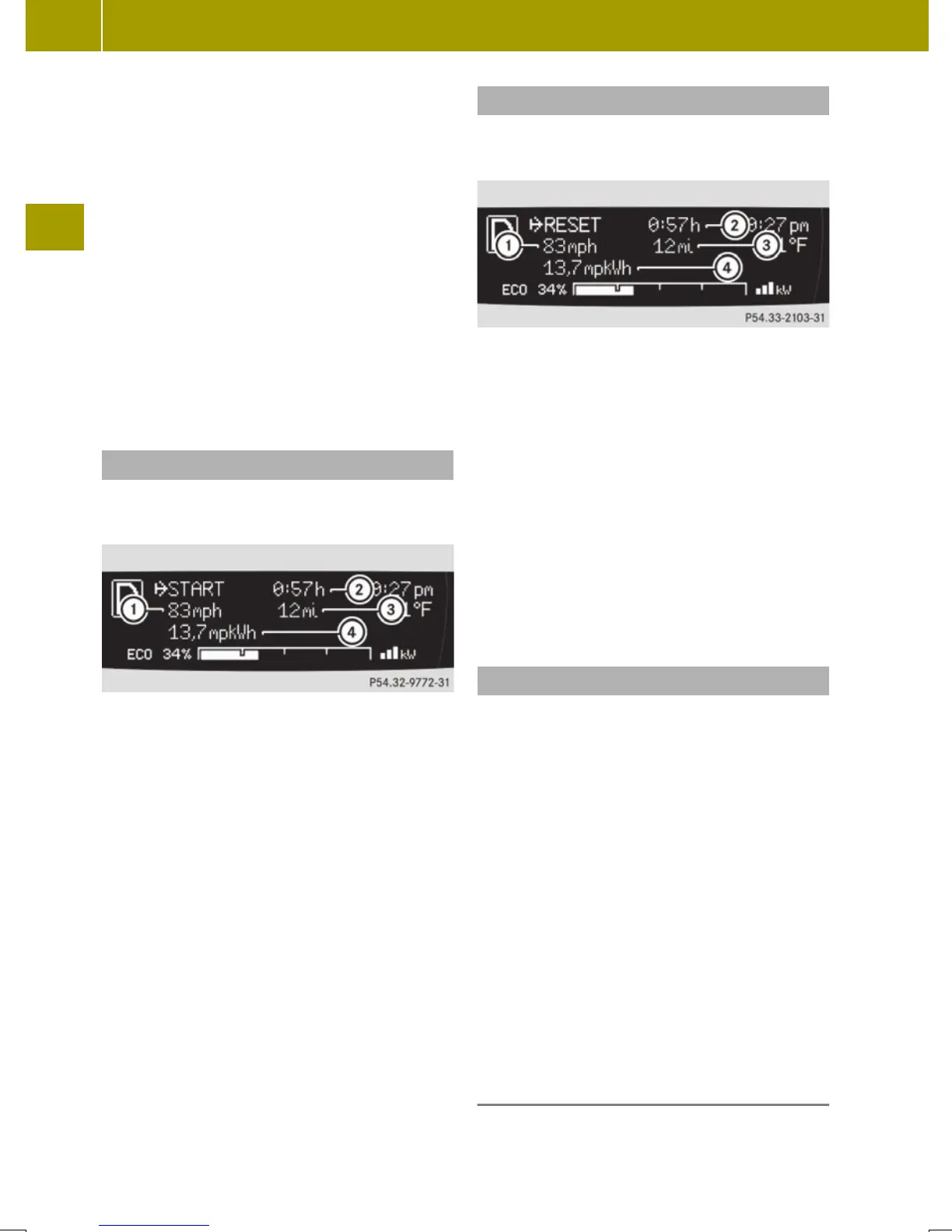
Start menu
The YSTARTSTART menu shows you the trip statis-
tics since start.
:
Average speed since start
;
Time elapsed since start
=
Distance driven since start
?
Average energy consumption
X
Press the control switch on the control
lever (Y page 83) up or down until the
YSTARTSTART menu appears in the multifunc-
tion display.
X
To reset: Press button B on the instru-
ment cluster until the YSTARTSTART menu is
reset to 0 (Y page 23).
i
The YSTARTSTART menu is reset to 0 automat-
ically
R
when the ignition has been switched
off for more than 4 hours
R
after driving more than 9999 miles or
kilometers
Reset menu
The YRESETRESET menu menu shows you the trip
statistics since the last reset.
:
Average speed since last reset
;
Time elapsed since since last reset
=
Distance driven since last reset
?
Average energy consumption
X
Press the control switch on the control
lever (Y page 83) up or down until the
YRESETRESET menu appears in the multifunc-
tion display.
X
To reset: Press button B on the instru-
ment cluster until the YRESETRESET menu is
reset to 0 (Y page 23).
Charge and depart menu
In the Charge and DepartCharge and Depart menu you can
change the following settings:
R
set a departure time
R
switch on/off the "Air conditioning
before start" function
R
instant charge of the high‑voltage bat-
tery
R
set the maximum charge current.
X
Press the control switch on the control
lever up or down until Charge andCharge and
DepartDepart appears in the multifunction
display.
X
Press the OK button on the control lever
briefly.
Setting the departure time
With this function, you can preset a depar-
ture time.
90
Control system
>> Controls.














 To Next Page