EasyManua.ls Logo

smartheart 01-527 - User Manual

smartheart 01-527
92 pages
Print Icon
To Next Page IconTo Next Page
Loading...
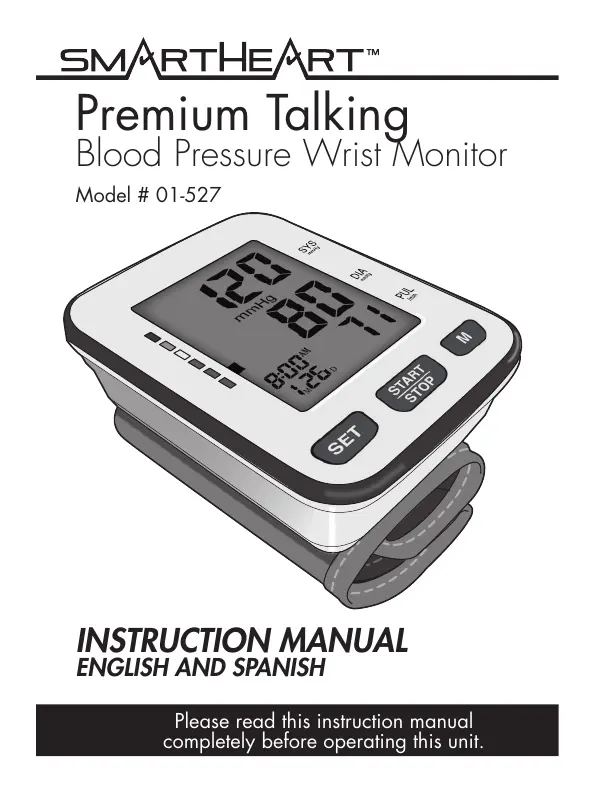
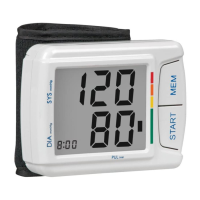
Premium Talking
Blood Pressure Wrist Monitor
Model # 01-527
INSTRUCTION MANUAL
ENGLISH AND SPANISH
Please read this instruction manual
completely before operating this unit.

Table of Contents

Questions and Answers

  • S
    Steven RoweAug 8, 2025
    Why are blood pressure results not within typical range on smartheart Blood Pressure Monitor?
    • P
      Paul CampbellAug 8, 2025
      There are several reasons why your blood pressure results might be out of the typical range. It could be that the cuff is either too tight or not correctly positioned on your wrist. Try adjusting the cuff so it sits 1/4” - 1/2” from the edge of the ulna bone. Another potential cause is movement during the test, either by you or the monitor. To ensure accurate results, sit in a relaxed position with your arm near your heart, avoid speaking or moving, and ensure the monitor remains stationary during testing.
  • J
    Jacqueline WintersAug 23, 2025
    What to do if smartheart Blood Pressure Monitor displays “Err”?
    • J
      Jacob MurrayAug 23, 2025
      If your smartheart Blood Pressure Monitor is displaying “Err”, here are a few things to check: 1. Make sure the hose is properly fastened to both the cuff and the monitor unit. 2. Ensure you are operating the device correctly by carefully reading the user manual and re-testing. 3. The error might appear if the pressurization exceeds the cuff's rated pressure of 300mmHg; in this case, read the user manual carefully and re-test properly.

Summary

Introduction, Safety, and Features

Safety and Handling Precautions

Crucial safety guidelines, general, operating, storage, and cleaning precautions.

Monitor Purpose and Usage

Details on the monitor's intended use, user base, and medical advice.

Monitor Components and Display

Overview of the monitor's parts, display screen, and controls.

Setup and Operation

Pre-Measurement Preparation

Key recommendations for accurate measurements, like relaxation and environment.

Battery Installation and Replacement

Step-by-step guide for inserting or replacing AAA batteries.

User Profiles and Time Settings

Configuring memory banks, date, and time for personalized tracking.

Language and Audio Settings

Selecting language for audio prompts and adjusting volume levels.

Cuff Application Guide

Detailed instructions on how to correctly fit and apply the wrist cuff for accurate readings.

Measurement Procedure

Step-by-step guide on how to operate the monitor to take a blood pressure reading.

Understanding Results and Maintenance

Understanding Blood Pressure Readings

Explanation of systolic/diastolic pressure, heartbeat indicators, and WHO standards.

Using Memory Features

How to recall, average, and clear stored blood pressure readings.

Monitor and Cuff Care

Guidelines for proper cleaning, maintenance, and storage to ensure longevity.

Troubleshooting and Technical Information

Symbols and Display Explanations

Definitions of device symbols, label icons, and display indicators.

Troubleshooting Common Issues

Solutions for common problems like inaccurate results or error messages.

FCC Compliance Information

Regulatory statement regarding radio and television interference.

Electromagnetic Compatibility (EMC)

Guidance on electromagnetic emissions and immunity for safe operation.

Product Specifications

Technical details, dimensions, weight, measuring range, and accessories.

5-Year Limited Warranty

Details of warranty coverage, terms, conditions, and return procedures.

smartheart 01-527 Specifications

General IconGeneral
Brandsmartheart
Model01-527
CategoryBlood Pressure Monitor
LanguageEnglish

Related product manuals