EasyManua.ls Logo

SmartRG SR808ac - User Manual

SmartRG SR808ac
63 pages
Print Icon
To Next Page IconTo Next Page
Loading...
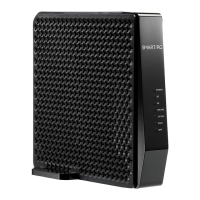
SR808ac Cable Modem
User Manual
VER: 1.0
Question and Answer IconNeed help?

Do you have a question about the SmartRG SR808ac and is the answer not in the manual?

Summary

Safety Precautions

Hardware Description and Hardware Installation

Hardware Description

Provides a detailed description of the device's physical components and indicators.

Front Panel

Describes the indicators and their status on the front panel of the modem.

Rear Panel

Details the interfaces and buttons located on the rear panel of the device.

Hardware Installation

Guides the user through the physical installation process of the cable modem.

Connecting the Device

Step-by-step instructions on how to connect the cable modem to the network.

PC Network Configuration and Login

PC Network Configuration

Instructions for configuring PC network settings for automatic IP assignment.

Logging In to the BCM3384 Cable Modem

Steps to access the cable modem's web-based management interface.

Web-Based Management

Connection

Shows the status of the cable modem's HFC and IP network connectivity.

Security

Allows configuration of administration access and system security settings.

Diagnostics

Provides tools for troubleshooting network connectivity issues (Ping and Traceroute).

Setup

Configures basic features related to the ISP connection, including IP settings.

DHCP

Manages the internal DHCP server for the local area network (LAN).

Backup

Allows saving or restoring the current CMRG configuration settings.

IP Filtering

Filters internet traffic to local PCs based on IP addresses.

MAC Filtering

Filters internet traffic based on MAC addresses of connected devices.

Port Filtering

Blocks specific internet services by filtering TCP/UDP port numbers.

Firewall

Manages firewall features for network protection.

Wireless

Configures the wireless network settings.

Summary

Safety Precautions

Hardware Description and Hardware Installation

Hardware Description

Provides a detailed description of the device's physical components and indicators.

Front Panel

Describes the indicators and their status on the front panel of the modem.

Rear Panel

Details the interfaces and buttons located on the rear panel of the device.

Hardware Installation

Guides the user through the physical installation process of the cable modem.

Connecting the Device

Step-by-step instructions on how to connect the cable modem to the network.

PC Network Configuration and Login

PC Network Configuration

Instructions for configuring PC network settings for automatic IP assignment.

Logging In to the BCM3384 Cable Modem

Steps to access the cable modem's web-based management interface.

Web-Based Management

Connection

Shows the status of the cable modem's HFC and IP network connectivity.

Security

Allows configuration of administration access and system security settings.

Diagnostics

Provides tools for troubleshooting network connectivity issues (Ping and Traceroute).

Setup

Configures basic features related to the ISP connection, including IP settings.

DHCP

Manages the internal DHCP server for the local area network (LAN).

Backup

Allows saving or restoring the current CMRG configuration settings.

IP Filtering

Filters internet traffic to local PCs based on IP addresses.

MAC Filtering

Filters internet traffic based on MAC addresses of connected devices.

Port Filtering

Blocks specific internet services by filtering TCP/UDP port numbers.

Firewall

Manages firewall features for network protection.

Wireless

Configures the wireless network settings.

SmartRG SR808ac Specifications

General IconGeneral
Frequency Bands2.4 GHz, 5 GHz
USB Ports1 x USB 2.0
DSL StandardsADSL2+, VDSL2
Wireless Standards802.11a/b/g/n/ac
Ethernet Ports4
SecurityWPA, WPA2, WEP
WAN Port1 x DSL (RJ-11)
Max Data Rate1750 Mbps (450 Mbps on 2.4 GHz + 1300 Mbps on 5 GHz)