2
fig B
1
F
3
F
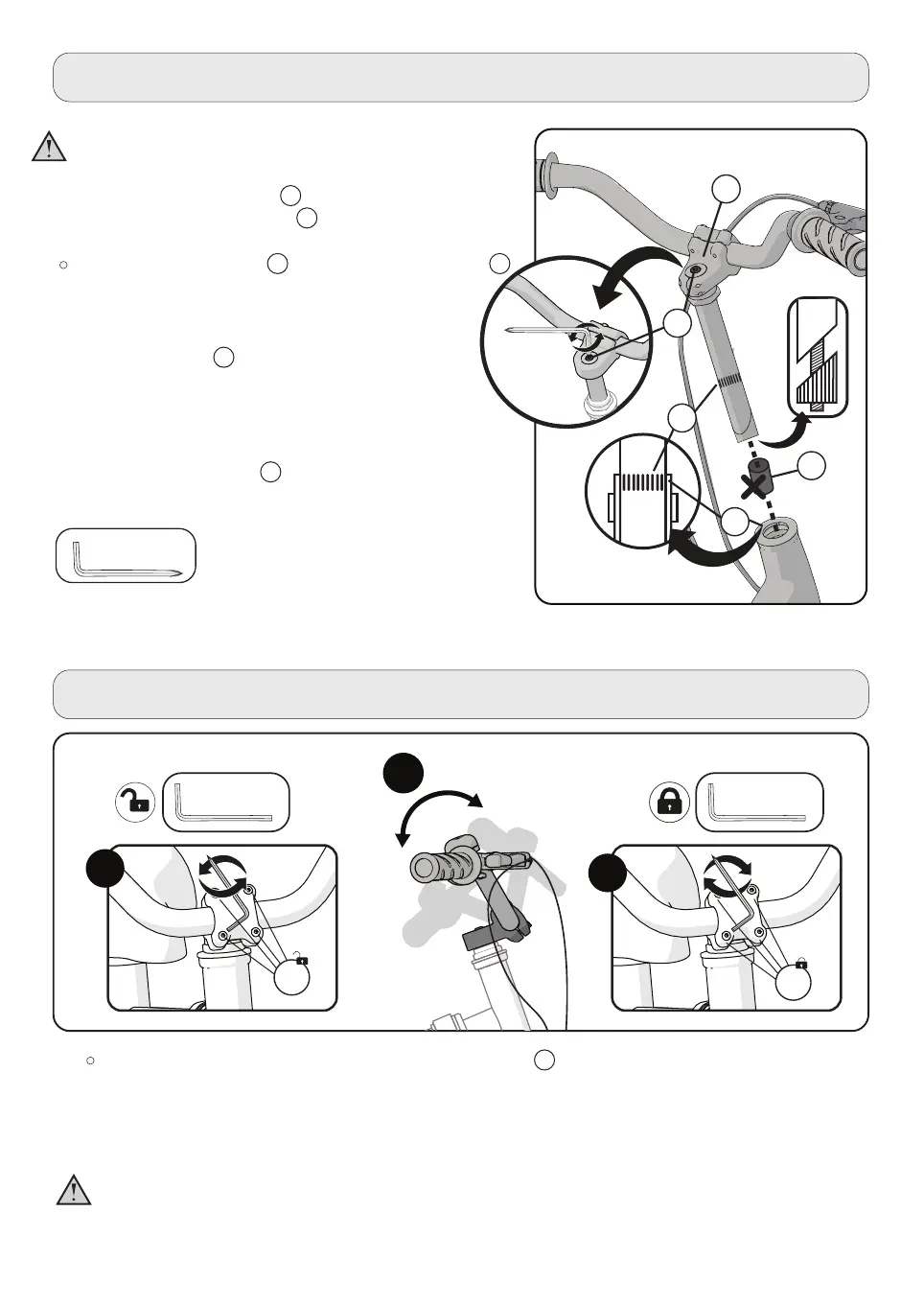
If necessary, make the the handlebar clamp nut/screw F loose and rotate the handlebar into
a comfortable riding position (fig A, B).
-10-
Handlebar and Stem Installation
Adjusting the handlebar
WARNING: In order to prevent any steering system
damage and possible loss of control,, the “MIN-IN”
(minimum insertion) mark , on the stem must be
below the top of the locknut B .
NOTE:
Separate the plastic cap C from the end of the stem
D .
A
STEPS:
1. Insert the stem D into the fork (fig A).
2. Point the stem towards the the front section of
the bike.
3. Streamline the stem with the front tyre and
tighten the stem bolt securely.
4. Tighten the stem bolt E just enough to hold it
in place.
WARNING: If the handlebar clamp in not tight enough, the handlebar can slip in the stem. This
can cause damage to the handlebar or stem, and can cause loss of control.
NOTE: Do not over tighten. See torque
table for recommended torque.
fig A
6mm / 0.23‘’
5mm / 0.2‘’ 5mm / 0.2‘’


 To Next Page